No-Code WhatsApp Appointment Reminders for Professionals
Yes: you can reduce no-shows by automating WhatsApp reminders linked to your calendar, and industry data backs this up. The manual method works while you have only a few appointments. After that, it becomes a full-time job nobody wants. For a professional or micro-business, the most practical solution is to connect your calendar to a system that sends WhatsApp appointment reminders automatically, with as little setup hassle as possible: a platform designed to automate this process does exactly that.
In brief:
- When you manage more than 15–20 appointments a week, automating WhatsApp reminders becomes essential for saving time and reducing no-shows.
- The most effective solution is to connect your calendar to automation platforms that send WhatsApp messages automatically, avoiding complex manual setup.
- WhatsApp reminders are generally read within minutes, thanks to open rates close to 98%, far higher than email and SMS.
- It is important to respect GDPR rules by limiting sensitive data in chats and using WhatsApp only for quick notifications, while handling confidential documents separately.
- Kesbatty lets you manage appointments and contacts in one place, with email confirmations and calendar invitations.
Why WhatsApp Works Better Than Email and SMS for Reminders
WhatsApp wins because people read it, and quickly. Open rates for business content approach 94–98% in Italy, a figure no newsletter or promotional SMS can hope to reach. Email ends up in spam or goes unread for days. SMS costs money for every message and has a rigid format, with no images, clickable links, or quick-reply buttons.
The figure that matters: in most cases, a WhatsApp reminder is read within minutes of being sent, while a business email can remain unopened for hours or days.
What this means in practice for anyone managing appointments:
- Fewer last-minute calls to “confirm availability.”
- Clients who actually remember the time, not just the day.
- The option to include direct links (a map, confirmation form, or documents).
- A more organized service in clients’ eyes, even when you work alone.
Industries such as beauty salons, professional practices, and real estate agencies report a real reduction in forgotten appointments when they switch from manual calls to automated reminders. It’s not magic: it’s simply the right channel at the right time.
Manual vs. Automated: When the Switch Becomes Necessary
Sending a WhatsApp message by hand works when you have five appointments a week. WhatsApp Business, in its basic version, has real limitations: broadcast messages require the client to have saved your number, or they won’t arrive at all. Add the time spent copying each client’s name, date, and time, and it’s clear why manual management doesn’t scale.
Here are some signs that it’s time to automate:
- You manage more than 15–20 appointments a week and spend at least an hour a day writing messages.
- You have already lost revenue because of a no-show that a reminder could have prevented.
- You use several tools (a paper diary, WhatsApp, an Excel spreadsheet) and waste time getting them to work together.
- A colleague acts as a “switchboard operator” just to remind clients about appointments.
Micro-businesses that exceed 50 bookings a month recoup the time invested in automation within a few weeks, because the saved administrative time is worth more than the cost of the tool.
A tip: Don’t wait until you “have enough clients to justify it.” The right time to automate is when YOU start forgetting to send the reminder, not when the client starts forgetting the appointment.
Automation brings three immediate benefits: automatic tracking of who has confirmed, consistent messages (no copy-and-paste errors), and hours saved each week that you can put back into your actual work.
Practical Integrations: Connect Google Calendar, the WhatsApp API, or a Platform
The most common workflow starts with Google Calendar: whenever you create or edit an event, an automation service detects it as a trigger and sends a WhatsApp message to the number associated with the contact, without you having to do anything after saving the appointment. The same principle applies when connecting your calendar to external notification services, a practice already well established for SMS too.
There are three practical ways to set this up:
- Official WhatsApp Business APIs: They offer greater volume and reliability, but require business account verification and often a technical intermediary to manage templates.
- Dedicated automation services: They connect your calendar and chats without requiring you to write code. Setup is faster, but there is less room for customization.
- Integrated platform: It brings your calendar, contacts, and reminders together in one place, so you don’t have to get three different tools to work together. A platform that combines your calendar, contacts, and reminders keeps appointments, automatic reminders, and contacts in the same workspace.
If you don’t have the time or inclination to configure APIs and webhooks, an integrated platform remains the most sensible choice: fewer pieces to fit together and fewer things that can break.
Effective Templates and Timing: Ready-to-Use Examples and a Suggested Schedule
A good WhatsApp appointment reminder has just a few ingredients: the client’s name, date, time, location (with a map link if they need to travel), and a clear action to take. Here’s a structure that works:
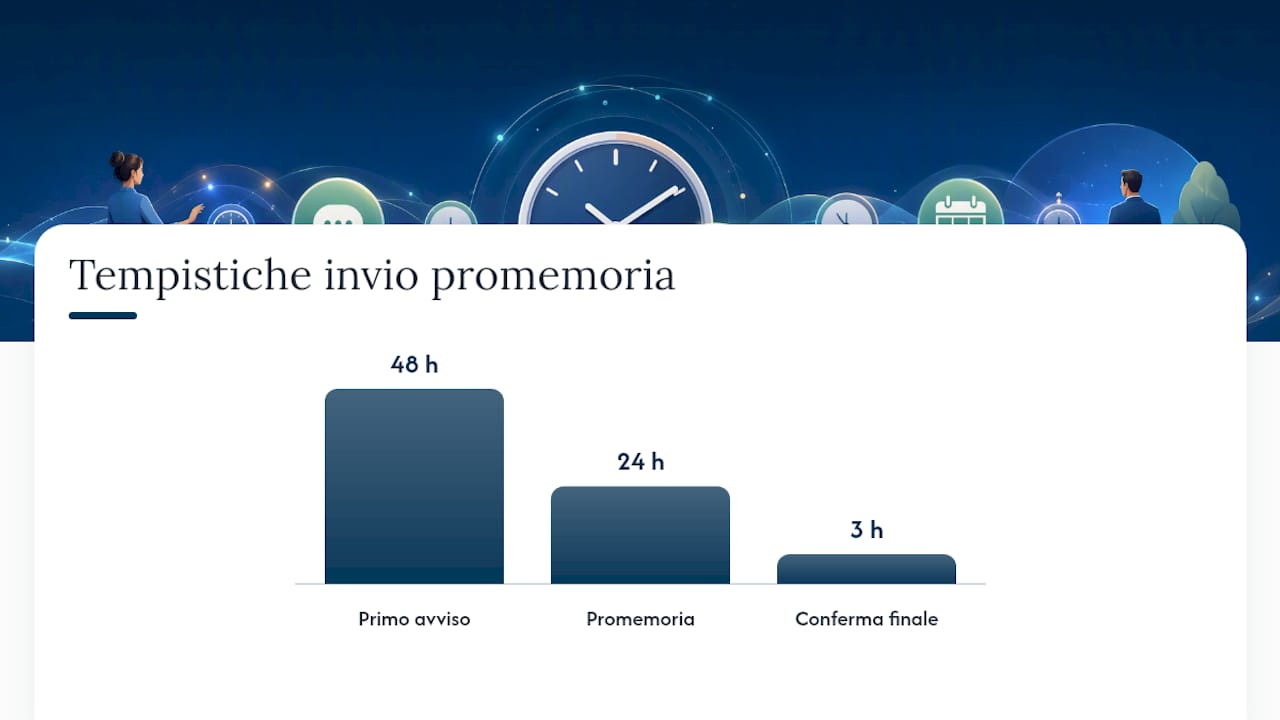
As for timing, the most common approach in professional practice uses several touchpoints (https://www.riccardogirardi.it/2024/04/whatsapp-marketing-professionale/appuntamenti-whatsapp-gestisci-lagenda-usando-le-chat/): an initial notice 48 hours ahead for services that require preparation (documents, fasting, materials), a reminder 24 hours ahead as a standard prompt, and a final confirmation 2–3 hours beforehand for appointments at risk of last-minute cancellation.
- Long or expensive services (consultations, treatments, site visits): three reminders (48h, 24h, 3h).
- Short, recurring appointments: one reminder at 24h is more than enough.
- First visits with new clients: always add a map link; it reduces cancellations from people who “couldn’t find the place.”
A tip: Avoid sounding like a call center. Write the way you’d speak on the phone to a client you know: the more natural the message, the higher the response rate.
Privacy and GDPR: Practical Rules for Using WhatsApp in Compliance
Treat WhatsApp as a notification channel, not an archive. The Italian Data Protection Authority is clear on this point: distinguish the channel used to communicate from the infrastructure where the data is actually processed and stored.
Practical rule: WhatsApp is for sending a quick alert. Sensitive data, clinical documents, and confidential client information belong in a secure system, not in chats.
What this means for day-to-day management:
- Don’t attach test results, medical records, or sensitive documents directly in chats.
- Use the message only for the appointment’s name, date, time, and location, without clinical or confidential details.
- Providing a clear privacy notice when collecting a phone number is essential to ensure compliance with the regulations. For more information, consult the guide to SMS enrollment preview, which explains effective and compliant opt-in practices.
- Define a legal basis for sending messages (consent or contractual legitimate interest) and set minimum retention periods for contact data.
The tool itself doesn’t create the risk; the way you use it does. If you use WhatsApp for quick notifications and move everything else to a secure management system, you can rest easy. This is the logic behind integrated platforms designed for independent professionals.
Step-by-Step Checklist for Setting Up Automatic WhatsApp Reminders
Before activating any automation, map out the workflow on paper: where the booking starts, where it goes in the calendar, and what triggers the message.
- Map the process: booking (phone, website, form) → entry in the shared calendar → automatic trigger → reminder sent → client response handled. A well-structured workflow that uses WhatsApp as the entry point while keeping the calendar as the source of truth reduces double-booking errors.
- Configure the templates: prepare two or three message variations (initial notice, reminder, final confirmation) and set the sending rules (48h, 24h, 3h, as above).
- Define a fallback: what happens if the message isn’t delivered? You always need a second channel (SMS or a call) for critical appointments.
- Test on a small sample: activate the automation for a week of appointments before rolling it out to your entire calendar.
- Measure the results: confirmation rate, no-show percentage compared with the previous month, and time saved on phone management.
A tip: Track “confirmed/cancelled” replies for at least a month. A system that automatically records the response and frees up the calendar slot lets you quickly fill openings left by cancellations, instead of finding them out on the day.
The two metrics that really matter are the confirmation rate (how many clients reply to the reminder) and the percentage reduction in no-shows month over month. If you see no movement in either after six weeks, the problem is almost always the timing or tone of the message, not the tool.
What I Learned Setting Up Automatic Reminders for Real Clients
The most common lesson is about rushing the initial setup: people who skip the testing phase and activate automation across their entire calendar in one go end up with poorly written templates or sending times that are wrong for their type of business. Another typical mistake is treating every appointment the same way, when a first visit needs more context (address, documents to bring) than a recurring appointment. Those who automate well save several hours a week on phone management and see a measurable drop in no-shows within the first month.
— Fabrizio
Kesbatty: Turn On Automatic Reminders Without Writing a Line of Code
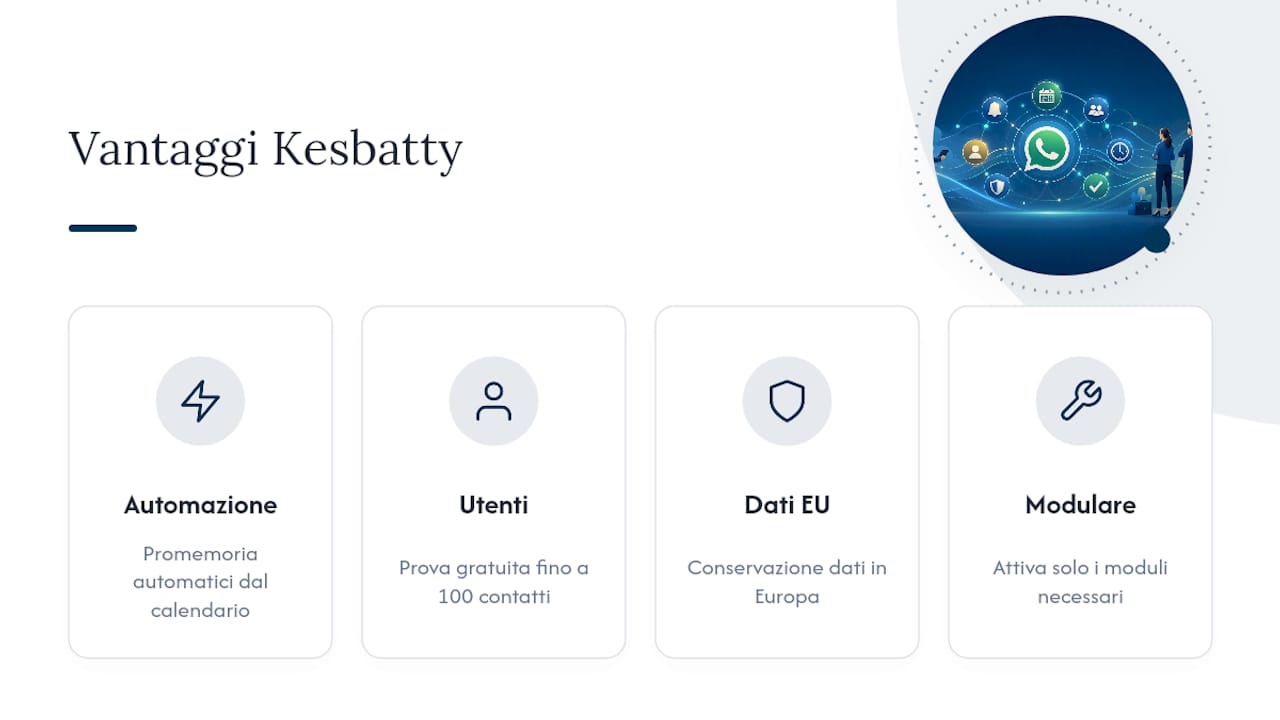
Some solutions are designed for people who don’t have time to get five different tools to work together just to remind a client about an appointment. Instead of separate tools, Kesbatty brings appointments, contacts, and email follow-up reminders together in one place, with no complex technical setup.

For a freelancer, consultant, or small team, this means linking appointments to contacts, so the appointment appears on the contact record. Modules are activated only when you need them, so you don’t pay for complexity you don’t use: if you only need appointment management, you can start with that feature and add more later. Data is stored in Europe, an important detail when managing information about real clients.
You can try Kesbatty free for up to 100 contacts and see for yourself how it manages appointments and contacts.
This article provides general information and does not replace advice from a qualified lawyer. Consult a qualified legal professional about your specific situation before acting on this content.
Sources
- Compendium on the processing of personal data through platforms connecting patients with healthcare professionals accessible via web and app … - Italian Data Protection Authority
- Tuxnews
- WhatsApp Appointment Reminders: How to Send Them, Automate Them, and Reduce No-Shows - RicordamiApp