4 Essential Groups in a Sample Client Information Form for Professionals

You can download free, editable templates today in Word, Excel, Google Sheets, or PDF, and customize them in just a few minutes. If you only need to collect personal details, choose a “simple” template; if you also need it for invoicing, opt for a “tax” version with fields for a VAT number and IBAN. In either case, remember to add a brief privacy notice that complies with the GDPR.
In brief:
- Excel or Google Sheets is preferable for managing large numbers of client records, converting them to PDF only for the final signature.
- A client information form should include the essential identification, contact, tax, and operational details, with a dedicated space for free-form notes.
- The privacy notice should be brief, state the legal basis and retention periods, and clearly distinguish operational consent from marketing consent.
- Customizing a template takes only a few steps: duplicate the file, remove unnecessary fields, and set up filters and required fields, while keeping working and signature versions separate.
- Integrating data management with Kesbatty lets you automate deadlines, updates, and communications, simplifying client relationships and GDPR compliance.
Contents
- Where to download free templates and which format to choose
- Which fields a client information form must include
- Privacy and the GDPR: what to write and how to protect the data
- How to customize a template in Word, Excel, or Google (step by step)
- Why it’s worth digitizing your client information form with KeSbatty
- How to collect explicit consent without making things complicated
- The client information form as a relationship tool, not just a record
- How to store and update client records without losing track of anything
- What I learned from looking at dozens of badly made client forms
- Digitize your client information form without switching between five different tools
- Sources
Where to download free templates and which format to choose
The format matters more than you might think. It’s not just about appearance: it changes how you’ll use the form every day.
Online resources fall into three main categories:
- Collections of industry-specific templates, organized by sector (real estate, consulting, accounting firms), often already set up with the fields typical of that profession.
- Pages with direct downloads in DOC, XLS, or ZIP format, for anyone who wants to start with a ready-made file and edit it right away.
- Online editors and shared spreadsheets, useful when several team members need to fill in the form at the same time.
Word is still the most intuitive choice if you want a clean layout to print or attach to a contract, but it isn’t designed to manage a growing client list. Excel and Google Sheets, by contrast, let you filter, sort, and export data to invoicing software: that’s why they remain the most practical formats among professionals for day-to-day operations. PDF comes into play when the form needs to be signed or stored as a final, uneditable document.
A tip: if you manage a large number of clients, it’s a good idea to start with Excel or Google Sheets. Convert only the final version to PDF for signing, and keep the working file updatable.
Collections of free templates in multiple formats also offer industry-specific versions, which are useful if you work in fields with specific needs, such as counseling or tax consulting.
Which fields a client information form must include
An incomplete client information form causes problems later, usually at the worst possible time: when you need to issue an urgent invoice or respond to an audit.
The fields that really make a difference fall into four groups:
- Identification details: first and last name or company name, tax code, VAT number (if applicable), and full address.
- Contact details: phone number, email, and, for electronic invoicing, certified email address (PEC) or recipient code.
- Tax and invoicing details: tax regime, IBAN, and agreed payment terms.
- Relationship details: contact person’s name, preferred communication channel, operational notes, and communication history.
The sample forms most commonly used by professionals include these exact sections, with separate tables for personal, tax, and invoicing details. Professionals working in firms often also add authorizations, recurring deadlines, and references to previous cases—fields that turn the form from a simple record into a practical working tool.
A tip: Always leave space for free-form notes. It’s the field you’ll use most, even if it seems the least important at first.
Privacy and the GDPR: what to write and how to protect the data
This is where most client information forms fall short—not through bad intentions, but because of haste. Someone copies a template found online and forgets the most sensitive part: the privacy notice.
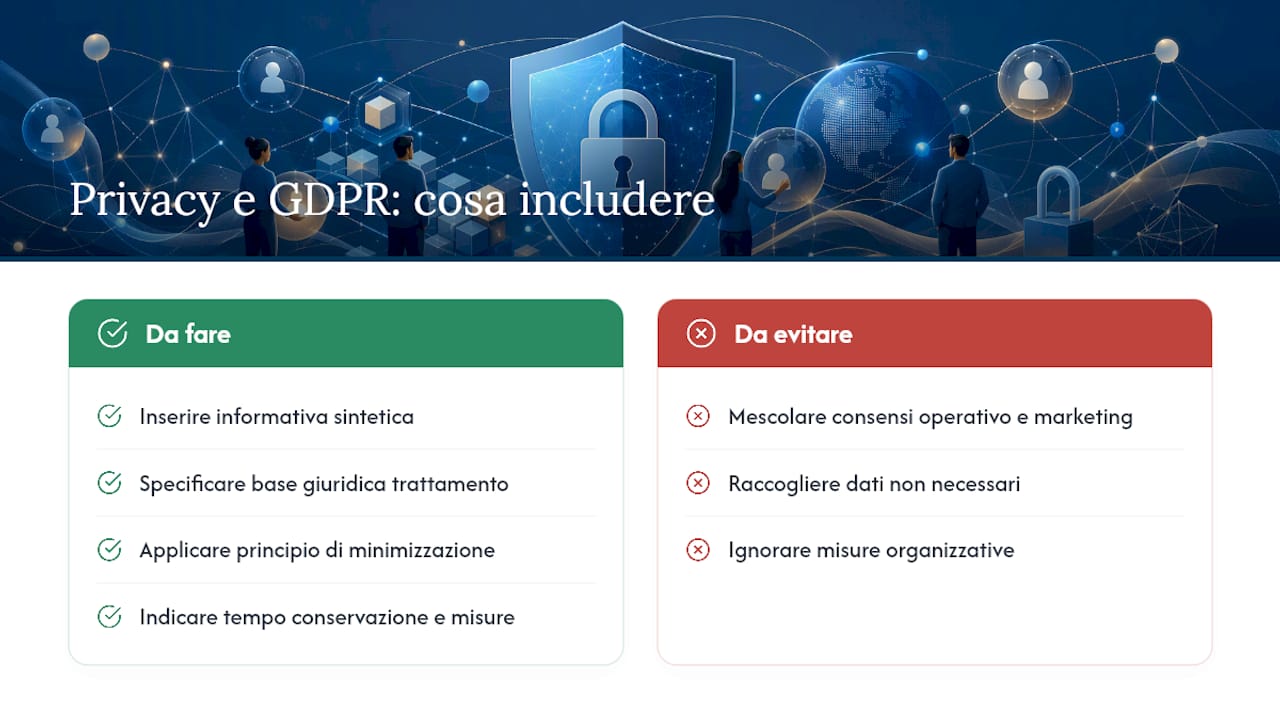
Every client information form should include a concise privacy notice stating the legal basis for processing, which is almost always performance of the contract or compliance with tax obligations. The European guidelines for small businesses are clear on this point: collect only the data needed for the stated purpose, and not one piece of data more.
The principle of data minimization simply means not collecting personal data that isn’t needed for the purposes of processing.
You should also state how long you’ll keep the data and the basic measures you’ll use to protect it: restrict access to the file, make regular backups, and use a key or locked drawer if the form is still on paper. Anyone working with professional clients, such as lawyers and technical firms, must also document the categories of data processed and the organizational measures adopted, not just the technical ones.
A common mistake is to mix consent for operational processing (needed to do the work) with consent for marketing (optional). Collect them separately, using two distinct checkboxes, not one “I agree to everything” box.
How to customize a template in Word, Excel, or Google (step by step)
Customizing a downloaded template takes less time than you might think if you follow a set order.
- Duplicate the original file before editing it, so you always have a clean copy to go back to if something goes wrong.
- Remove fields you’ll never use: if you don’t issue electronic invoices, remove the PEC field instead of leaving it blank and confusing.
- Add checkboxes for consent, always separating operational processing from marketing.
- Mark required fields in bold or with an asterisk, so whoever fills in the form doesn’t skip essential tax details.
- In Excel or Google Sheets, create filters for client status or service type: you’ll need them when exporting lists for periodic invoicing.
- Save a PDF version only for the final signature, keeping the editable working file separate, and always include the date of the latest change in the filename.
Why it’s worth digitizing your client information form with KeSbatty
A well-made Excel template solves the problem of collecting data, but it remains an isolated file: it doesn’t connect to your calendar, alert you to deadlines, or update itself when you write to a client. KeSbatty was created to close that gap by bringing contacts, appointments, and tasks together in one place instead of scattering them across three or four different tools.
Modules are activated only when you need them, with no complicated setup to undo later. You can send quotes and documents via a public link, without the client having to create an account or log in, and the data remains hosted in Europe. The free plan includes a limited number of contacts, enough to start testing the workflow without an immediate commitment.
How to collect explicit consent without making things complicated
Explicit consent isn’t a formality to squeeze into the bottom of a page in tiny print. It must be an active choice by the client, not a box that’s checked by default.
The most reliable option is still an unchecked box, accompanied by a short sentence explaining what that specific data will be used for. Avoid generic phrases such as “I agree to the processing of my data”; it’s better to specify, “I authorize the use of my data to send quotes and service-related communications.” If you plan to use contacts for newsletters or marketing communications too, you need a second, separate checkbox, never combined with the first.
Always keep a record of when and how consent was collected: the date, channel (paper form, online form, email), and version of the privacy notice shown at the time. You don’t need a complex system; one extra column in the Excel spreadsheet or a date field in the digital form is enough.
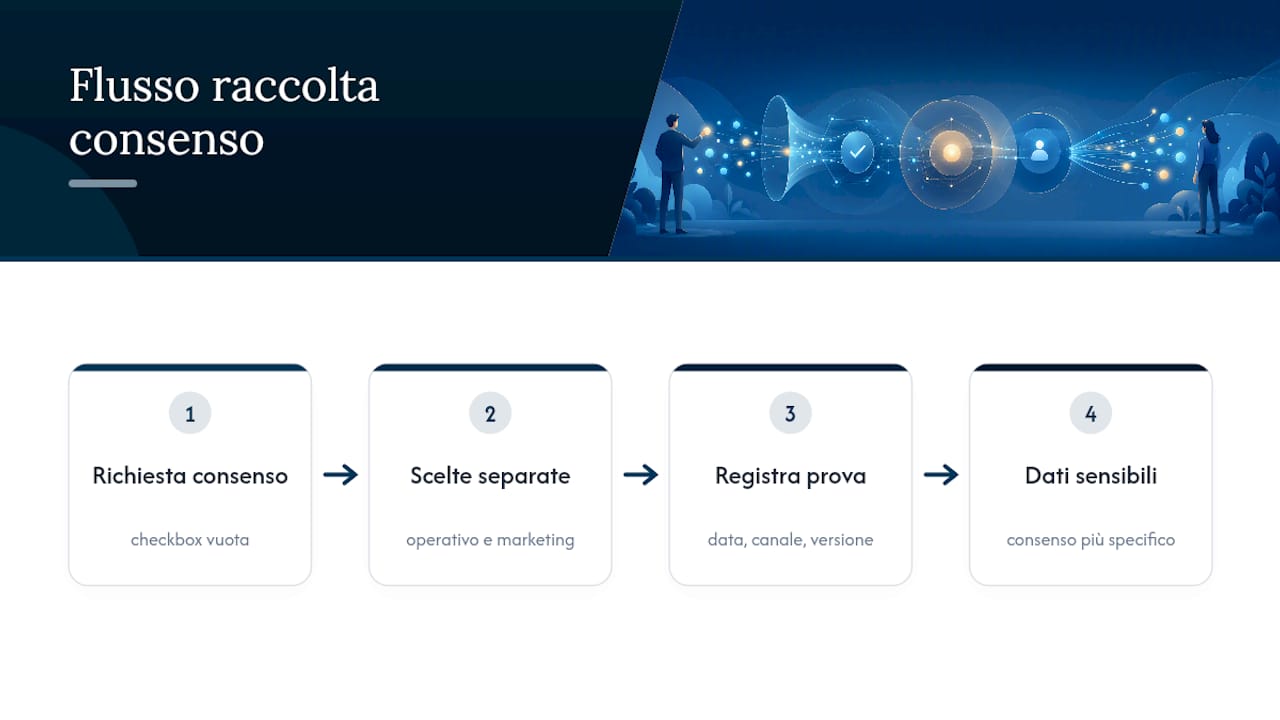
If you work with minors, health data, or special categories of data, the required level of care is higher. In those cases, consent must be even more specific and the legal basis must be documented more precisely, because keeping records of processing becomes an integral part of compliance, not an optional detail.
The client information form as a relationship tool, not just a record
A well-maintained client information form tells a story. It isn’t just a container for tax details: it’s a record of every interaction you’ve had with that person or business.
The “notes” field and communication history are more valuable than they might seem at first. Knowing that a client prefers to be contacted by email rather than by phone, or that they reported an invoicing problem two months ago, saves you from repeating questions and making the client feel like a number. Being clear about the data you collect builds trust, as well as compliance: a client who sees that their data is managed in an orderly way recognizes your professionalism even before receiving the first quote.
Updating the form after every significant interaction, not just at the start of the relationship, is what turns a static record into a living tool. It takes only two minutes after a call to note what was decided: you’ll see the difference by the third or fourth contact, when you no longer have to ask, “Could you remind me where we left off?”
How to store and update client records without losing track of anything
A perfect client information form on the day it’s created, then left untouched for six months, isn’t much use. Storage matters just as much as filling it in initially.
Keep all your forms in one folder or shared folder, avoiding scattered copies on different desktops: it’s the fastest way to end up with three different versions of the same client’s details, each with one updated item and the rest out of date. Rename files using a consistent convention, such as the client’s name plus the date of the latest change, so you can immediately see which version is correct.
Schedule periodic checks, even just quarterly, to make sure the tax details are still valid: inactive VAT numbers, changed IBANs, and replaced company contacts are more common than you might think. If you still use paper forms, plan to keep a digital backup and store the original somewhere with restricted access.
What I learned from looking at dozens of badly made client forms
Most client information forms found online are too long or too generic. They try to anticipate every possible scenario and end up discouraging the person who has to fill them in—including the client, when they’re the one providing the information.
The thing you underestimate at first, and later regret, is the notes field. It seems the least important, but it’s the one you’ll use most during the first three months of working with a new client. GDPR compliance is treated the same way, as an obstacle to get past quickly, when it’s an opportunity to show clients that you can handle their information thoughtfully.
The most contrarian advice I can give you is this: don’t start with the most comprehensive template you can find online. Start with the simplest one, use it for a month, and add only the fields you’ve actually found you need to refer to. An Excel sheet with ten fields used well beats a form with forty fields that no one ever fills in completely.
— Fabrizio
Digitize your client information form without switching between five different tools
A well-structured Excel sheet solves the problem of collecting data, but it stops there: it doesn’t remind you about deadlines, connect the form to a calendar appointment, or alert you when it’s time to update a client’s tax details. Kesbatty takes that exact static file and turns it into a living tool, where contacts, appointments, and tasks share the same space instead of living in three separate tabs.

With Kesbatty, you can send quotes and documents via a public link without asking the client to create an account, and modules are activated only when you actually need them, with no setup to undo later. The plan is free for up to 100 contacts, so you can test the complete workflow before deciding whether you really need an upgrade. If you already manage dozens of client forms scattered across Word and Excel, try KeSbatty and see how much time you save in the first week.