Social Media Editorial Plan: A Practical Guide with Models and Templates

A social media editorial plan is the operational document that turns marketing goals into scheduled, measurable content: it defines the audience, content pillars, calendar, and KPIs, so every post becomes part of a strategy rather than a last-minute improvisation. Below, you’ll find practical examples of a weekly outline, downloadable templates, and an operational checklist for building a plan that really works, not just on paper.
In brief:
- A social media editorial plan is a strategic tool that connects business goals, content pillars, and KPIs, ensuring consistency and measurability.
- It is essential to distinguish between the editorial plan, the operational calendar, and the overall strategy to avoid confusion and maintain a long-term focus.
- Selecting 3–5 content pillars and carefully segmenting the audience ensures variety and relevant messaging, while avoiding repetition and loss of attention.
- Planning should include a flexible calendar, with periodic reviews of data and KPIs, so it can adapt to trends, seasonality, and unexpected crises.
- Integrating management tools such as digital platforms reduces errors, simplifies collaboration, and keeps the plan up to date with other business activities.
Table of Contents
- What is a social media editorial plan, and how does it differ from a calendar?
- Why you need one: practical goals and essential KPIs
- Essential components: audience, pillars, format, and channel
- Building the operational calendar: weekly outline and posting frequency rules
- Efficient production: batching, workflow, and content status
- Practical tools and templates for managing the plan
- Measurement and review: the routine that keeps the plan alive
- Governance: roles, responsibilities, and approval times
- Crisis management and an emergency plan for social content
- Adapting the plan to trends and seasonality
- Integrating the social media editorial plan with other business channels
- Perspective: why the editorial plan dies outside the spreadsheet
- Try KeSbatty to manage your editorial plan without jumping between five apps
- Sources
What Is a Social Media Editorial Plan, and How Does It Differ from a Calendar?
People who work in marketing often use “editorial plan” and “editorial calendar” as synonyms, but they are two different levels of the same work. The social media editorial plan is the strategic level: it defines why you publish, who you publish for, which content pillars you use, and what voice you use. The calendar is its operational translation: the dates, times, platforms, formats, and status of each individual piece of content.
Social strategy sits one level above that: it sets the overall direction (positioning, tone of voice, priority channels) and lasts for months or years. The editorial plan puts it into practice, usually over a quarterly or six-month horizon. The calendar, finally, is the day-to-day execution tool that follows from the plan.
Confusing these three levels is the most common mistake among people who manage social media for themselves or for a client. The typical result: they open an Excel spreadsheet, enter scattered ideas, and three weeks later can no longer remember why they are publishing a particular piece of content or whom it is for.
A serious social media editorial plan always includes:
- Business goals connected to the content (awareness, leads, retention)
- Content pillars that structure what to talk about
- The target audience and its segmentation
- The operational calendar derived from the pillars
- KPIs for measuring whether the plan is working
It should be drawn up before launching a new product, at the start of each quarter, or when you notice that your social content no longer has a recognizable thread running through it.
Why You Need One: Practical Goals and Essential KPIs
An editorial plan without measurable goals is just a calendar of random posts, however well written they may be. The first step is to connect each content pillar to a specific business goal: increasing brand awareness, generating qualified leads, or strengthening the loyalty of people who already follow you.
KPIs fall into two groups that are often confused. Organic KPIs measure the health of your community: engagement rate, follower growth, content reach, and average video watch time. Conversion KPIs, on the other hand, measure business impact: clicks to your website, contact requests generated, and sales attributed to a social campaign.
Choosing the right KPIs means avoiding two opposite traps. The first is tracking only likes, which say little about the actual return on investment. The second is expecting every post to generate a direct sale, an expectation that stifles creativity and burns through the budget on constant testing.
A practical method: assign one primary KPI and one secondary KPI to each editorial pillar.
- Educational content → primary KPI: watch time; secondary: saves
- Product content → primary KPI: link clicks; secondary: direct-message inquiries
- Community content → primary KPI: comments; secondary: shares
A tip: Don’t change your KPIs every month. You need at least 8–12 weeks of consistent data to understand whether a pillar is working or whether you are simply looking at statistical noise.
The monthly review method recommended by Salesforce starts precisely here: plan according to your actual production capacity, not your ambitions, because a plan based on unattainable goals is the most common reason editorial calendars are abandoned after just a few weeks.
Essential Components: Audience, Pillars, Format, and Channel
An effective editorial plan is built on four blocks that fit together. Skipping any one of these steps almost always leads to the same problem: content that is technically correct but does not speak to anyone in particular.
Audience Segmentation and Micro-Targeting
A generic target audience (“marketing professionals aged 25–45”) is no longer enough to guide content production. You need finer segmentation: people considering hiring an in-house social media manager, people who already have one but are looking for better tools, and people managing several clients on their own at the same time.
Each segment deserves a different angle on the same topic. A post about time management, for example, might discuss priorities and delegation for a company marketing manager, while for a freelancer it might focus on day-to-day survival amid deadlines and multiple clients.
Content Pillars: How Many You Need and How to Choose Them
Research into effective editorial models converges on a specific number: 3–5 content pillars are enough to ensure variety without diluting the audience’s attention. Fewer than three pillars makes content repetitive; more than five dilutes the message and complicates production.
Typical pillars for a B2B company:
- Educational: guides, explanations, industry data
- Social proof: real cases, results, testimonials
- Product: features, updates, use cases
- Community: behind the scenes, company culture, people
- Reactive: trends, current events, timely conversations
Each pillar has a specific role in the audience’s journey. The educational pillar attracts people who do not know you yet, the product pillar persuades those already considering a purchase, and the community pillar builds loyalty among people who have followed you for a while.
Adapting Formats to Channels Without Doubling the Work
The most time-consuming mistake is treating every platform as a separate project. The practical solution is to start with a core piece of content (often a video or a long article) and derive variations for each channel, changing only the format and caption length, not the underlying message.
- LinkedIn: long-form text with data or a carousel with concise slides
- Instagram: a short Reel or visual carousel using the same content
- TikTok: a more informal, direct, less polished version
- Facebook: a link with a preview and a conversational description
This approach sharply reduces production time because the heavy creative work (research, the idea, the structure) is done only once.
Building the Operational Calendar: Weekly Outline and Posting Frequency Rules
The calendar is the part of the plan that makes everything actionable. An effective tool does more than list dates: it assigns a platform, format, and progress status to every piece of content, just as the editorial calendar guide explains when distinguishing a real calendar from a simple list of posts.
A typical weekly outline for a small team or a professional managing social media independently:
| Day | Pillar | Format | Channel |
|---|---|---|---|
| Monday | Educational | Carousel | Instagram, LinkedIn |
| Tuesday | Product | Image post | |
| Wednesday | Community | Reel/short video | Instagram, TikTok |
| Thursday | Social proof | Long-form text | |
| Friday | Reactive/light | Story or short post |
Set your posting frequency according to your actual production capacity, not your desire to be everywhere every day. Three well-made posts a week beat seven poorly made ones. That is even more true in 2026, when algorithms reward time spent on content more than sheer posting frequency.
To set the right frequency:
- Calculate how many hours a week you genuinely have available to create content
- Divide that time between brainstorming, production, and review
- Set a number of posts you can sustain for at least three months without skipping weeks
- Always leave 1–2 slots open each week for reactive content or urgent needs
That spare capacity is what distinguishes a rigid calendar, which falls apart at the first unexpected campaign, from a genuinely useful tool. Seasonal campaigns and product launches should be added as dedicated blocks, layered over the regular outline rather than forced into slots that are already occupied.
Efficient Production: Batching, Workflow, and Content Status
Batching, or producing content in dedicated sessions rather than one piece at a time each day, cuts down on the time spent “getting back into creative mode” several times a week. A two-hour session devoted only to writing captions, for example, produces more consistent results than ten scattered minutes each morning.
A typical batching session for a monthly plan might look like this:
- Session 1: brainstorming and topic research (all pillars)
- Session 2: writing copy and captions for two weeks
- Session 3: visual production (photos, graphics, video editing)
- Session 4: final review and scheduling
To track progress, you need a workflow with clear, basic statuses: idea, draft, ready for review, approved, scheduled, published. Without these statuses, every team ends up asking in chat “Where are we with this post?” several times a day—which is exactly the kind of time batching should save.
A tip: Before scheduling any content, run through a two-minute checklist: working link, correct hashtags, tags for the right people, and a format suited to the platform. A careless publishing mistake costs much more than the two minutes you would have spent checking it.
Practical Tools and Templates for Managing the Plan
A shared spreadsheet (Google Sheets or Excel) is still the most accessible starting point: free, flexible, and easy to share with a client or collaborator. Its limits become apparent as the number of posts to schedule grows: without automation, manually updating statuses and reminders becomes a job in itself.
Dedicated schedulers solve this problem by turning a calendar row directly into the post that is actually published, linking planning and publishing in a single step. They are still specialized tools, though: they manage social content but do not connect with the rest of your work (clients, deadlines, documents).
Regardless of the tool you choose, the basic template should include these columns, as the Shopify guide to editorial planning also suggests:
- Publication date and time
- Target platform
- Editorial pillar
- Format (Reel, carousel, text, Story)
- Copy, with any channel-specific variations
- Asset link (where the graphic or video is stored)
- Progress status
- Content owner
For assets, create a shared folder organized by month and pillar, with consistent file names (date, pillar, version). It may sound like a bureaucratic detail, but it can save you when you need to republish old content or hand the work to a colleague without spending hours searching for the right file.
Measurement and Review: The Routine That Keeps the Plan Alive
An editorial plan that is never reviewed soon becomes a dead document. The recommended review routine has three distinct time frames, each with a specific goal.
Weekly review (15 minutes): check what was published against what was planned and flag any gaps in the following week’s calendar.
Monthly review (about an hour): analyze recent performance, compare the pillars, and decide whether a format deserves more space or should be scaled back.
Quarterly review: compare actual production capacity with what was planned, and revisit goals and KPIs if the business context has changed.
- Record every test hypothesis (a new format, time, or tone) and document the result after at least 3–4 posts
- Compare a pillar’s data with its historical average, not with one isolated viral post
- Consider scaling up a format only after seeing a repeated signal, not a one-off spike
The signs that it is time to drop a format are just as clear: engagement consistently below the pillar’s average for several consecutive weeks, or production costs that no longer justify the return. Managing the plan as a system that updates in response to concrete data rather than the instinct of the moment is what separates a calendar that improves over time from one that stays stuck in its first version.
Governance: Roles, Responsibilities, and Approval Times
Even an editorial plan managed by one person needs clear rules, because confusion tends to arise precisely when there is no written process. In a team of two or three people, basic governance involves three distinct roles, even if they sometimes belong to the same person: the person who proposes content, the person who approves it, and the person who publishes it.
Minimum roles to assign:
- Creator: proposes the idea and produces the first draft
- Reviewer: checks tone, brand consistency, and accuracy
- Publisher: schedules and monitors the actual publication
Set specific response times to prevent content from getting stuck in review for days: 24 hours for routine approval, 2 hours for reactive content related to an urgent issue or current trend.
For unexpected situations (illness, vacation, client emergencies), decide in advance who will cover for whom. A robust editorial plan always has a backup plan for review, not just production: content that is ready but stuck waiting for an approval that never comes wastes just as much time as content that was never written.
Crisis Management and an Emergency Plan for Social Content
Every editorial plan needs a protocol for stopping or changing publication during a crisis, whether internal (a company mistake) or external (a current event that makes the planned tone inappropriate). Without this protocol, you risk automatically publishing scheduled content while the public conversation is focused elsewhere.
The first practical step is to appoint someone with the authority to pause the entire calendar within minutes, without waiting for approval from several people. This role should be assigned before a crisis hits, not during one.
A basic emergency protocol should include:
- A fast communication channel for the people responsible (a dedicated chat, not email)
- A checklist of 3–4 questions to decide whether to pause, postpone, or change content that is already scheduled
- A list of sensitive words or topics to monitor so you can avoid publishing something inadvertently out of context
- A standard response message ready to use for comments or inquiries during the most critical phase
After handling each crisis, add a brief note to the editorial plan: what happened, how you responded, and what to change next time. Over time, this informal archive becomes the team’s most useful operations manual, because it comes from real situations rather than theoretical assumptions.
Adapting the Plan to Trends and Seasonality
An overly rigid editorial plan loses its ability to take advantage of opportunities that arise during the year: holidays, industry events, viral trends that last only a few days. The solution is not to rewrite the plan each time, but to build flexibility into it from the start.

The simplest method is to divide the calendar into two overlapping layers: a fixed layer, built around the pillars and weekly outline, and a variable layer, reserved for trends and seasonal content.
For predictable seasonal events (Black Friday, holidays, recurring industry events), plan at least a month ahead: seasonal content takes longer to produce and often requires dedicated graphic assets. Unexpected trends, on the other hand, call for a faster process: a practical rule is to give yourself no more than 24–48 hours from the time a trend emerges to decide whether and how to join in. Otherwise, the moment has passed and your content will feel late.
Keep track of which trends worked and which did not. Over time, this informal log helps you recognize more quickly which kinds of conversations really fit your brand, so you can avoid chasing every trend just because it is popular.
Integrating the Social Media Editorial Plan with Other Business Channels
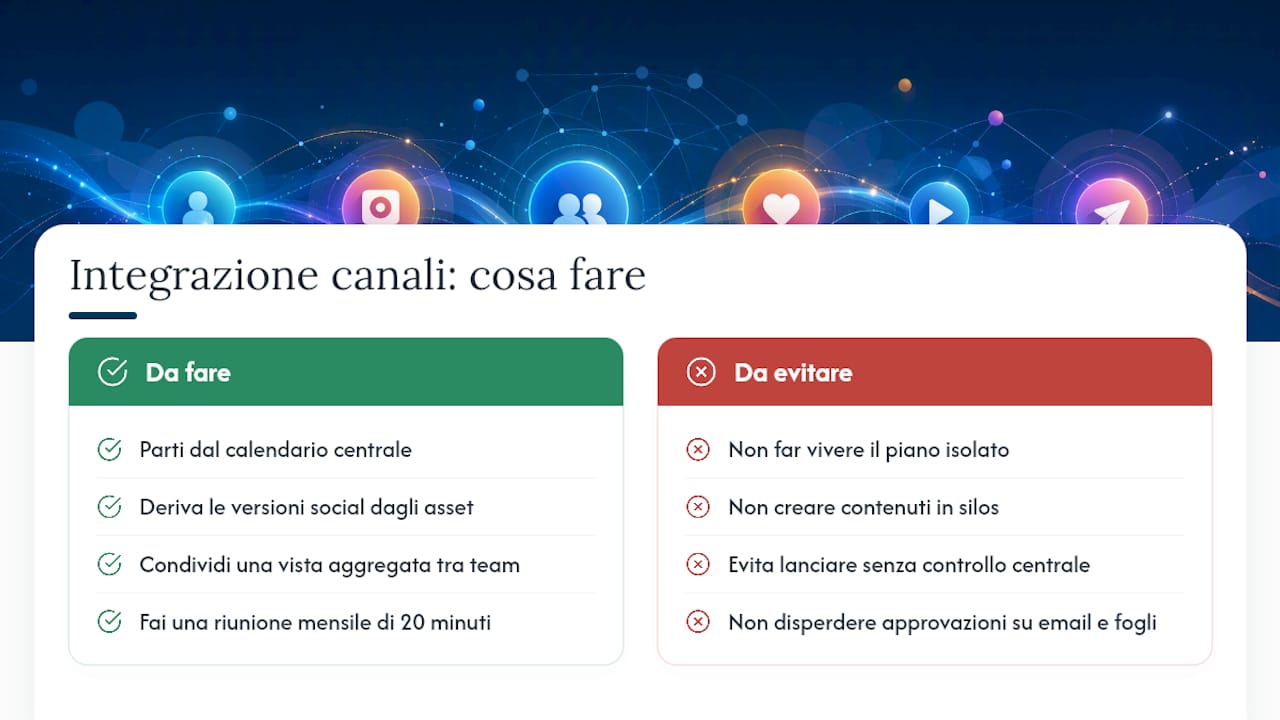
The social media editorial plan should not exist in isolation from the rest of your company’s communications. Newsletters, blogs, press releases, and sales materials often cover the same topics as social content, but on different timelines and with different people responsible: the risk is duplicating work or, worse, communicating contradictory messages during the same period.
The simplest way to connect channels is to start with the calendar of major content (product launches, campaigns, announcements) and derive social versions from it, not the other way around. A press release naturally becomes a more direct LinkedIn post; a blog article becomes an Instagram carousel with its key points.
Sharing a central calendar, even just as an aggregated view across the different teams, prevents the social media manager from discovering a launch at the last minute after it has already been announced elsewhere, or a newsletter from going out while social media is covering a completely different topic. Even a 20-minute monthly meeting between the people managing social media, content, and external communications is enough to avoid most of these overlaps.
For anyone managing contacts and projects for several clients at once, this integration becomes even more delicate: without a single reference point, information about deadlines and approvals ends up scattered across emails, chats, and different spreadsheets, each with a slightly different version of the truth.
Perspective: Why the Editorial Plan Dies Outside the Spreadsheet
Most guides to editorial planning focus on what goes into the spreadsheet: columns, pillars, KPIs. Few discuss where that spreadsheet sits in relation to the rest of a professional’s or small team’s work, and this is often the real reason a well-designed plan stops working after two months.
The problem is rarely the quality of the template. The editorial plan lives in isolation from the appointments calendar, client checklists, and project deadlines, in an app separate from everything else. Every switch between tools costs time and attention, and in the long run the plan ends up being updated now and then rather than every week.
A platform such as KeSbatty addresses this exact problem: it brings the editorial plan module together with contact, appointment, and task management in one place, so the social media manager does not have to jump from a scheduling app to a separate CRM just to check when a client approved a piece of content. Modules are activated only when needed, so there is no need to configure a complex system from scratch just to plan two posts a week.
— Fabrizio
Try KeSbatty to Manage Your Editorial Plan Without Jumping Between Five Apps
If you manage social content for several clients or for your own company, the problem is rarely coming up with ideas: it is keeping the editorial plan, client deadlines, and each piece of content’s status together without spending the day checking four different tools.

KeSbatty is designed for people who work alone or in teams of two and do not have time to waste on complicated setup. The editorial plan module sits alongside the modules for contacts, appointments, and tasks, so you can see at a glance where a piece of content stands and link it directly to the client or project it belongs to, without copying information from one app to another. You can also send drafts or quotes linked to a social campaign through a public link, without making anyone create an account just to approve a post.
You can activate each module only when you need it, and get started for free with up to 100 contacts before unlocking the advanced features. Try KeSbatty and move your editorial plan out of an isolated spreadsheet and into the same place where you already manage clients and deadlines.
Sources
- How to Create a Social Media Editorial Calendar (2026 Guide)
- Editorial calendar: methods and models that work | Rushnet
- 10 Tips for Creating a Successful Editorial Plan - Salesforce
- Editorial plan: what it is and how to create one + template - Shopify Italy