Kanban vs. Gantt: Which Should You Use to Manage Your Projects?

For projects with fixed deadlines, defined deliverables, and dependencies between tasks, Gantt remains the clearest tool. For continuous workflows, priorities that change every week, and small teams that want agility, Kanban almost always wins. In practice, though, the best choice is often a mix: try both for two weeks and see where the team spends less time updating the tool instead of working.
In brief:
- Gantt is ideal for managing projects with fixed deadlines and clear dependencies, but it requires regular updates to be effective.
- A Kanban board offers more flexible, immediate management, making it perfect for continuous workflows and environments where priorities change quickly.
- Combining the two tools makes it possible to keep a quick overview and operational details without duplicating update work.
- For small teams or freelancers, it is often better to use Kanban for day-to-day work and reserve Gantt for major milestones, optimizing management time.
- The choice between Gantt and Kanban depends on how much structure is required and how often the project needs to be updated to work at its best.
Contents
- Kanban vs. Gantt: What a Gantt chart is and what it is used for
- Kanban vs. Gantt: What a Kanban board is and the advantages it offers
- Advantages and limitations of the Gantt chart
- Advantages and limitations of the Kanban board
- A direct comparison of Gantt and Kanban across operational dimensions
- How to choose between Gantt and Kanban: a five-step checklist
- Using Gantt and Kanban together without duplicating work
- A practical recommendation to get started today
- What most guides don’t tell you
- Integrated Kanban: how Kesbatty simplifies day-to-day management
- Sources
Kanban vs. Gantt: What a Gantt chart is and what it is used for
A Gantt chart is a visual representation of a project on a horizontal timeline: each task becomes a bar that starts on one date and ends on another, with dependencies between tasks marked by arrows or visual links. It also includes milestones, key points with no duration that mark a delivery or approval, and the critical path: the sequence of tasks that determines the project’s minimum duration.
This tool was created for projects with defined deadlines, where knowing “what must finish before what” matters more than “who is working on what right now.” A Gantt chart shows the plan on a timeline, highlights dependencies, and can indicate the critical path. It is very useful when a client wants to see right away when the final delivery is due.
The downside is maintenance. Every time a date slips, every bar connected downstream may need to be adjusted by hand, and in many software tools this work is not automatic at all. A Gantt plan that is not updated regularly soon becomes a decorative document: nice to show in a meeting, but useless for understanding the project’s actual status.
Kanban vs. Gantt: What a Kanban board is and the advantages it offers
A Kanban board organizes work into columns (typically “to do,” “in progress,” and “done”) and cards that represent individual tasks. Each card moves from left to right as it progresses, while work-in-progress (WIP) limits prevent too many tasks from being open at once. The backlog collects everything that has not yet entered the workflow.
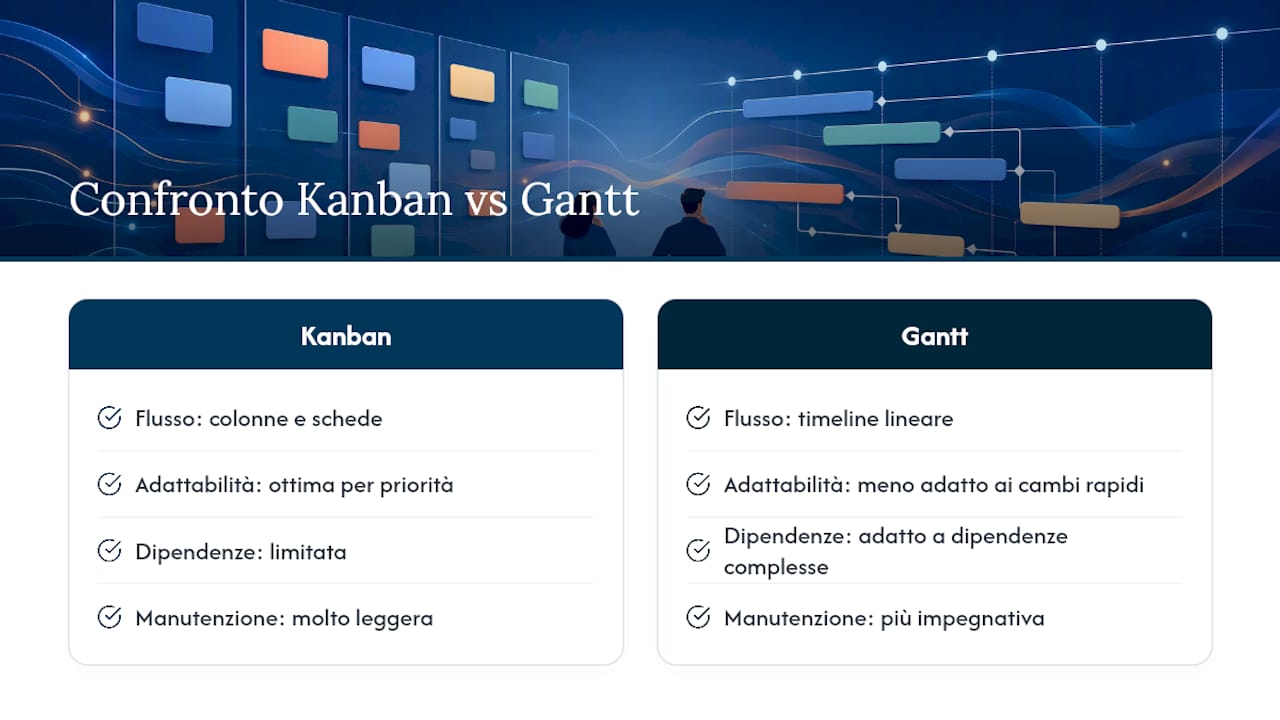
This method comes from lean manufacturing, where lean principles emphasize flow control and reducing waste caused by accumulated, unfinished work. Applied to project management, its main advantage is the immediate visibility of bottlenecks: if a column gets backed up, you can see it at a glance, without recalculating anything.
Kanban boards show workflow with columns and cards, reduce lead time, and help identify blockers, with much less maintenance than a complex timeline. They are the right tool when priorities change often, when you work with several clients in parallel, or when a project does not really have a “beginning and end” but is instead a continuous stream of requests, as is often the case for freelancers and consultants.
Advantages and limitations of the Gantt chart
Gantt remains indispensable in some contexts, but it comes with a management cost you should understand in advance.
Advantages:
- Clearly shows the timeline and dependencies between tasks.
- Highlights the critical path, which helps you understand which delays are truly risky.
- Communicates effectively with stakeholders and clients who want to see precise dates.
- Clearly marks milestones, which are useful for aligning expectations on intermediate deliveries.
Disadvantages:
- Requires regular updates: if a date slips, several connected bars may need to be adjusted.
- Becomes outdated quickly if no one keeps it current, as articles on Kanban and Gantt point out.
- With complex projects, the number of dependencies can make the chart difficult to read.
A tip: Update the Gantt chart only at major milestones, not every day. Let the day-to-day details live on a linked Kanban board, so you avoid spending more time moving bars than actually working.
Advantages and limitations of the Kanban board
Kanban stands out for its simplicity, but it does not cover everything a project with strict deadlines needs.
Advantages:
- Immediate flexibility: you can reorder priorities without recalculating anything.
- Real visibility into work in progress, column by column.
- Low maintenance overhead, perfect for people working alone or in pairs.
- Easy to get started: a few columns are enough, with no complex preliminary planning.
Disadvantages:
- Does not show dependencies between tasks far apart in time very well.
- There is no natural view of long-term milestones or fixed deadlines.
- For highly structured projects, the lack of a timeline can disorient external stakeholders.
There are two useful metrics to watch: cycle time, or how long a card takes to go from start to finish, and throughput, or how many cards you complete in a given period. These two numbers are enough to tell whether the workflow is working or has become stuck.
A direct comparison of Gantt and Kanban across operational dimensions
The two methods address different needs, and the table below summarizes where each performs better. The levels (High, Medium, Low) are qualitative assessments based on how the two approaches typically work, not scores for any one tool.
| Operational dimension | Gantt chart | Kanban board |
|---|---|---|
| Timeline vs. workflow visualization | High (precise timeline) | Low (no built-in time scale) |
| Dependency management | High | Low |
| Flexibility when things change | Low | High |
| Visibility for external stakeholders | High | Medium |
| Maintenance overhead | High | Low |
| Suitability for predictive projects | High | Medium |
| Suitability for continuous workflows | Low | High |
The pattern is clear: where Gantt excels (dependencies, timelines, communication with people outside the operational team), Kanban is weak, and vice versa. It is no coincidence that many modern software tools offer simplified timeline views, a middle-ground compromise that borrows some Gantt concepts without the rigidity of traditional planning.
How to choose between Gantt and Kanban: a five-step checklist
Before opening a new tool, answer these questions in order.
- Are the project requirements stable or do they change often? Fixed requirements point toward Gantt; fluid requirements point toward Kanban.
- Are there strict contractual deadlines? If the client has a non-negotiable delivery date, Gantt helps protect it by showing the critical path.
- Do stakeholders need to see a timeline or a workflow? The people funding the project often want dates; the operational team often wants priorities.
- Is the work a project with an endpoint or a continuous workflow? A website launch is a project; managing clients month after month is a workflow.
- How many people need to update the tool? More people mean a greater risk of misalignment with a Gantt chart that is not centralized.
Once you have chosen, the next step is practical: create the minimum structure (columns for Kanban, main bars for Gantt) and decide right away which metric to track: cycle time for Kanban or milestone slippage for Gantt.
Using Gantt and Kanban together without duplicating work
Gantt and Kanban are not at odds with each other. Many teams use Gantt at a high level for an overview of the project and Kanban for day-to-day work. The real challenge is synchronizing them without doing the work twice.
The most effective setup has clear roles: the project manager maintains Gantt as a map of milestones and contractual deadlines; the team works exclusively on Kanban cards without ever touching Gantt directly. Gantt milestones are updated only when something changes that affects the client or the budget, not every time a card moves to another column.
A tip: Set one fixed day each week (Friday, for example) for the project manager to transfer to Gantt only the milestone changes that have emerged from the Kanban board. Everything else stays on the board.
Practical rules to avoid confusion:
- Keep one source of truth for operational dates: the Kanban board.
- Update Gantt only for significant events that matter externally (client, sponsor, contract).
- Periodically compare the board’s cycle time and throughput with the Gantt estimates to see whether the plan is realistic.
A practical recommendation to get started today
The basic rule remains simple: use Gantt when dependencies and deadlines matter more than flexibility; use Kanban when workflow and responsiveness matter more than long-term planning. In most real-world cases for freelancers and small teams, combining the two approaches beats using either one alone.
Two concrete actions to take today: create a Kanban board with three columns for the work you are managing right now, and draw a Gantt chart by hand, even on a sheet of paper, with only the main milestones for the coming month. After two weeks, compare which of the two made you spend less time on updates and which gave you more clarity while you worked.
What most guides don’t tell you
The discussion about Gantt and Kanban is often presented as an ideological choice, almost like taking sides between the traditional method and the agile method. In practice, for people working alone or in pairs, this framing is almost always wrong: the problem is rarely which methodology is “better,” but how much time you are willing to spend keeping it current.
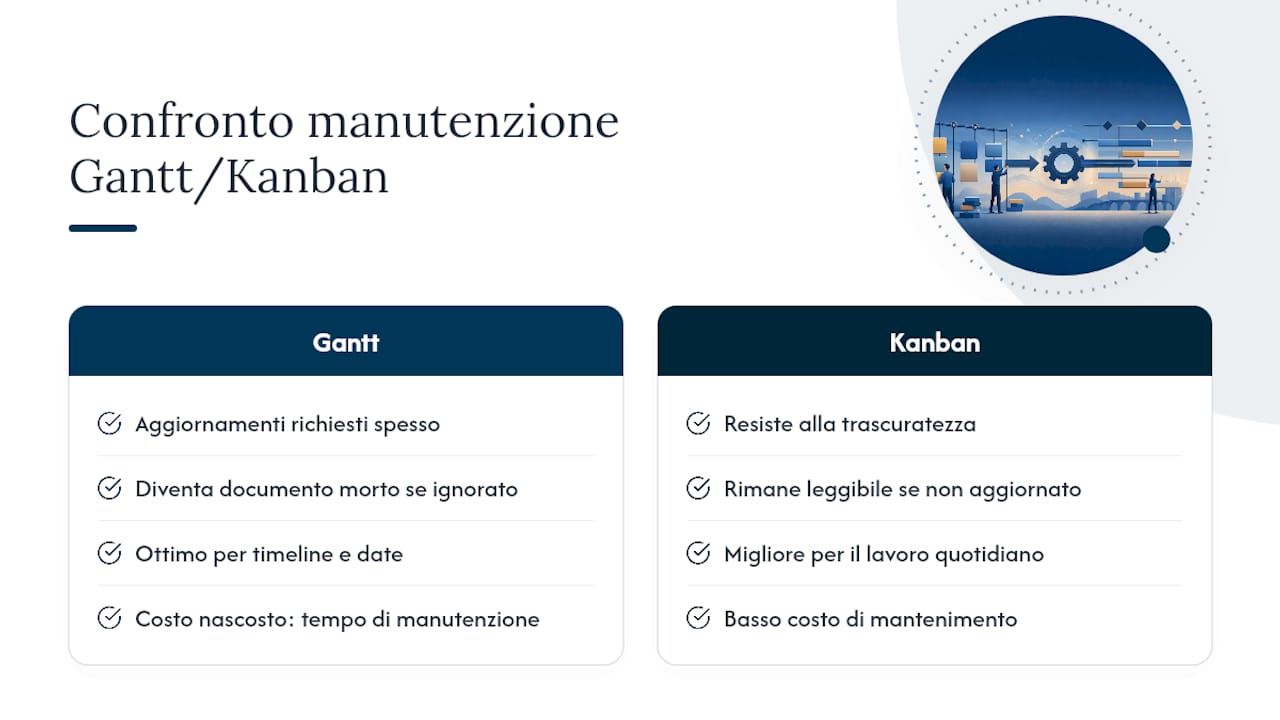
The real hidden cost of Gantt is not its theoretical rigidity, but the time someone has to spend moving bars every time a deadline slips. If no one has that time, after two weeks Gantt stops being a tool and becomes a dead document. Kanban, by contrast, survives neglect: even if you do not update it for a day, it is still readable.
This does not mean Gantt is useless, quite the opposite. For a consultant who needs to show a client when the final delivery will arrive, nothing communicates better than a timeline with dates. But most independent professionals do not need that precision every day: they need to know what to do today, and Kanban does that better than any chart.
— Fabrizio
Integrated Kanban: how Kesbatty simplifies day-to-day management
If you have decided that Kanban is the right approach for your workflow, the next question is where to keep it without having to open another subscription that is separate from the rest of your contacts and appointments.

Kesbatty was created for people who are tired of switching between apps to manage clients, tasks, and deadlines. The platform includes:
- Customizable Kanban boards to organize tasks and projects without opening a separate tool.
- Centralized management of contacts and appointments, directly connected to ongoing tasks.
- Sending quotes and documents with a public link, without requiring the client to create a login.
- Automatic reminders and a monthly report to keep track of project status.
Each module is activated only when you need it, with no complicated setup, and the data remains stored in Europe. For a freelancer or micro-team, this means having the Kanban board in the same place where you already manage clients and your schedule, instead of chasing information scattered across four different tools. You can try Kesbatty for free for up to 100 contacts and activate the advanced modules when your workflow really calls for them.
Sources
- Gantt chart: what it is, how to create one, and when to use it — Castro & Partners
- Kanban vs. Gantt charts: Can Kanban effectively replace Gantt charts? — TechRepublic
- Gantt chart | Corso Project Management