Professionals: Send Quotes Online, Use Ready-Made Messages, and Get Them Signed

To send an online quote that your client can accept with evidentiary value, send it through a tracked link that requires an OTP or records a click to accept. The document should identify the parties and include an itemized description, price, and timeline. Then keep the signed PDF together with the metadata: timestamp, IP address, and file hash.
In brief:
- Sending quotes through a tracked link with an OTP and a record of acceptance provides evidentiary value and legal validity.
- It is essential to include complete details, detailed descriptions, price, validity period, and an explicit acceptance statement in the offer, preferably with a signature or click.
- Advanced electronic signatures with OTPs and metadata are generally sufficient for most quotes, while qualified signatures are reserved for specific cases.
- To track and archive responses effectively, monitor whether a quote has been opened or accepted and keep metadata such as the timestamp and document hash.
- Using integrated platforms like Kesbatty simplifies the whole process, reduces friction, and keeps everything under control in one digital solution.
Contents
- How to create an online quote you can send without surprises
- Which channels to use to send a quote to a client
- What legal value does an electronic signature have on a quote?
- How to track statuses and archive evidence
- Ready-made messages to accompany a quote
- Why an integrated platform simplifies the whole process
- A signature alone isn’t enough: what really matters
- Try Kesbatty to send quotes and get them signed right away
- Sources
How to create an online quote you can send without surprises
A poorly written quote isn’t just unpleasant to look at; it’s legally weak. Here’s what it really needs to include to hold up when it matters—that is, when someone disputes it.
Articles 1326 and 1327 of the Italian Civil Code establish that an agreement is formed when the parties are identified, the subject is clear, the terms are defined, and acceptance can be proven. In practical terms, here’s the minimum checklist:
- Complete details for the sender and recipient (name, VAT number or tax code, address)
- An itemized description, line by line: what you’ll do, how long it will take, and what is and isn’t included
- Price with VAT stated, any discounts, and payment terms (deposit, balance, late-payment penalties)
- The offer’s expiration date and rules for changes or unplanned extra work
- An explicit acceptance statement, such as “to accept, sign and return” or “by clicking Accept, you confirm these terms”
Almost everyone skips this last point, and it’s the one the courts examine most closely. Established case law indicates that a signature alone on a document headed “quote,” without itemized descriptions or wording that shows a commitment, may not be enough to make it a binding contract.
A tip: Don’t just write “quote for job X”: list each item separately, with quantities, timelines, and prices. A judge—or simply a client who changes their mind—will look closely at this level of detail.
Which channels to use to send a quote to a client
Not all channels are equal when you need to get a quote to someone and receive a quick response. The choice depends on who you’re dealing with, not on which channel seems more professional to you.
- Email with a PDF attachment: still the standard for B2B, it leaves a written record and can be strengthened with certified email (PEC) when greater evidentiary weight is needed. But the client has to download, sign, and send it back, with all the friction that entails.
- Link to a quote page: increases the likelihood of acceptance because the client can click, read, and accept in the same place without downloading anything.
- WhatsApp or SMS: perfect for clients on the go, such as at construction sites or home appointments; send the direct link, not a large attachment, and check that you have the right number before sending.
- Dedicated dashboard or app: lets you see the status of every quote you’ve sent at a glance, without having to ask, “Did you see my email?”
For a client working on a smartphone in the middle of a construction site, a WhatsApp link that opens and can be signed quickly is worth more than a perfect PDF left unopened in their inbox.
What legal value does an electronic signature have on a quote?
The eIDAS Regulation and Italy’s Digital Administration Code distinguish three levels of electronic signature: simple (FES), advanced (FEA), and qualified (FEQ). Each level has different technical requirements and evidentiary strength. Knowing which one to use helps you avoid both inadequate security and unnecessary complications.
For most ordinary commercial quotes, an advanced signature is more than enough. An OTP sent to an email address or verified phone number, together with the timestamp and document hash, provides solid technical evidence in the day-to-day work of people serving individual clients or small businesses.
In commercial practice, using an OTP and recording the metadata provides effective evidence in almost all cases, while a qualified signature remains reserved for situations with a specific legal requirement or a request from the public administration.
A qualified signature—the kind that requires SPID or a digital certificate—comes into play only when the law explicitly requires it or a public body makes it a condition. For a renovation quote, a consulting service, or a graphic design job, using one would be like driving a pneumatic hammer to put in a thumbtack.
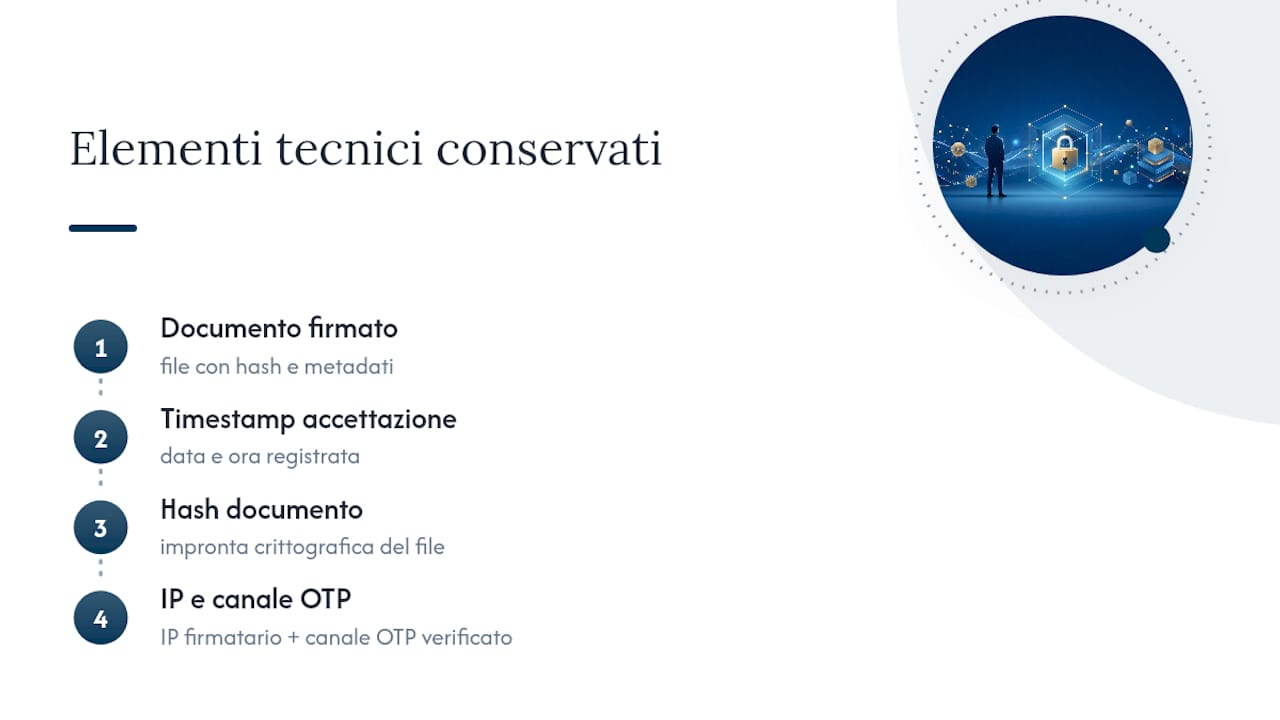
Whatever level of signature you choose, what really matters is the technical information you keep afterward: the acceptance timestamp, the hash of the signed document, the IP address of the person who clicked, and the verified channel through which the OTP was sent. These details, not the sophistication of the signature, make the difference in a dispute.
How to track statuses and archive evidence
A quote you send and never check again is a lost quote. Here’s how to organize the workflow without going crazy:
- Track key statuses: sent, opened, read, accepted, expired. Knowing that a client opened the link three times without accepting tells you much more than total silence.
- Keep the right evidence: signed PDF, acceptance metadata, and the notification email received by the client. Sequential numbering in your records makes everything easier to find months later.
- Set automatic reminders: if a quote has been opened but not accepted after three days, it’s worth following up instead of waiting indefinitely.
- Back up your records regularly, separately from your main email inbox, so you don’t lose everything if you change providers or accounts.
Ready-made messages to accompany a quote
The words you use around the quote matter almost as much as the document itself. A confusing message creates doubt; a clear one gets clicks.
For email, you could write: “I’m sending you the quote for [service] as an attachment. To accept, click the link and confirm the terms shown: you’ll receive a signed copy by email.” Direct and to the point.
For WhatsApp, keep it much shorter: “Hi [name], here’s the quote for the work we discussed: [link]. Just click to accept, then I’ll send you the signed copy.”
Always add a clause to the document itself, such as: “Acceptance by signing or clicking this link constitutes a binding agreement to the terms above.” Keep the tone professional but human, and avoid attaching too many files: one well-organized PDF is enough; there’s no need to send endless brochures with it.
Why an integrated platform simplifies the whole process
Managing quotes across email, WhatsApp, an Excel sheet for statuses, and a shared folder for signed PDFs is a recipe for losing something. That’s why it makes sense to keep everything in one place.
Kesbatty lets you send documents through a public link without requiring the client to log in or download an app. You send the quote from your phone while you’re still at the construction site; the client opens it and accepts with a click or OTP, and you receive a notification before you even get back to your car.
The real advantage isn’t any single feature; it’s no longer having to jump between five different tools just to find out whether a quote has been read.
Modules are activated only when you need them: if all you need today is to send a quote, you use just that. If you also want to track the next appointment tomorrow, you can activate the calendar without reinstalling anything.
A tip: Keep the record of quotes you’ve sent, along with their statuses, close at hand. It stops you from sending the same document to the same client twice—a situation that comes up more often than you think.
A signature alone isn’t enough: what really matters
The most overlooked lesson on this topic is that the technical security of the signature matters less than people think, while the quality of the document matters more than they realize. Many professionals spend time choosing the “most secure” type of signature and then write a three-line quote with no details. That’s the wrong order of priorities.
Common wisdom insists that you always need a qualified signature to be “safe.” That’s not the case: in day-to-day practice, an OTP with recorded metadata holds up very well for the vast majority of commercial cases. Complicating things with SPID for a gardening quote is a waste of time.
Here’s what you should really prioritize, in order: first, an itemized description that leaves no room for interpretation; second, an explicit acceptance statement in the document; third, a sending channel that reduces friction for the client. Electronic signature comes fourth, and in most cases the right choice is the simplest one, not the most sophisticated.
— Fabrizio
Try Kesbatty to send quotes and get them signed right away
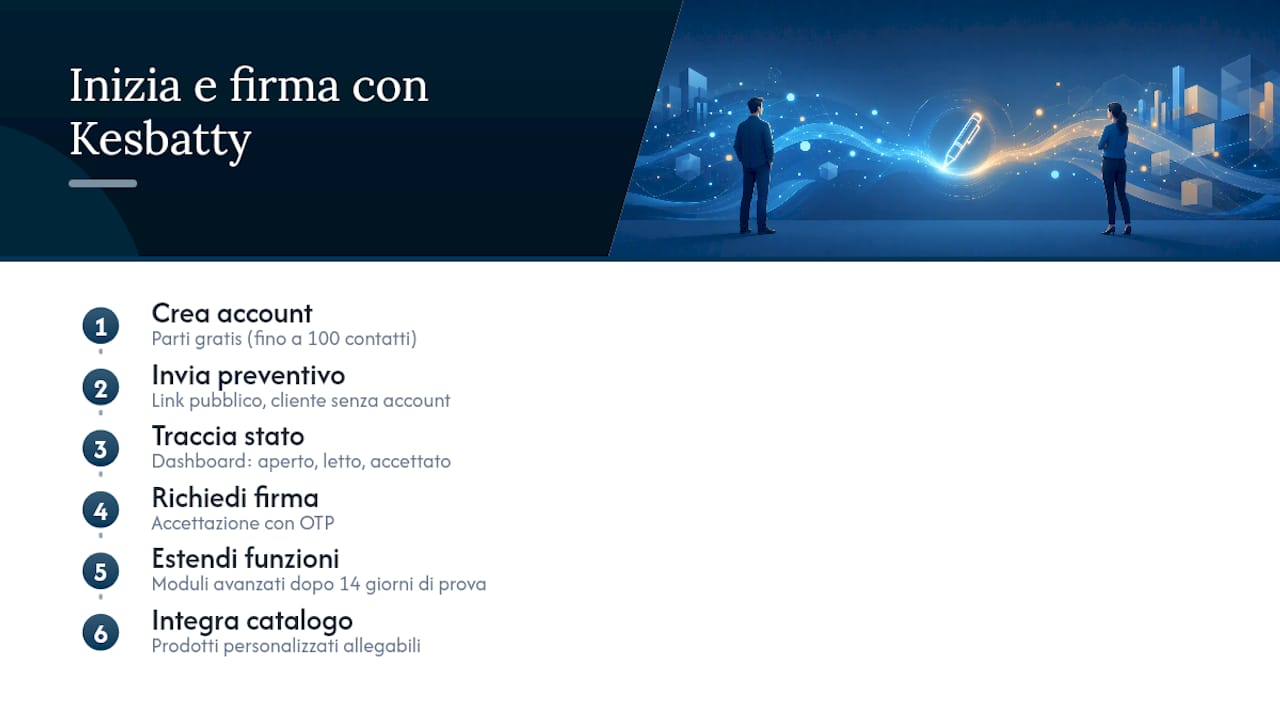
Kesbatty is a practical alternative to chasing emails, WhatsApp messages, and scattered folders to manage a quote from sending to signature: everything stays in one place and is tracked, without requiring the client to install anything or create an account.

The platform includes document sharing through public links, OTP requests for acceptance, and a dashboard that immediately shows which quotes have been opened, read, or accepted. You can start for free with up to 100 contacts and activate advanced modules only when you really need them, after a no-obligation 14-day trial. If you work with clients who are waiting for answers about measurements and materials, a catalog of customized products can work well alongside the documentation you attach to your quote.
To get started, just create a Kesbatty account and send your first tracked quote in just a few minutes, without complicated setup or multiple steps across different tools.
This article provides general information and is not a substitute for advice from a qualified lawyer. Consult a qualified legal professional about your specific case before acting on this content.
Sources
- Qonto — Quote (glossary)
- PuntodiDiritto — Does a work quote signed by the client count as a contract?
- Epreventivo