Managing Client Requests: How to Stay Organized Without Going Crazy

Managing client requests means collecting every inquiry, assigning it to the right person, and tracking it through to resolution with a clear record of what happened. There is one operational goal: centralize everything in one place, track the status of every request, and always know who is responsible for what. If you currently use several channels without a shared workflow, you are probably already losing valuable contacts.
In brief:
- Effective client request management means distinguishing an initial inquiry from a structured support ticket, without turning every question into a complex process.
- Kanban views are a good choice for medium to large groups, while lists work well for high volumes. Keep the number of clear statuses small to make work easier.
- Bringing all channels into one system, generating unique IDs, and setting procedures for requests received outside business hours helps prevent lost leads and confusion.
- Assigning an owner to every request right away and distinguishing between sales and technical support prevents handoffs and delays.
- Tracking response times, first contact resolution, and customer satisfaction helps you assess and improve service efficiency and quality.
Table of Contents
- Client inquiry or support ticket: what's the difference?
- How the dashboard works: Kanban or list?
- How to centralize requests from multiple channels
- Who is responsible for what: assignment rules
- Which KPIs are worth tracking?
- Time-saving automation and integrations
- A checklist to get started in the right order
- The perspective of people who work with freelancers and micro-teams
- One tool, not five apps open at once
- Sources
- Frequently asked questions
Client inquiry or support ticket: what's the difference?
They are two different things, even though they are often confused. An inquiry is the first contact: a question, a sales query, or a general report that comes in by email, form, or phone. A ticket is created when that inquiry is formalized, assigned, and tracked with a status and a deadline.
- An inquiry is the incoming event; a ticket is the structured handling of it.
- Not every inquiry becomes a ticket: a simple sales question can be resolved with a reply, without opening a formal workflow.
- Treating every inquiry as a ticket adds unnecessary work; tracking none of them means losing leads.
The distinction also matters for SLAs and reporting: if you measure response times only for opened tickets, you overlook the entire first-contact stage, which is often where the most valuable time is lost.
How the dashboard works: Kanban or list?
A Kanban view works well when request volume is moderate and you want to see at a glance where bottlenecks are building up: new, in progress, waiting, closed. A list is more suitable when you handle dozens of requests a day and need to sort them by priority, date, or client without scrolling through columns.
- Use Kanban for the team's daily visual overview.
- Use a list for audits, reporting, and exports.
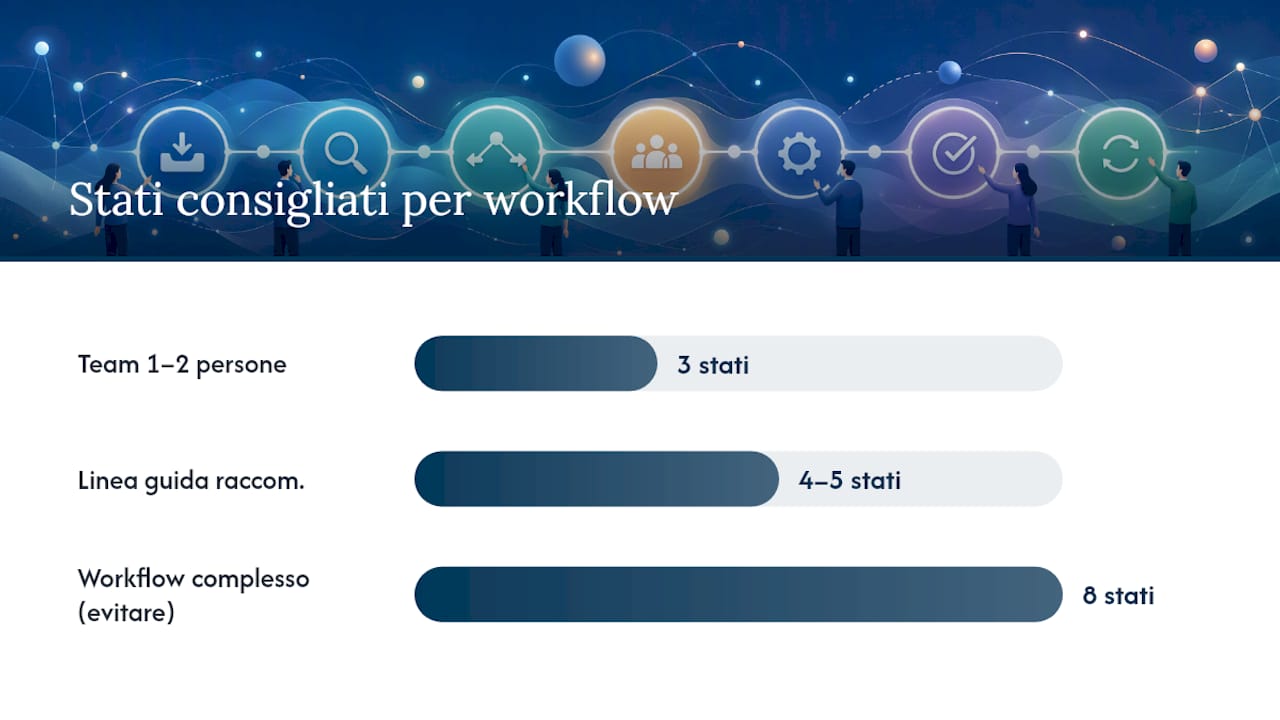
- Limit statuses to four or five: more categories only create confusion about who needs to move what.
From the view, you should be able to drag a request between statuses, close it with one click, or generate a linked document without opening other screens.
A tip: If your team has one or two people, you don't need a workflow with eight statuses: three are almost always enough, and you'll remember them all.
How to centralize requests from multiple channels
Requests come in through web forms, WhatsApp, social media, email, and phone, and each channel has its typical problems: emails get lost in shared inboxes, WhatsApp messages stay on someone's personal phone, and social media comments are read too late. Bringing channels together in a single workflow prevents lost leads and lets you measure what really happens after first contact, as Touchsite's analysis of client request management points out.
- Map every active channel and connect each one to a single contact record, not to separate inboxes.
- Automatically generate an identifier (ticket ID) at first contact: this prevents duplicates and lets you link emails and subsequent conversations to the same case.
- Set a procedure for exceptions, such as requests that arrive outside business hours or through unattended channels, specifying who picks them up and when.
Who is responsible for what: assignment rules
Requests bouncing between departments are almost always caused by unclear responsibility, not a lack of effort. Every request should have an identified owner within a few minutes of arriving, not only after someone happens to notice it.
- The owner is responsible for the request until it is closed, even if they bring in a specialist for technical details.
- Sales gets involved only with requests that have sales potential, marked as such from the start.
- A supervisor checks cases that are blocked or have been waiting too long, based on a threshold set in advance.
Routing can be automatic (by channel, keyword, or customer type) or manual for ambiguous cases. When a request is waiting for a customer response, pause the SLA instead of letting it run: otherwise, your average response times will be misleading.
Which KPIs are worth tracking?
There are only a few essential KPIs for a support operation, but they should be considered together, not in isolation: first response time, first contact resolution rate (FCR), and CSAT remain the three indicators most often cited for understanding whether service is working.
- First response time: the time between the inquiry and the first useful reply.
- FCR: the percentage of inquiries resolved without the need for further exchanges.
- CSAT: the satisfaction reported by the customer after the request is closed.
- AHT: the average time spent on each request.
- Backlog: open requests that have not yet been handled.
A low average handling time can hide superficial responses. For this reason, adding qualitative post-interaction feedback to the numbers helps explain the reason behind a metric, not just the metric itself. When working with business clients, it makes sense to look at CSAT for each strategic account as well as in aggregate: one dissatisfied important client weighs more than ten satisfied clients with low priority.
Time-saving automation and integrations
Useful automation is not meant to replace the people doing the work, but to eliminate repetitive steps, as explained in detail on the SzopaLabs blog on AI-powered office workflow automation. A modern ticketing system assigns and classifies incoming requests, applies dynamic priorities, and tracks each case through to closure, as described in Temovo's approach to advanced ticketing.
- Automatically create a contact record when a new request arrives.
- Automatically route requests based on channel, keyword, or customer type.
- Send notifications when a request has been idle longer than a set amount of time.
- Integrate with calendars, document areas, and messaging tools so you never have to leave the main workflow.
Artificial intelligence can be useful in two specific areas: automatically prioritizing urgent cases and analyzing the tone of a message to spot unhappy customers before they write a negative review.
A tip: Before adding sophisticated automation, check that your data is all in one place: automating fragmented processes only multiplies the confusion.
A checklist to get started in the right order
The most common mistake is trying to turn everything on at once: channels, automation, KPIs, training. A gradual sequence works better.
- Map your active channels and connect them one at a time to a single contact record.
- Generate a ticket ID for every request and link all related conversations to the same case.
- Define three or four clear statuses and a dashboard the whole team can read.
- Train staff in multiple skills so absences don't block an entire channel.
- Introduce automation only after checking that the data is centralized.
| Stage | Key action | Risk if skipped |
|---|---|---|
| Channel mapping | Connect each channel to one record | Scattered requests and lost leads |
| Ticket ID | Generate an identifier at first contact | Duplicates and requests bouncing between channels |
| Clear statuses | Limit the workflow to 3–4 trackable stages | An unreadable dashboard and confusion about who does what |
| Training | Staff with skills across multiple channels | Operational blocks when someone is absent |
The perspective of people who work with freelancers and micro-teams
People who work alone or in pairs don't need an enterprise system with twenty unused modules: they need to turn on only what they need, when they need it. A consulting firm with three active clients doesn't need to configure a CRM designed for a call center with fifty agents.
Simplicity is not a compromise: it's the right choice when the time it takes to set up a system matters as much as the time it takes to use it. It's better to have a tool that lets you turn on one module at a time than one that promises everything and takes weeks to set up.
— Fabrizio
One tool, not five apps open at once
If you're a freelancer, consultant, or run a micro-team, the problem is rarely a lack of tools: it's having too many that don't talk to each other. The platform brings contacts, appointments, tasks, and documents together in one place, with modular features you can turn on as needed and no endless setup.

You can send quotes and documents through a public link without requiring an account, and keep track of every request from a single dashboard instead of across email, WhatsApp, and spreadsheets. Data can remain on servers in Europe, which matters to people working with clients who care about privacy. The freemium plan lets you get started with a limited number of contacts, which is useful for testing the workflow before accessing advanced features. Try Kesbatty with the 14-day free trial and see how much time you recover in the first week.
Sources
- Customer service KPIs: how to measure customer care effectiveness
- CRM and customer support: sales, tickets, and history | AndreaBerretti
- Managing client requests: how not to lose leads and contacts | Touchsite
Frequently asked questions
What is the best customer management software?
There is no single best program for everyone: the choice depends on request volume and team size. For freelancers and micro-teams, a modular tool like Kesbatty avoids the complexity of systems designed for large support teams.
What are the main stages of managing a client request?
A typical workflow has five steps: receive the request, create a record with a ticket ID, assign it to someone responsible, work on it while updating its status, and close it after checking customer satisfaction.
What is the best database for customers?
The most effective database is one that keeps contacts and companies separate from tickets, linking them with navigable references instead of piling everything into one endless record, as Andrea Berretti suggests.
What is the best program for managing customer orders?
It depends on the type of business: those handling recurring orders benefit from a system that brings customer details, order status, and related documents together in a single dashboard, avoiding the need to switch between separate applications.
How can you avoid losing requests that arrive through different channels?
Centralizing every channel, from the website form to WhatsApp, in a single workflow with an identifier for each request is the most reliable way to avoid losing leads, as Touchsite's data shows.