Customer Relationship Management: How to Turn Contacts into Revenue

Customer relationship management is the system of processes and tools that turns a one-off contact into a lasting relationship that generates revenue over time. Done well, it reduces manual work and improves retention without relying on discounts or vague promises. A CRM helps keep everything on record, but it does not replace the people who decide how to nurture each relationship every day.
In brief:
- Investing in a simple CRM system focused on essential data helps a micro-team spend less time on repetitive tasks and manage deadlines more effectively.
- Onboarding and a customer health score are the first priorities for effective relationship management; advanced automation can come later.
- Sharing data across marketing, sales, and support makes it possible to act quickly when problems arise or customers show signs they may leave.
- Retention grows stronger through valuable communications, regular check-ins, and a system for monitoring signs of dissatisfaction.
- Tools such as Kesbatty bring together key features for customers, appointments, and documents, with a free option and modules you can activate as needed.
Table of contents
- What is customer relationship management?
- Why it pays off: measurable benefits for companies and micro-teams
- What are the stages of the customer relationship?
- Which CRM tools does a small team really need?
- How to retain customers without discounts
- Which KPIs measure the quality of the customer relationship?
- Putting it into practice: what really makes a difference
- How to handle customer complaints and grievances
- Training and skills for customer-facing roles
- Integrating customer management with marketing, sales, and support
- What really changes when you start managing relationships seriously
- Kesbatty: one tool for managing customers, appointments, and documents
- Sources
- Frequently asked questions
What is customer relationship management?
Managing customer relationships means systematically organizing every interaction, appointment, and task involving the people who buy from us, from the first message through contract renewal. In practice, it is the set of rules, data, and habits that helps a professional or small team always know who needs what, without relying on memory or scattered scraps of paper.
The difference between a manual process and one supported by a CRM comes down to traceability. With a paper planner or spreadsheet, information can easily get lost when the person looking after a customer changes. A CRM system centralizes data, interaction history, and deadlines, making the real status of every relationship visible to everyone on the team.
There are three practical goals: improve retention, grow the value generated by each customer over time (known as customer lifetime value, or CLV), and free up hours that would otherwise be spent chasing emails and scattered notes. This is not just theory: it is the difference between a business that grows in an orderly way and one that deals with emergencies every week.
Why it pays off: measurable benefits for companies and micro-teams
Keeping a customer costs less than acquiring a new one, and this principle is even more relevant in B2B, where sales cycles are long and trust takes time to build. Organizations that invest in retention reduce acquisition costs and increase cross-selling and upselling opportunities with existing customers, because an established relationship makes a sale easier.
For a micro-team, the impact is most visible in efficiency. Someone working alone or with one or two other people does not have time to manually chase every deadline: a structured process cuts the time spent on repetitive tasks such as reminders, follow-ups, and document collection.
The practical effects show up in three areas:
- Less time wasted searching for information scattered across emails, chats, and notes.
- More renewals, because no contract expires without prior contact.
- Fewer communication errors, because everyone on the team sees the same history.
Retention, then, is not just a matter of customer satisfaction: it directly multiplies margins by generating more revenue from the same acquisition investment.
What are the stages of the customer relationship?
The journey from first contact to loyal customer has clear stages, each with different activities. Skipping a stage or managing it poorly is the most common reason customers drift away without a clear warning.
- Acquisition: the first contact, often through a referral, content, or personal network. The goal here is to understand whether there is a real need before making an offer.
- Qualification: check whether the prospective customer has a budget, timeline, and problem that fit what we offer, rather than investing time in leads that will not convert.
- Onboarding: the first 90 days are critical. A clear checklist, defined deadlines, and a regular point of contact are essential: this is when the customer decides whether the collaboration is working.
- Ongoing management: regular check-ins, monitoring signs of risk (slower replies, less use of the service, requests for discounts), and proactive communication.
- Renewal or expansion: get ahead of the deadline by several weeks and offer a review of results before the customer asks for one.
In a micro-team, the main risk is that nobody is formally responsible for a particular stage, so everything gets done “when there’s time.” Even informally assigning someone to each stage prevents things from falling through the cracks.
Which CRM tools does a small team really need?
Not every piece of data deserves a field in the system. An effective CRM for a freelancer or small team records only what is actually needed to decide on the next action: name, company, contact channel, deal status, date of last contact, and next deadline. Everything else is noise that makes data entry harder and discourages daily use.
A micro-team needs only a few specific modules to make a real difference:
- A contact book linked to companies, so information is not duplicated for different people at the same customer.
- An integrated calendar and appointments, so it is easy to see when to follow up with someone.
- Tasks and kanban boards to track what is in progress, what is blocked, and what is finished.
- Sending documents and quotes through a public link, without making customers create an account.
A B2B CRM needs to support long sales cycles with features such as opportunities and forecasts, rather than being limited to a static contact list. But for a freelancer or a two-person team, simplicity remains the priority: activate only the modules you actually use, and avoid configurations that go unused after the first week.
A tip: Before adding a new field to your CRM, ask yourself whether anyone will actually look at it in the next three months. If the answer is “maybe,” leave it out.
How to retain customers without discounts
The strongest retention does not come from recurring promotions, but from communication that delivers real value before the customer even asks for it. Sharing a relevant case study, an industry benchmark, or an observation about their results builds trust more durably than lowering the price.
- Value-added communication: send relevant content (a similar problem you solved, an industry figure) instead of just asking, “How are things?”
- Regular check-ins and QBRs: a quarterly review with the customer, even an informal one, reinforces the sense that you are paying attention throughout the relationship, not just at renewal time.
- Customer health score: assign a simple indicator (green, yellow, or red) based on contact frequency, service usage, and the tone of replies, to identify who may leave before it is too late.
- Cross-sell playbook: define clear triggers, such as completing a project or the customer growing their team, to offer an additional service at the right time.
More than half of B2B sales leaders believe building trust remotely is harder than doing so in person. This makes it even more important to alternate automated digital touchpoints with real conversations, even if that means only a quarterly video call.
Which KPIs measure the quality of the customer relationship?
Numbers matter more than gut feelings when it comes to understanding whether a relationship is going well or deteriorating. A micro-team has only a few essential KPIs to track, but it should monitor them consistently:
- Retention rate: the percentage of customers who remain active over a given period.
- Churn: the percentage of customers lost, the most direct indicator of an ongoing problem.
- CLV (customer lifetime value): the total value generated by a customer over the course of the relationship.
- NPS (net promoter score): how likely a customer is to recommend us.
- Average response time: the time between a request and our response.
- Renewal rate: the percentage of contracts renewed out of all those due to expire.
Here is a practical example of an operational threshold: if a customer’s health score moves from green to yellow (fewer contacts in the past month, more support requests), an automatic escalation goes to the person managing the relationship, rather than waiting passively for the next renewal. Linking these indicators to monthly reports, even simple ones, makes it possible to spot patterns before they become emergencies and connect sales data to the operational decisions made each week.
Putting it into practice: what really makes a difference
The most common mistake when introducing a CRM is configuring it before mapping the actual processes involved in your work. Anyone who installs a system by copying a standard setup without understanding how their customer workflow really works ends up with unnecessary fields and automations that nobody uses. The right sequence is to map the stages you already follow informally, then translate them into a small number of fields and sensible automations.
Adoption, not technology, remains the main obstacle. A system that delivers immediate value, with ready-to-use templates and simple automations that free up real time, gets used. One that requires complex configuration before showing any benefit gets abandoned after two weeks.
KeSbatty is a platform that offers modules you can activate as needed, lets you send quotes and documents through a public link without requiring customers to log in, and hosts data in Europe to support attention to privacy.
A tip: Do not activate a module “because it might be useful.” Activate it when the need actually comes up; otherwise, it will just be an unused button in the menu.
Data ownership in SaaS contracts deserves attention when choosing tools to manage sensitive customer information, because providers do not all offer the same guarantees.
How to handle customer complaints and grievances
Handling a complaint well strengthens the relationship more than a thousand polite emails. The first step is to respond quickly, even if only to confirm that you have received the report: silence, more than the mistake itself, is what pushes a customer to leave.
You also need a minimal, repeatable process: record the complaint in the same system where you keep the customer’s history, work out whether it is an isolated problem or a recurring pattern, and set a deadline for resolving it. People working alone tend to handle complaints “from memory,” but that is exactly when an open issue is most likely to get lost.
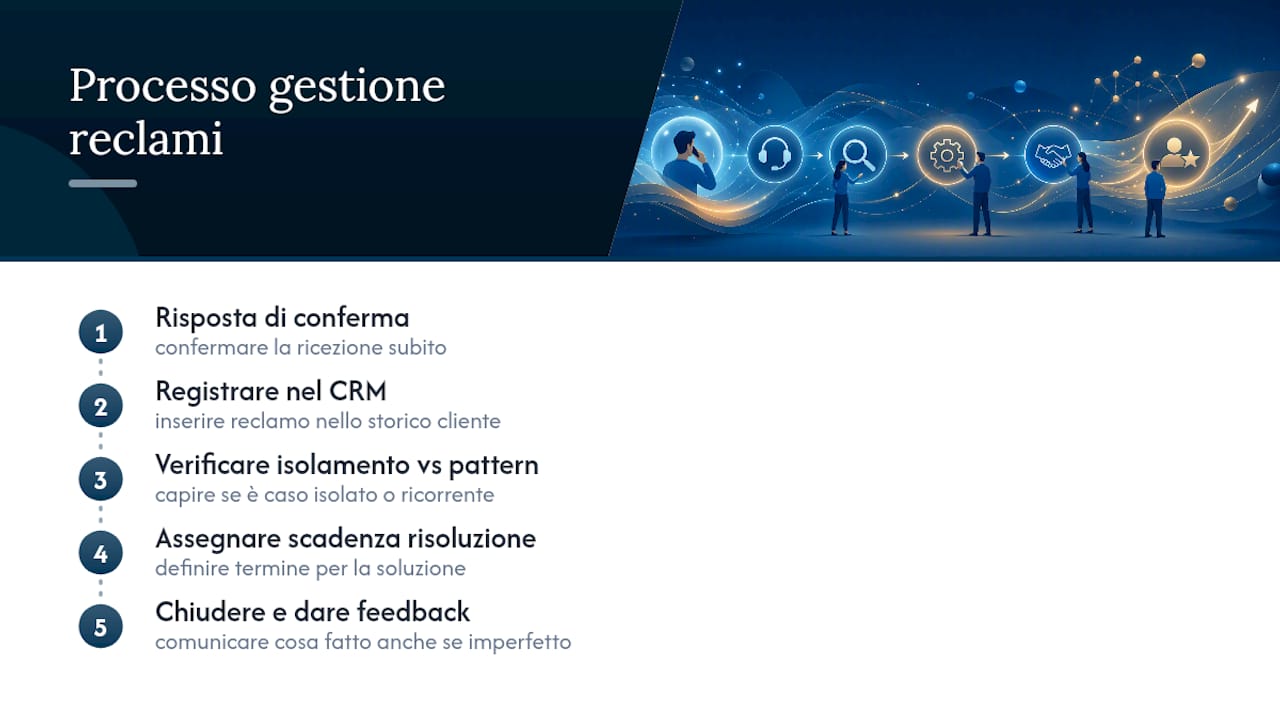
Always close a complaint with explicit feedback to the customer, even when the solution is not perfect. Explaining what was done and why conveys more professionalism than a quick but vague reply. It is also worth distinguishing an operational complaint (a late delivery, an error in a quote) from a deeper sign of dissatisfaction: in the latter case, you need a direct conversation, not just a written apology.
Keeping a record of complaints also makes it possible to identify recurring causes. If three different customers report the same type of problem in one quarter, they probably are not the problem: an internal process needs to be reviewed.
Training and skills for customer-facing roles
Even a two-person micro-team needs defined skills to manage customer relationships well. Good intentions are not enough: people need to know how to run a check-in, interpret a customer health score, and structure valuable communication instead of sending a simple status update.
For people in small teams, the most effective training does not involve long courses; it comes from shared routines: a brief weekly discussion about who may leave, a shared onboarding checklist, and a common language for describing a customer’s status (green, yellow, red, for example). This reduces dependence on one person who “knows everything by heart” and makes service more consistent when someone is away or changes roles.
Anyone coordinating a team, even informally, should spend time creating reusable templates: scripts for follow-up emails, standard questions for QBRs, and clear criteria for when to escalate a problem. These tools are more useful than any theoretical training because they become part of everyday work rather than forgotten notes after a course.
Integrating customer management with marketing, sales, and support
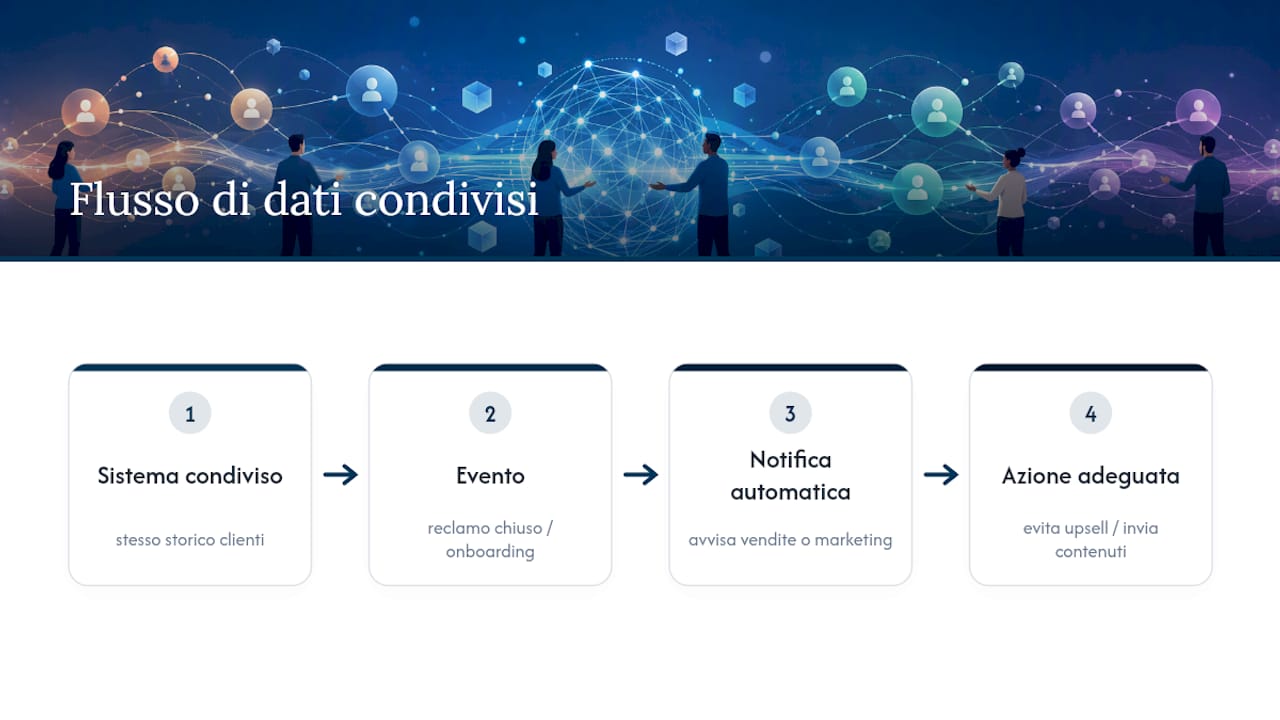
Customer relationship management stops working well when it is isolated in a corner of the business, separate from marketing, sales, and support. If marketing does not know which customers are at risk of leaving, it will keep sending generic communications instead of content designed to retain them. If sales cannot see the history of reported problems, it may offer an upsell at the worst possible time.
The practical solution, even for a small team, is to share the same data system across sales, support, and communications. You do not need a complex infrastructure: everyone just needs to see the same contact history and customer status, rather than relying on separate spreadsheets that are updated late or not at all.
Here is a concrete example: when support resolves a significant complaint, that information should automatically reach the person managing the commercial relationship, to avoid proposing a renewal or upsell right after a negative experience. In the same way, people responsible for content should know which customers have just completed onboarding, so they can send material suited to that specific stage rather than standard communications.
Tools such as automated reporting templates help turn interaction histories into reports that everyone across departments can read, without having to reconstruct a customer’s situation from scratch each time.
What really changes when you start managing relationships seriously
A micro-team’s priority is not to buy the most complete CRM on the market, but to start with two things: structured onboarding during the first 90 days and a simple health score for every active customer. The rest—advanced modules, complex automations, sophisticated reports—can come later, when the need is concrete rather than theoretical. Try this approach with five customers before rolling it out to everyone: results say more than any plan written in advance.
— Fabrizio
Kesbatty: one tool for managing customers, appointments, and documents
Kesbatty is a platform designed for people who have tried managing customers with lots of different applications and are looking for a solution that brings these features together in one tool. You can activate modules only when needed, from CRM for contacts and companies to appointment, task, and kanban management, without having to configure features you do not need.

Features for freelancers, coaches, and social media managers include the ability to send quotes and documents through a public link without requiring customers to create an account. Data is hosted in Europe, providing a level of protection for sensitive information.
The 14-day free trial lets you test onboarding with a real customer and see whether the health score and automatic reminders really reduce the manual work described in this article. The freemium plan remains free for up to 100 contacts, which is useful if you want to evaluate the platform without committing before unlocking advanced modules. You can start a free trial on Kesbatty and see for yourself how much time you can recover in the first week.
Frequently asked questions
What are the three pillars of customer relationship management?
The three pillars are people (the people who look after the relationship), processes (defined stages from acquisition to renewal), and technology—that is, a system such as a CRM that centralizes data and automates reminders.
What are the four types of customers that should be managed differently?
They are generally divided into new customers who are evaluating, customers in onboarding, active and stable customers, and customers at risk of leaving. Each group needs a different contact schedule and type of communication.
What are the main stages of a customer management program?
The key stages are acquisition, qualification, onboarding, ongoing management, and renewal or expansion, each with specific activities and owners, as described in this article’s operational roadmap.
What are the stages of the customer journey?
A typical journey includes awareness, evaluation, purchase, use, and retention. The final two stages are where a CRM such as Kesbatty has the greatest impact, thanks to automatic reminders and regular reports.
Is a CRM useful for a solo freelancer without a team?
Yes. A freelancer can benefit from a lightweight CRM: it prevents contact histories from getting lost and reduces the time spent on follow-ups and manually sending documents and quotes.