Two Modules, 7 Days: Project Management for Freelancers Without the Chaos

If you manage multiple clients on your own, the problem is never a single project going wrong: it’s the fragmentation across ten different tools. The practical solution is a single hub covering planning, time tracking, client communication, and document sending, so you can stop chasing information scattered across email, spreadsheets, and chats. In the sections below, you’ll find concrete steps: how to set priorities, which tools to combine, which mistakes to avoid, and how to set everything up in one week.
In brief:
- Using an integrated project management system reduces time spent on administrative work and limits transcription errors.
- It’s advisable to assess projects by financial value, genuine urgency, and strategic impact, while limiting the number of active projects.
- Weekly planning, with reviews and dedicated time blocks, helps you stay in control of multiple projects without overloading yourself.
- Choosing modular tools such as Kesbatty can simplify automation and help you avoid lengthy, complex setups.
- Invoicing at each milestone and tracking three key numbers help avoid financial surprises and improve a freelancer’s cash flow.
Why Freelancers Need a Single Project Management System
Every extra app you open during the day comes with a cognitive cost. Experts call it “app fatigue”: the time you lose remembering where you saved something, copying information from one tool to another, or replying late because a client’s message was in a chat you check once a day. It’s not laziness; it’s a problem with how your work is structured.
The practical rule is simple: integrate when your tools communicate well with one another, and consolidate when you’re still manually copying and pasting. Automation between a contact form and a CRM reduces the time you’d otherwise spend transferring data by hand and writing standard first replies to leads.
The benefits of a centralized system show up in three ways:
- Fewer context switches: every move from one app to another costs minutes that add up over the course of the day.
- Fewer transcription errors between a quote, contract, and invoice.
- More billable hours, because administrative time shrinks instead of expanding.
Priorities, Time Blocking, and KPIs: The Rules That Really Matter
Before opening any tool, decide how you’ll assess projects. Three criteria are enough: financial value, genuine urgency (not the urgency perceived by the most insistent client), and strategic value—that is, how much the work brings you closer to the clients or projects you want more of. Freelancers who work with steady pipelines also know how to say no, which protects both the quality of their work and their long-term reputation.
On the practical side, three techniques make a difference:
- Time blocking: Set aside extended blocks of time for deep work on a single project, without notifications.
- Batching: Group similar tasks (email, invoicing, reviews) into dedicated time slots instead of handling them bit by bit.
- Limit WIP (work in progress): Keep no more than 2–3 active projects per client in parallel; beyond that, quality declines along with your clarity of mind.
For KPIs, measure a few things consistently: billable hours as a share of total hours worked, average client response time, and the percentage of projects delivered by the original deadline. These numbers show whether the system is working or whether you’re just looking busy.
A tip: Calculate your billable utilization rate once a month, not every day. A single data point tells you little; a three-month trend tells you whether the system is improving or getting worse.
The Operational Checklist for Every New Project
A repeatable workflow saves you from reinventing the wheel with every client. Start with a brief that captures the project goal, expected deliverables, deadline, indicative budget, and who makes the final approval decisions. Without this, every ambiguity turns into a free revision later on.
Your quote should always include intermediate milestones with dates, not just a final deadline: this lets you catch delays before they become impossible to recover from. Add a 15–20% buffer to the estimated time for each phase, because tracking time accurately is what makes future quotes more realistic, not an accounting exercise for its own sake.
For delivery, a basic checklist cuts down on unnecessary revisions considerably:
- Check that every deliverable addresses the original brief point by point.
- Send a written summary of what’s included and what would require an additional fee.
- Set a maximum number of revision rounds in the quote (two is a reasonable standard).
- Ask for written approval before considering the project closed.
Which Tools You Really Need and How to Make Them Work Together
There are six essential broad categories: task manager, calendar, time tracker, CRM for contacts and clients, document storage, and automation. You don’t need a separate tool for each one; you need them to communicate with one another without manual intervention.
A typical practical workflow works like this: a lead fills out a form on your website, the system automatically creates a contact in the CRM, generates a follow-up task with a reminder and, when the quote is signed, opens the project with milestones already set up. No copying and pasting, no leads lost in a crowded inbox.
Simple automations built with tools such as Zapier or Make connect different forms and cut repetitive tasks: they’re often the quickest way to gain real hours, not just hours you feel you’ve gained.
When choosing a tool, watch out for a common mistake: extremely flexible tools such as systems based on freeform blocks take weeks to configure before they become useful. If you work alone or in a pair, it’s better to start with solutions that have structured workflows ready to use, where modules can be activated when needed without having to build everything from scratch.
Here’s a practical way to choose:
- If you have a few active clients, one tool with modular features beats many disconnected apps.
- If your work requires collaboration with other professionals, look for tools that allow sharing without requiring multiple paid accounts.
- If you spend more than 30 minutes a day switching between apps, that’s a sign you need to consolidate, not add another one.
The Most Common Project Management Mistakes for Freelancers (and How to Avoid Them)
Five mistakes come up more often than all the others: lack of planning, ineffective communication, inadequate risk management, poor resource allocation, and lack of monitoring. The countermeasures are simpler than they seem.
- Estimating without a buffer: Always add 15–20% more time to each phase, especially on new projects with new clients.
- Communication scattered across too many channels: Set one official channel for written decisions, even if informal chats happen elsewhere.
- Uncontrolled scope creep: Write in the quote what is NOT included, not just what is, and tie every extra request to an explicit additional fee.
How Kesbatty Applies These Principles in Everyday Work
Kesbatty was created to solve exactly the problem described above: too many tools, with too little consistency between them. The platform brings together a CRM, calendar, tasks, and document sending in one environment, with modules that you activate only when you really need them.
Some verifiable details about the platform:
- Documents (quotes, PDFs, files) can be shared through a public link, without the client having to create an account or log in.
- Data is stored in Europe, a detail that matters to those who work with clients concerned about privacy.
- Tasks can be organized on customizable Kanban boards, so the workflow adapts to the way you work, not the other way around.
A concrete workflow: a client fills out a form, and Kesbatty generates a lead that can be converted into a contact with one click. You can manage this workflow without having to configure external integrations.
How to Manage Budgets and Invoicing Without Losing Hours Every Month
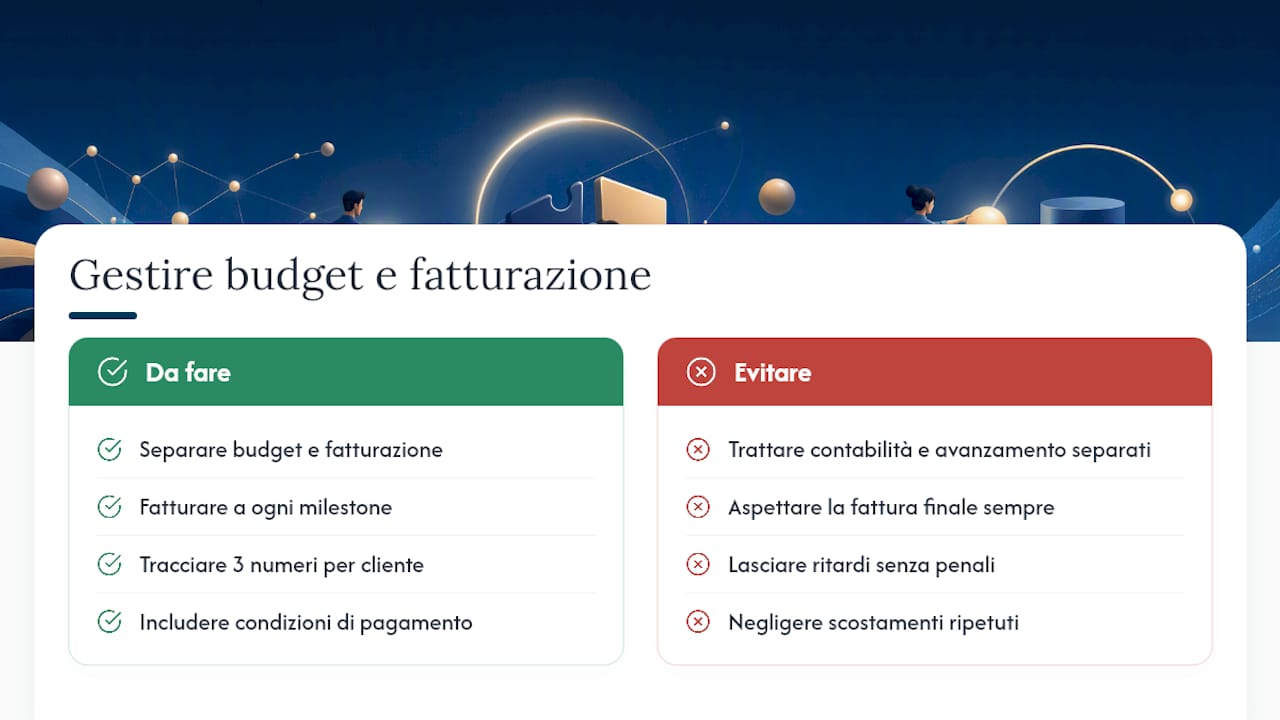
Disorganized invoicing is one of the most overlooked sources of financial stress for a freelancer. The first step is to clearly separate the project budget from the invoicing flow: the budget estimates how much the work will cost; invoicing tracks how much you’ve actually collected and what’s still outstanding.
For projects with milestones, invoice at each completed stage rather than waiting until the end: this reduces the risk of negative cash flow on long projects and lets you catch any disputes about deliverables right away, before they build up around a single final invoice that can be contested.
Track three numbers for each client: the quoted amount, the amount actually invoiced, and the average time to collect payment. A recurring gap between the amount quoted and the amount invoiced is almost always a sign of unmanaged scope creep, not faulty estimates from the start.
In practical terms, a well-written quote always includes payment terms: an advance payment percentage is a reasonable standard for new projects, along with the due dates for interim invoices and penalties for delays of more than 30 days. Without this, every late payment becomes an informal negotiation that drains your energy.
Keeping quotes, invoices, and deadlines in the same place where you manage project tasks removes a critical step: having to manually cross-check work progress against payment status. They’re two sides of the same coin, and treating them separately is one of the most common causes of end-of-month financial surprises.
Managing Workload When Projects Overlap
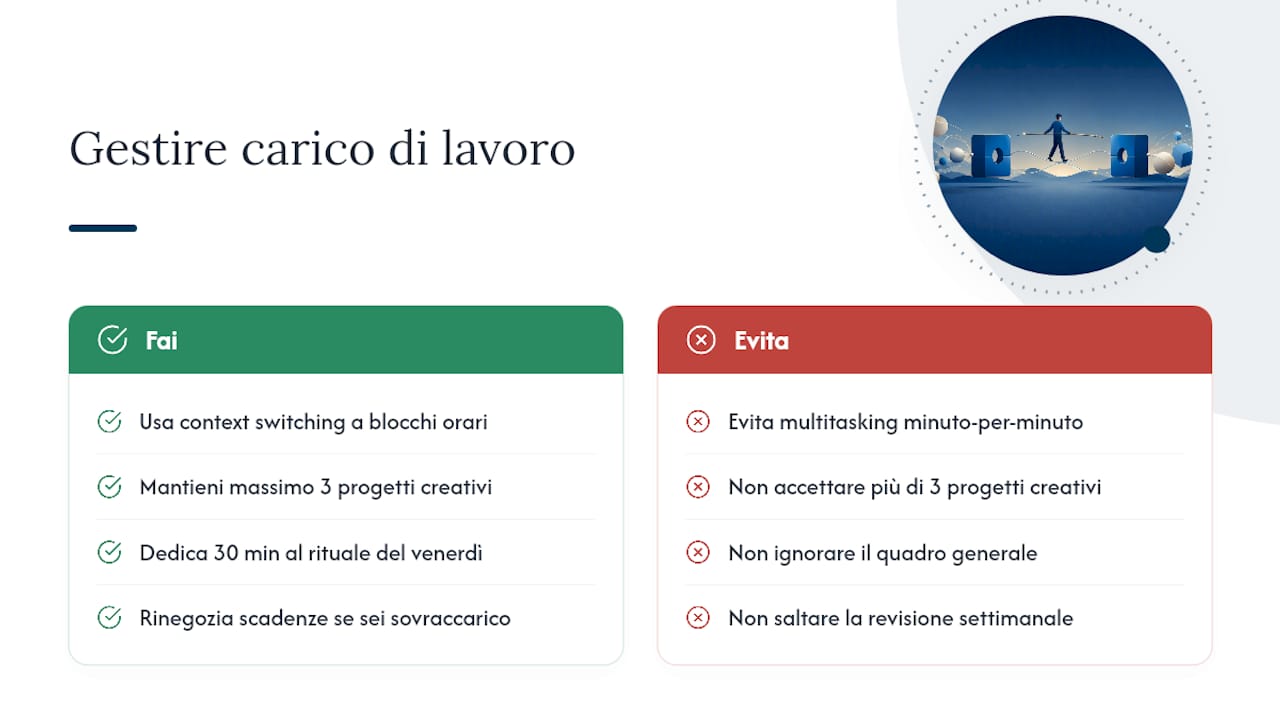
Real multitasking, where you switch from one project to another within the same minute, is almost always counterproductive. The strategy that works best is “planned context switching”: you alternate between different projects, but in blocks of hours, not minutes.
A practical way to tell whether your workload is too heavy: if you have more than three active projects requiring your creative attention (not just administrative attention) in the same week, the average quality drops, even if you don’t notice it right away. In that case, the right choice is to renegotiate a deadline rather than deliver everything late or with less care.
An effective method is a weekly review, often called the “Friday ritual”: spending 30 minutes at the end of the week reviewing the status of all active projects helps you spot bottlenecks before they become Monday emergencies. It’s not a waste of time: it’s the only moment when you look at the overall picture instead of individual deadlines.
For those who also work part-time or study while serving clients, organizing time blocks carefully becomes even more important: some time management strategies designed for people who study and work also work well for freelancers who need to alternate between different projects during the same day.
Finally, don’t underestimate the value of saying no or postponing. Turning down a project that doesn’t fit within a sustainable workload isn’t a business failure: it’s what lets you deliver good work on the projects you’ve already accepted.
The Author’s Plan for the First Test Week
In the first two days, choose your hub and activate just two modules, CRM and tasks: that’s all you need to get started. On days 3 and 4, import your main clients and create a reusable quote template. In the final days, set up a basic automation (a form or email that creates a contact) and schedule your first weekly review.
The advantage of starting small is that you see measurable results within seven days, without the risk of abandoning the system halfway through because of too much initial setup. Adding modules when you need them is always better than starting with everything turned on and not using anything fully.
— Fabrizio
Try Kesbatty: One Tool Instead of Five
Kesbatty is designed for exactly the system described in this article: a CRM, calendar, tasks, and document sending in one place, with modules you activate only when you need them, without complicated setups that take days to learn.

The free plan covers up to 100 contacts and lets you try the complete workflow right away: client form, automatic contact creation, and a linked task with a deadline. In the first 30 days, the most tangible benefit you’ll notice is fewer apps open at the same time and less administrative time, not more. Documents are sent using a public link, without the client needing to log in, and the data stays on European servers.
If you want to move from theory to practice, start the free Kesbatty trial and import your first clients today: two active modules are enough to see the difference in the first week.
Sources
- Freelancers in Italy: who they are, how they work, and the challenges they face
- The definitive guide to managing multiple projects as a freelancer