Set Up Client Document Management in 6 Steps for Small Practices and Teams

Managing client documents well takes a document management system (DMS) connected to clear working procedures, not just folders on a shared drive. An integrated DMS eliminates duplicate copies, keeps the authoritative version close at hand, and helps you handle privacy requirements with confidence. Start with a modular pilot sized to your team’s actual workload, and expand only after you have confirmed it works.
In brief:
- An effective document management system should be integrated and based on clear working procedures, avoiding simple shared archives that cause confusion.
- A document management system supports structured version control, specific metadata, and retention rules, reducing errors such as sending the wrong attachment or wasting time searching.
- Integrating practice management software with the document system through links, synchronization, or APIs prevents duplication and keeps client data consistent.
- Folder structures and file names should follow strict patterns, such as
YYYYMMDD_CLIENT_DOCTYPE_VERSION.ext, to make searching and auditing easier.- Meeting GDPR and ISO/IEC 27701 requirements calls for encryption, multi-factor authentication, logging, and regular permission reviews to protect sensitive data.
Contents
- Why a CRM isn’t enough: the difference a real DMS makes
- The features that make client document management effective
- How to link documents to the client record in your CRM
- How to organize folders, file names, and backups without the headache
- What you need to comply with the GDPR and ISO/IEC 27701
- How to implement a document management system in six steps
- What I’ve learned from watching how micro-teams really work
- KeSbatty: one place for contacts, appointments, and client documents
- Sources
Why a CRM isn’t enough: the difference a real DMS makes
A CRM keeps structured data organized: the client’s name, phone number, deal status, and next deadline. Documents are a different matter. A signed contract, an invoice, or an expert report attached to a case isn’t a row in a database. It’s a file with a history (who created it, who changed it, and which version is final) that the average CRM can’t tell.
A document management system captures, indexes, stores, and tracks these electronic files, supporting compliant retention and advanced search. On its own, a CRM almost never manages:
- Structured version control (which file is the draft and which is signed)
- Metadata specific to each document type (expiration date, regulatory reference, case status)
- Compliant digital preservation rules required for tax and accounting documents
When there’s no DMS, the practical result is the classic mistake of emailing a client the wrong attachment during an urgent case review, or spending twenty minutes looking for an invoice just before a tax deadline. These delays are small, but they add up and increase the risk of errors and non-compliance.
The features that make client document management effective
A good client document management tool isn’t the one with the most options; it’s the one that does four operational jobs well.
- Indexing and full-text search: Every file should be searchable by its contents, not just its name, with linked metadata (client, case type, deadline).
- Version control and a required naming convention: Without a shared file-naming rule, every team member creates their own system, and chaos is guaranteed within weeks.
- Granular permissions, audit trail, and approval workflows: Knowing who viewed or changed what, and when, is essential for sensitive cases.
- Integration with exchange channels: Certified email (PEC), email, digital signatures, and compliant digital preservation should connect to the system instead of remaining isolated in separate inboxes.
General-purpose cloud systems such as Microsoft 365 can help with collaboration, but roles and permissions need careful configuration: used with their default settings, these systems tend to scatter authoritative versions precisely when they’re needed most.
A tip: Before choosing any software, write down the five document types you handle most often (contracts, invoices, minutes, technical attachments, PEC communications) and check that the system handles each one with dedicated metadata, not a generic “miscellaneous” folder.
How to link documents to the client record in your CRM
The real value of client document management becomes clear when a file stops living on its own and becomes part of the client record. There are three practical models, with increasing levels of complexity:
- Direct link: The client record in the CRM contains a link to the document stored elsewhere, without duplicating the file.
- Metadata synchronization: The CRM and archive automatically share the case status, date, and category, keeping information consistent in both systems.
- API integration: The two tools communicate in real time, updating each other when a document’s status changes.
This integration directly affects three everyday processes: onboarding a new client (where required documents need to be collected and linked to their record right away), managing ongoing cases, and customer support, where a quick reply depends on finding the right document in seconds. Document governance integrated well with the CRM improves consistency and response times for clients.
The main risk if you skip this step is duplication: two copies of the same contract in two different systems, with only one of them up to date. The simplest way to avoid this is to define one source of truth for each document category and prohibit “convenience” copies outside that source.
How to organize folders, file names, and backups without the headache
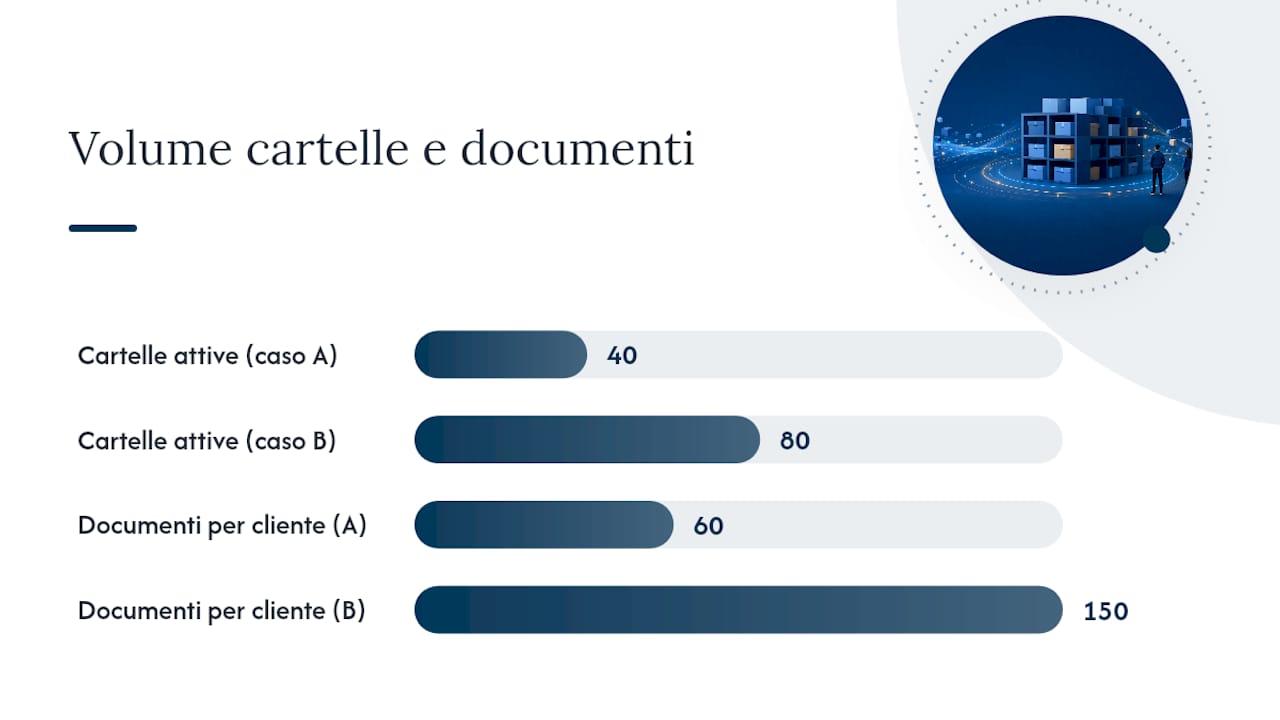
Folder structure has more influence than any software on how much time you’ll spend looking for a document. The structure that works best for consultants and practices handling multiple cases has three levels: a root folder for clients, a folder for each client, and functional subfolders by case type. Firms handling grants and incentives manage an average of 40 to 80 active client folders, each with 60 to 150 documents. Without this structure, it’s easy to lose four to six hours on a single application review, often right before the deadline.
The file name matters as much as the folder. A standard pattern such as YYYYMMDD_CLIENT_DOCTYPE_VERSION.ext makes each document instantly identifiable, even out of context. Strictly applying this convention, with the suffix _def reserved for the official version only, reduces searches by 60–70% in complex cases.
| Element | Working rule |
|---|---|
| Folder structure | Client root → client → case subfolders, plus a restricted-access archive folder |
| File naming | YYYYMMDD_CLIENT_DOCTYPE_VERSION.ext, with _def used only for the official version |
| Version control | Keep previous versions in the archive rather than deleting them, for audit purposes |
| Backup | 3-2-1 rule: three copies, two different storage media, one offline copy |
| Permissions | Three levels: read, edit, and administration, with access revoked automatically when a collaboration ends |
The 3-2-1 backup rule remains the most robust standard: three copies of the data, on two different types of storage media, with at least one offline copy disconnected from the network. Be careful with automatic two-way synchronization between devices: if it isn’t configured properly, it can propagate an accidental deletion to every copy instead of protecting you from it.
The most commonly overlooked routine is revoking access: when an external collaborator finishes an assignment, their access should be closed that same day, not “next time.”
A tip: Schedule a permissions review every three months. Five minutes each quarter can prevent awkward discoveries a year later, when someone who no longer works with you still has access to everything.
What you need to comply with the GDPR and ISO/IEC 27701
Privacy compliance in client document management isn’t a form you fill in once. It’s a set of documents and procedures that need to live inside the system you use every day. In addition to the privacy notices required by Articles 13 and 14 of the GDPR, you need a record of processing activities, a consent register, a retention policy, and procedures for managing data breaches.
One point is often underestimated: the distinction between a data controller and a processor isn’t automatic. It needs to be assessed case by case, because some activities typically carried out by accountants and consultants may mean that the professional acts as an independent data controller, rather than simply as a processor on the client’s behalf.
On the technical and organizational side, four measures make a practical difference:
- Encrypting data both at rest and in transit
- Multi-factor authentication for access to the document system
- Activity logging, with an audit trail available for review
- A data protection impact assessment (DPIA) when processing involves sensitive data or special categories of data
The CNDCEC recommends integrating the GDPR and ISO/IEC 27701:2025 to build a genuine PIMS, a personal information management system that goes beyond a simple compliance checklist and becomes part of how the organization works every day. Incorporating this standard into your document processes strengthens the trust of clients who entrust sensitive data to your practice, as well as supporting compliance.
How to implement a document management system in six steps
Moving from scattered folders to a structured system doesn’t require a six-month project. With a clear method, a micro-team can have a working pilot up and running in a few weeks.
- Make a quick assessment of current workflows: where the most time is lost and where the most errors happen.
- Choose a limited pilot: one type of case or a small group of clients, not everything at once.
- Define the structure, naming rules, and permissions before uploading a single file.
- Launch the pilot and measure concrete results: search time, number of errors, and team feedback.
- Migrate existing documents in a controlled way, keeping historical versions for audits.
- Train the team on the rules and establish a short, practical written policy.
| Phase | Estimated duration | Goal |
|---|---|---|
| Assessment and pilot selection | 1 week | Identify priorities and problem areas |
| Structure, naming, and permissions | 1 week | Have the rules ready before migration |
| Pilot and results review | 2 weeks | Validate search times and error rates |
| Migration and training | 2 weeks | Get the system working across the whole team |
Governance doesn’t end after launch: verified backups, periodic permission reviews, and an informal audit every quarter keep the system healthy over time instead of letting it deteriorate like the old shared folder.
What I’ve learned from watching how micro-teams really work
Most micro-teams don’t fail because they lack tools, but because they have too many tools that aren’t connected. A consultant using three different apps for documents, contacts, and appointments spends more time getting the systems to talk to one another than working for clients. People who manage client cases every day need a few solid rules (naming, permissions, backups) applied consistently, not ten more features that are never configured properly.
— Fabrizio
KeSbatty: one place for contacts, appointments, and client documents
If you manage client cases on your own or in a small team, the problem is rarely a lack of software: it’s having too many tools that don’t talk to one another. Some platforms bring contacts, appointments, tasks, and documents together in one solution, with modules you can activate when needed and no complicated setup.

Some platforms let you send clients quotes and documents through public links, without requiring them to register or log in, saving time for both sides. Centralized task management lets you track the status of each case, with attention to where data is hosted for privacy reasons. Many professionals use this approach to avoid chasing emails and scattered folders. You can try KeSbatty for free and activate only the modules you really need, based on your actual workload.
Sources
- Grant Document Archiving: A Professional Practice System
- Accountants: A document on management in professional practices in light of ISO/IEC 27701:2025 has been published
- Client document management for professional practices