8 Steps to Manage Client Contacts as a Freelancer or Micro-Team

Managing contacts means centralizing data, segmenting contacts, and automating follow-ups: it’s the fastest way to avoid losing clients. For a freelancer or micro-team, the right choice isn’t the most comprehensive CRM, but the one that reduces the time spent searching for information. You need one up-to-date system to replace your address book, email, and Excel spreadsheet.
In brief:
- If you manage more than 30 active contacts, inefficient and outdated systems are already costing you valuable time.
- It’s essential to keep a clean, up-to-date, segmented contact database and review it regularly each month to avoid outdated or duplicate records.
- For a freelancer, a lightweight tool that combines contacts, a calendar, and document sharing with basic automations is enough. You don’t need complex software.
- Sharing information across marketing, sales, and support makes management more effective and prevents teams from working with fragmented or conflicting data.
- A simple, integrated system like Kesbatty can save time and keep everything on one platform, helping you manage the client lifecycle.
Table of Contents
- What client contact management means: practical components of a useful contact record
- Why good contact management matters: benefits and key numbers
- Practical tips: how to organize, clean, and segment your address book in 8 steps
- How to choose client contact management software
- Practical setup for freelancers and micro-teams
- Integrating contact management with marketing, sales, and support
- How to maintain contact data quality and keep it up to date
- Automating contact management processes with a CRM
- Practical contact management examples for different types of business
- Why simplicity beats completeness for small teams
- Kesbatty: one tool for contacts, appointments, and documents
- Sources
What client contact management means: practical components of a useful contact record
Client contact management isn’t just about storing names and numbers. It’s about building a record that tells the story of each relationship, so when a client calls back, you don’t have to reconstruct everything from memory.
A contact record that works in day-to-day use includes:
- Identifying details: name, role, company, and industry
- Contact channels: email, phone, and any social media or messaging profiles
- Qualitative notes: preferences, recurring objections, and the tone of voice to use
- Interaction history: calls, quotes sent, and appointments scheduled
- Relationship status: lead, active client, or dormant client
Your phone’s address book gives you a name and number, while a relational database can provide more detailed context for each contact. That difference turns a contact list into a working tool.
Why good contact management matters: benefits and key numbers
According to data collected by Wave Connect, contact management is the most widely used CRM feature. That’s no coincidence: before you can sell, invoice, or plan anything, you need to know who you’re talking to and what you promised them.
A tip: If you have more than 30 active contacts managed only from memory or in an Excel spreadsheet, you’re already losing valuable time every week without realizing it.
A significant share of CRM buyers say automation is an essential requirement when choosing a tool. That suggests the problem isn’t collecting data, but acting on it without constant manual input. Small and medium-sized businesses that adopt a CRM report better access to client data and improved retention rates, according to an analysis by The CRO Club. For a freelancer, that means losing fewer clients because of a missed follow-up and having more time for paid work instead of searching for information scattered across emails and notes.
Practical tips: how to organize, clean, and segment your address book in 8 steps
Before choosing any software, organize the data you already have. Applying a CRM to a disorganized address book doesn’t solve anything; it just gives you a better snapshot of the mess.
- Import everything to one place. Export contacts from email, your phone, and paper planners into a single file or tool.
- Map the essential fields. Decide in advance which information is required (name, channel, status) and which fields are optional.
- Remove duplicates. Saving a contact three times with variations of their name creates confusion and duplicate follow-ups.
- Fix incomplete data. Phone numbers without a country code, invalid email addresses, and empty notes should be fixed right away.
- Segment contacts into 3 or 4 useful groups. For example: hot leads, active clients, dormant clients, and suppliers. A few groups are enough to help you find your way around.
- Set a follow-up reminder. Even a simple automation can keep a hot lead from going cold because you forgot to follow up.
- Set a periodic update reminder. Review your address book every month, not every year.
- Check the basics of data protection. Track where you collected consent and who can access the data.
Many professionals spend a significant amount of time each day entering data manually—a lot of which can be recovered with a little automation during import, as Wave Connect notes. When it comes to privacy, people in Italy need to pay particular attention: tracking consent and controlling access are recommended practices even for those managing only a few contacts, as explained by Terre Marsicane. An Excel spreadsheet shared across several devices, with no control over who can edit it, doesn’t offer these safeguards.
How to choose client contact management software
The right choice depends on how much time you want to spend on setup. If your answer is “as little as possible,” look for tools you can start using without weeks of configuration.
When evaluating your options, check the following:
- Practical ease of use, not theoretical ease of use: try adding a contact and an activity without looking at a tutorial
- Modularity: can you turn on only the features you need now without paying for unused modules?
- GDPR compliance: where the data is stored and who can access it
- Integrations: whether it connects to the email, calendar, and invoicing tools you already use
- Price and free-plan limits: how many contacts you can manage before you have to pay
During a free trial, ask specific questions: how much does it cost to import existing contacts? Are there strict limits on the number of records or automations you can activate? What happens to your data if you deactivate your account? Directories such as Capterra let you quickly compare several free options before committing.
If you manage fewer than 50 contacts and use few automations, a lightweight tool is more than enough. Once you have a few hundred contacts, need more segments and connected automations, and need reporting, it’s time to consider a more structured solution—without moving to a platform designed for teams of twenty.
Practical setup for freelancers and micro-teams
A workflow that really works for a freelancer is simpler than it might seem: acquire a contact, qualify them quickly, schedule a follow-up, and deliver the work or quote. Each step needs to leave a trace in the contact record, or the process breaks down at the first distraction.
When you activate a new tool, don’t try to set up everything at once. Start with the contacts module, then add the appointments calendar, then document sharing. In this order, each feature is added without disrupting the habits you’ve already established.
- Contacts module: the foundation, where names, notes, and history are stored
- Appointments calendar: linked to the contact, so you don’t double-book
- Document sharing without a login: useful for sending quotes or contracts without making clients create an account
- Lead checklist: a quick way to tell who is ready to buy and who has only asked for information
A coach or social media manager handling ten or fifteen active clients at once doesn’t need an IT department to set up this system. They need each module to turn on only when it’s needed, without complex configurations to undo if something goes wrong.
Integrating contact management with marketing, sales, and support
A well-managed contact doesn’t live in isolation in the CRM module. The contact information also supports marketing, sales, and customer support—three functions that, for a freelancer, are often all handled by the same person.
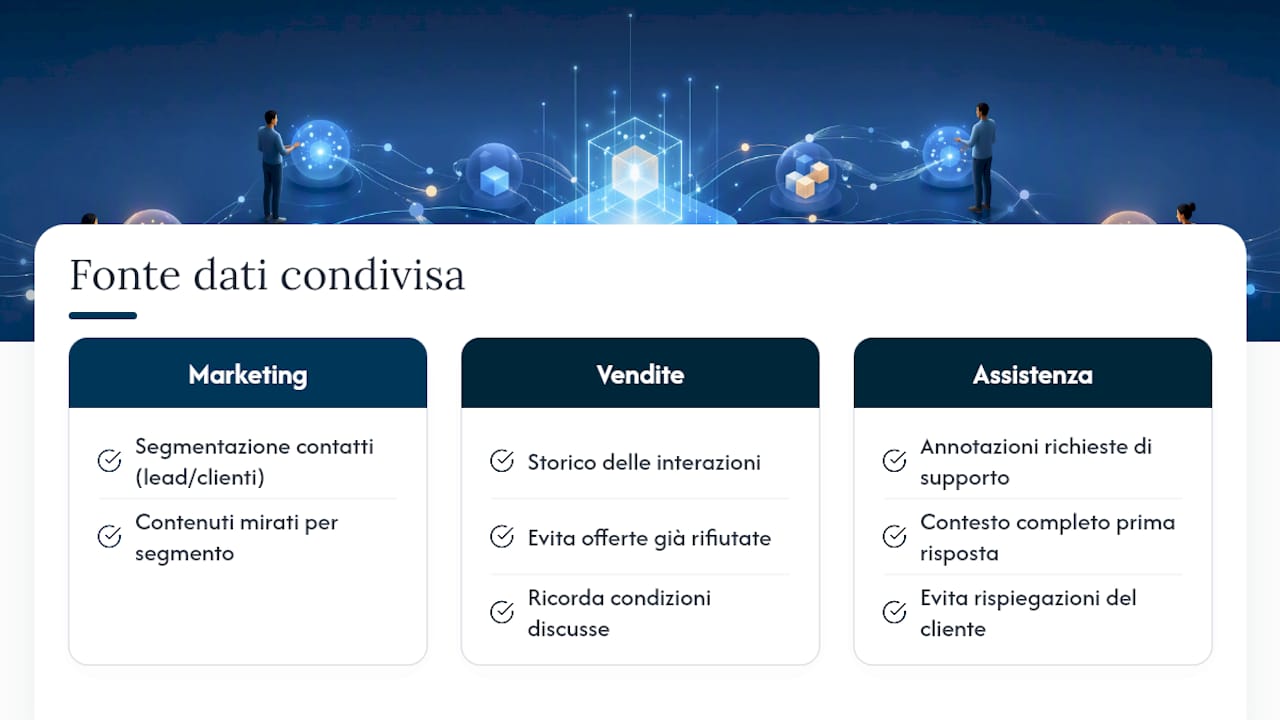
On the marketing side, segmentation done while cleaning up data (hot leads, active clients, dormant clients) becomes the foundation for targeted content: a coach can send different material to a lead who still needs to decide and to a client who is already following a program. On the sales side, the interaction history helps you avoid making an offer that has already been rejected or forgetting a condition you discussed with that specific client.
Customer support benefits in the same way: if every support request is noted in the contact record, whoever responds—even if it’s always you—has the full context before writing the first line. That avoids the most frustrating experience for someone paying for a service: having to explain a previously reported problem all over again.
Avoid keeping these three areas in separate tools that don’t communicate with each other. A quote sent by email, a sales note in a spreadsheet, and a support ticket on WhatsApp tell three parts of the same story that no one puts back together. When company contact management, sales, and support share the same data source, you can see the time savings after just a few weeks.
How to maintain contact data quality and keep it up to date
A contact database loses value with every day that passes without updates: phone numbers change, companies close, and roles evolve. Data quality isn’t a one-time project; it’s a habit to maintain.
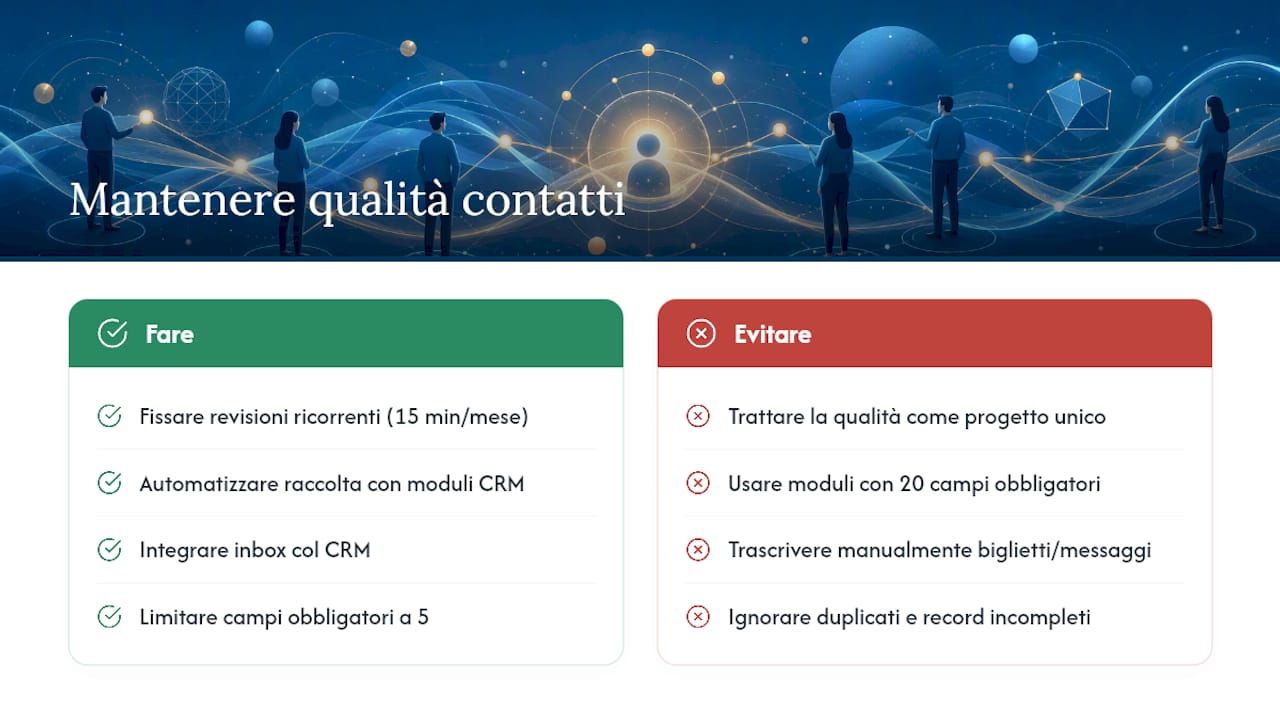
The first useful strategy is to set aside a recurring time—even just fifteen minutes a month—specifically for reviewing your address book: contacts to archive, information to complete, and duplicates missed during the first cleanup. The second is to reduce manual data entry where possible, because it’s the most common source of typos and incomplete records.
Automating incoming data collection through contact forms connected directly to the CRM or integrations with email significantly reduces the margin for error compared with manually transcribing business cards or messages. This kind of automatic data capture is also one of the factors that increases real-world adoption of CRM tools by the people who use them every day.
The reverse rule applies too: the fewer unnecessary required fields you have, the more likely the data entered will be accurate. A form with twenty fields encourages generic answers or skipped steps. A form with five essential fields is easy to fill out and easy to maintain over time.
Automating contact management processes with a CRM
Automation isn’t meant to remove the human relationship with the client. It’s meant to free up the time you currently spend remembering to send a follow-up message. An automatic reminder that alerts you three days after you send a quote doesn’t replace the conversation; it just makes it more timely.
The most useful automations for a freelancer or small team aren’t complex: a reminder when a lead hasn’t received a reply in a week, an automatic confirmation message after an appointment is scheduled, or an alert when a contact goes too long without a recorded interaction. These are simple mechanisms that cover the situations where human memory most often fails, not the situations that call for judgment or empathy.
One often overlooked point is that automation only works if the underlying data is clean. A reminder based on a date field that was never updated is useless; worse, it generates false alarms that make you ignore later notifications. That’s why automation and data quality need to be built together, not one after the other.
If you’re looking for a free tool to start testing these automations, you can compare the options listed in directories such as the Capterra one mentioned earlier, and check which ones include basic automations in their free plan.
Practical contact management examples for different types of business
An individual coach typically manages between ten and thirty active clients, with recurring sessions and personal notes on their goals and progress. For this profile, the priority is interaction history: knowing what was said in the last session matters more than any complex automation.
A social media manager handling several companies at once mainly needs to quickly distinguish contacts by client and project, with content delivery deadlines linked to the calendar. Here, segmenting by project status is more useful than any other classification.
A consultant who works with quotes and contracts benefits most from tracked document sharing: knowing whether a quote has been opened, and when, changes how they schedule the next follow-up.
A two-person micro-team, typical of many small businesses in Italy, has a different problem: preventing both members from managing the same contacts in different tools and duplicating work. In this case, the top priority is a single shared data source that updates in real time, so whoever answers the phone always knows what the other person wrote the day before.
Why simplicity beats completeness for small teams
Many freelancers buy tools designed for companies with sales departments of twenty people, then use a tenth of the features and get lost in the rest. Complexity adds no value if no one uses it; it only adds another tool to learn. It makes sense to move to a more structured system only when your client segments number more than a few hundred or when you need advanced reporting to share with external collaborators.
— Fabrizio
Kesbatty: one tool for contacts, appointments, and documents
If you’ve read this far, you’ve probably already figured out what you need: not another business CRM with thirty features you’ll never use, but one place to keep contacts, appointments, and documents without jumping between five different apps. A platform built specifically for this: for freelancers, coaches, consultants, and social media managers who want to stop searching for information scattered across email, WhatsApp, and an Excel spreadsheet.

The platform combines a contacts module linked to a calendar, kanban-style tasks, automatic reminders, and the ability to send quotes and documents through a public link, without making clients create an account or log in. Each module is activated only when needed, with no cost or configuration for unused features. A free plan is available with a limited number of contacts, suitable for small teams, and advanced features can be tried before you subscribe. If you run your business alone or with a collaborator, try Kesbatty and see how your day changes when your contacts finally have one place to live.
Sources
- CRM Statistics 2026: More Than 80 Data Points and Market Trends | Wave Connect
- Free Contact Management Software | Capterra
- Basic rules for managing work contacts while protecting supplier and buyer data as much as possible – Terre Marsicane
- 20 Powerful CRM Statistics to Maximize Revenue Growth - The CRO Club