Freelance Client Management: Pipelines and Follow-Ups That Work

The practical solution is simple to write down and a little more demanding to put into practice: use a pipeline with clear statuses (Lead, Opportunity, Quote Sent, Active, Inactive, Lost), set an automatic reminder within about ten days for every pending quote, and standardize onboarding, contracts, and revision policies. Once these three things are in place, freelance client management goes from a “daily scramble” to a process that practically runs itself.
In brief:
- A pipeline with clear statuses and automatic reminders makes freelance client management easier, helping prevent disorganization and missed opportunities.
- A solid quote should include a verifiable scope, detailed deliverables, dates, prices, and payment terms to reduce disputes and unpaid revisions.
- Standardizing onboarding, revision policies, and follow-up templates saves time and helps maintain a steady workflow without errors.
- Using integrated tools such as a CRM, project management, and a compatible invoicing system supports automated record-keeping and management of activities.
- Checking in every two or three months, including with inactive clients, helps maintain relationships without becoming intrusive and can revive collaborations.
Contents
- How to organize freelance client management in three stages
- What tools do you need to manage clients without losing track of anything?
- Which templates make client management repeatable?
- How many billable hours can you handle without burning out?
- How to manage payments and reminders without damaging the relationship
- What strategies help retain clients over time?
- How to handle conflicts and objections with clients
- What I learned from managing too many different tools
- Why KeSbatty can simplify freelance client management
- Sources
- Frequently asked questions
How to organize freelance client management in three stages
Every client goes through three distinct stages, and treating them as separate phases (instead of one big tangle of emails) is what makes the difference between working calmly and living with inbox anxiety.
First contact: the discovery call
Before writing a quote, schedule a 20–30-minute call with specific questions:
- What is the concrete goal of this project (not “I want a website,” but “I want 50 leads a month”)?
- What budget do they have in mind, even just as a ballpark figure?
- What timeline are they thinking of, and is it negotiable?
- Who else makes decisions or approves the work, besides the person I’m speaking with?
The answers to these four questions prevent most misunderstandings that later turn into scope creep. Templates for discovery calls and detailed quotes are among the practices most recommended by experienced freelancers, along with written revision policies from the start, according to this collection of practical client management tips.
Negotiation: what every quote should include
A weak quote leads to endless discussions. A solid one always includes:
- A verifiable description of the work scope (not “social media management,” but “12 posts a month across 2 channels”)
- Each deliverable listed individually, with its delivery format
- Start and end dates, with any interim milestones
- Price, payment method, and terms (e.g., 30% upon acceptance, balance on delivery)
- Number of revisions included and the cost of additional revisions
Ongoing management: onboarding and updates
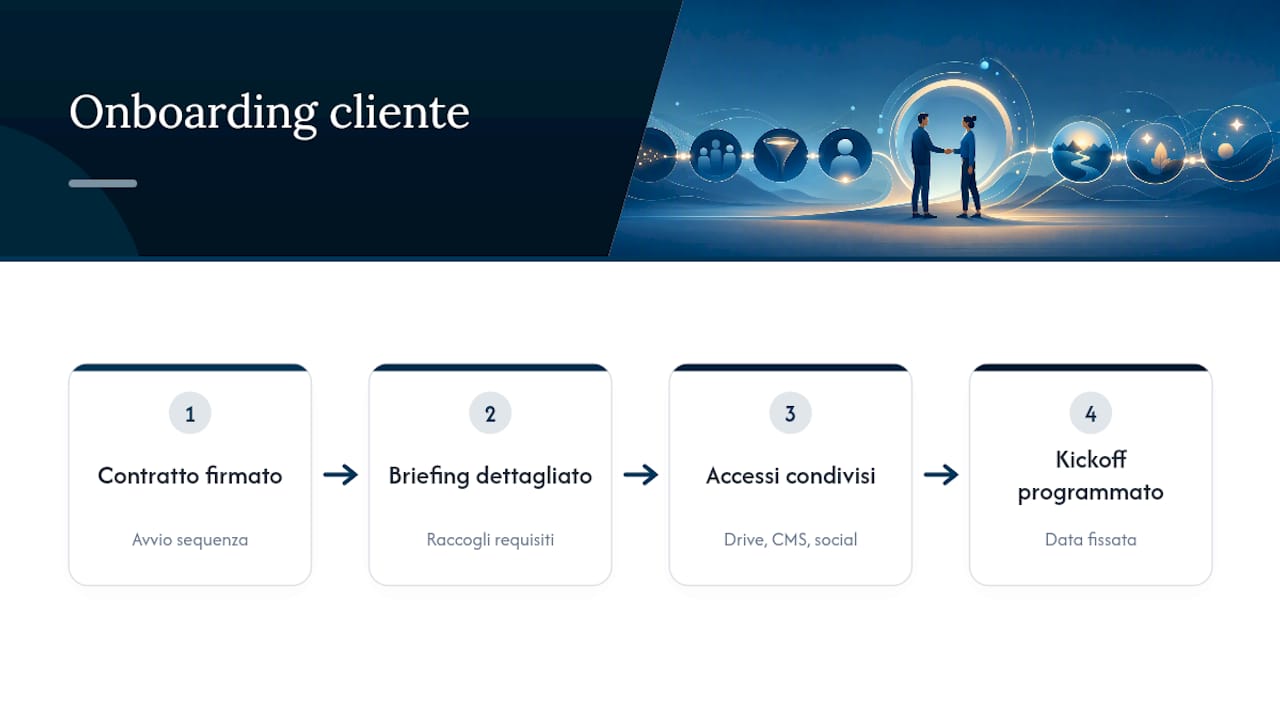
As soon as the client accepts, a set sequence begins: signed contract, detailed briefing, shared access (Drive, CMS, social media), and a kickoff date. Standardizing this step reduces errors caused by information being lost or forgotten, as shown by an analysis of the most effective practices for freelancers.
What tools do you need to manage clients without losing track of anything?
An Excel spreadsheet captures the situation at a particular moment. A real pipeline, by contrast, tells you what to do next: who to call back, which quote is about to expire, and which client you haven’t spoken to in two months. That is the practical difference between a simple contact list and a freelance client management system designed to prompt action, not just store data.
A basic freelance client management toolkit includes:
- A CRM with a visual pipeline organized by status, so you can see at a glance where each deal stands
- A project management or Kanban tool to organize operational tasks
- An electronic invoicing system compatible with the Sistema di Interscambio (SDI), mandatory for those operating in Italy
- A time tracker, even a simple one, to understand where your billable time is really going
The practical workflow is straightforward: a lead enters the pipeline, receives a quote, and when they sign, moves to Active status and automatically generates the first invoice. Connecting the pipeline and invoicing in the same system eliminates duplicate data entry and builds a history that helps calculate each client’s value over time.
A tip: Before switching tools, try mapping your current workflow on a sheet of paper. If you can’t say what status each client is in within ten seconds, that’s a sign you need a real pipeline, not another tool.
Which templates make client management repeatable?
Repeatable processes are what save you hours every week, because they eliminate decisions made in the heat of the moment. A solid onboarding checklist includes: sending and signing the contract, requesting access (hosting, social media, Drive), adding the client to the CRM with all their contact details, and an initial 15-minute meeting to confirm expectations and timelines.
For revision policies, the most common formula among professionals is simple: two revisions included in the price, with each additional revision billed at the hourly rate. Putting this rule in writing before work begins prevents endless unpaid changes from eating into your margin, as the same collection of client management practices cited above points out.
Three emails are worth having as ready-to-use templates:
- A quote follow-up 7–10 days after sending it, with a light tone (“I wanted to make sure you received the quote. Do you have any questions?”)
- A brief weekly update, even just three lines, for longer projects
- A request for feedback immediately after final delivery, useful both for improving and for collecting testimonials
How many billable hours can you handle without burning out?
A realistic estimate for a full-time freelancer is between thirty and a little over thirty billable hours a week, with another 5–10 hours taken up by administration, quotes, and communications. Those who consistently exceed this threshold start to see the quality of their work decline, even as revenue rises.
Setting clear response times (for example, within 24 business hours) and preferred communication channels is one of the most practical ways to avoid burnout from having too many clients, along with batching similar tasks into dedicated blocks of time.
When your workload stays consistently above a sustainable level, it’s time to raise your rates for new projects, not accept everything out of fear of losing work.
How to manage payments and reminders without damaging the relationship
Late payments are one of the most common causes of financial stress for self-employed people, and most cases can be resolved with clear processes, not aggressive language. Set explicit payment terms in the contract (e.g.
Automating these reminders within the same system that manages the pipeline means that sending a reminder doesn’t depend on your memory or your mood that day.
For recurring clients, consider a fixed monthly retainer or a prepaid block of hours: this shifts liquidity risk from an individual project to a more predictable flow and reduces the number of invoices you have to chase each month.
What strategies help retain clients over time?
Retaining a client costs less than finding a new one, but it requires ongoing attention, not just timely delivery. One practical method is to calculate each client’s lifetime value: by adding up all the invoices issued to that client, you get a concrete figure to guide how much to invest in the relationship, following the lifetime value approach applied to freelance client management.
In that case, it’s worth making time to acquire new clients even when your schedule is full.
For clients who have become inactive, a light check-in every two or three months (an update, a useful article, a question about how things are going) often revives opportunities that would otherwise quietly disappear. There’s no need for a sales pitch: just stay on their radar without being intrusive.
How to handle conflicts and objections with clients
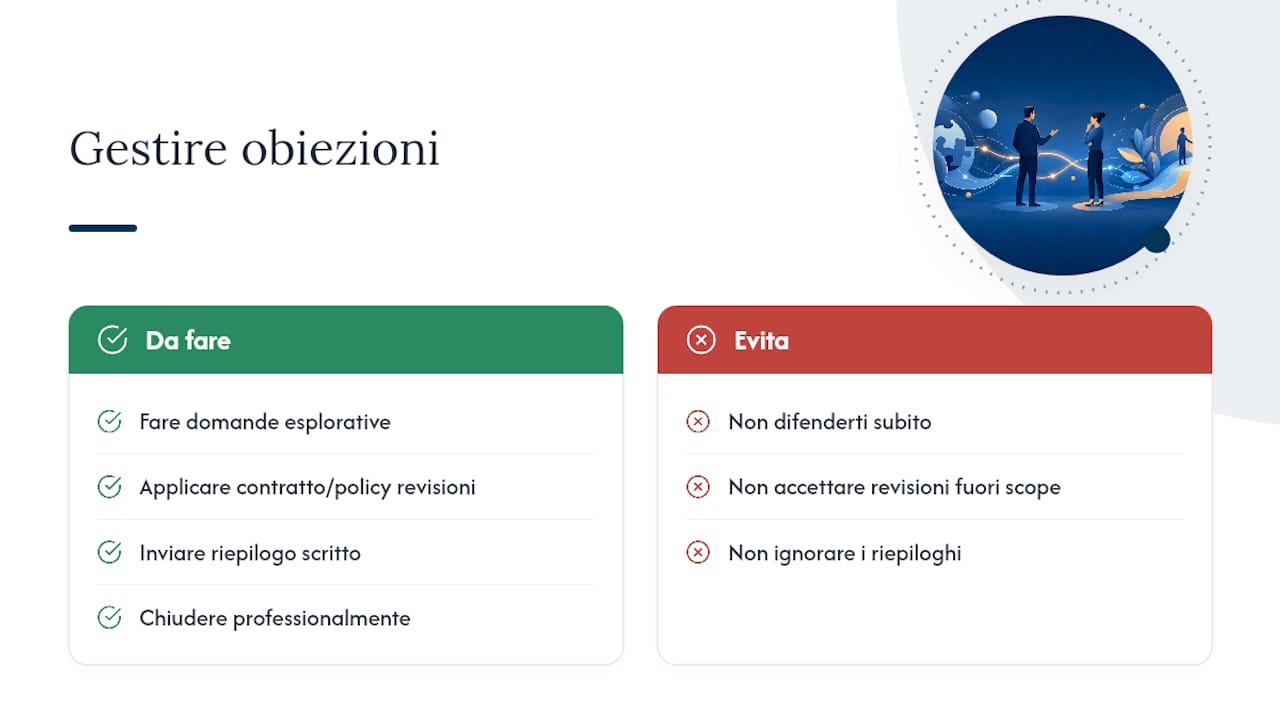
The most common objections concern three things: price, timing, and the perceived quality of the work. In every case, the most effective first move isn’t to defend yourself, but to ask questions: “What exactly did you expect to be different?” often reveals that the problem is an expectation that wasn’t aligned at the start, not a mistake in the work delivered.
When the discussion concerns a revision outside the agreed scope, the contract and the revision policy written in advance become the tools that end the conversation without tension: you aren’t saying no to the client; you’re applying a rule that was agreed from the outset.
In more serious conflicts, putting a summary of what was discussed verbally in writing (even just in a follow-up email) protects both parties and reduces the differing interpretations that can arise weeks later. If the relationship remains draining despite honest attempts to resolve things, ending it professionally, with the final work delivered and the accounts settled, is often the healthiest choice for your business.
What I learned from managing too many different tools
For years, I spread freelance client management across three or four different tools: a spreadsheet for contacts, an app for tasks, and another for invoices. It worked, but every time a client moved from Lead to Active, I had to update everything manually in different places. Fragmentation isn’t just inconvenient: it’s where follow-ups get lost and reminders are forgotten.
KeSbatty was created precisely to solve that problem: a modular pipeline, document sharing via a public link that clients can open without logging in, and centralized task management. If the processes described here make sense to you, the next step is to try them in a system that brings them together.
— Fabrizio
Why KeSbatty can simplify freelance client management
If you’ve read this far, you already have the right ingredients: a pipeline, follow-ups, and templates. The practical challenge is keeping them together without spending the day switching between five browser tabs. KeSbatty was created specifically for this: it brings together client pipelines, sharing quotes and documents via a public link that doesn’t require clients to create an account, and appointment and task management in one place.

A 14-day free trial is available, allowing you to test the workflow described in this article—lead, quote, and acceptance—without paying anything upfront. As your client load grows, advanced modules can be activated without complicated setup. Data is stored on infrastructure located in Europe.
The easiest way to get started is to activate the basic pipeline on KeSbatty and try taking one real client from lead status to active, so you can experience firsthand how much time you save compared with your current method.
Sources
- Client management hacks for freelancers - AgntWork
- How to manage multiple freelance clients without burning out | Zinn Hub
- How to manage clients well: 3 tips for freelancers
Frequently asked questions
What are the 4 types of clients in a freelance pipeline?
In practice, the most commonly used statuses are Lead, Opportunity, Quote Sent, and Active, with Inactive and Lost closing the cycle for those who don’t convert or drop off over time.
What are the most in-demand freelance jobs today?
The most consistent demand is for social media management, consulting and coaching, web development, and marketing services—areas where managing multiple clients at once makes an organized system necessary from the very first projects.
What is the best client management software for freelancers?
There isn’t one tool that works for everyone, but the best choice is one that brings together pipelines, document sharing, and task management in one place instead of combining several separate apps. That’s the approach KeSbatty is built around.
What is the best platform for organizing appointments and tasks as a freelancer?
For solo professionals and micro-teams, a modular platform that activates the calendar, reminders, and Kanban only when needed avoids the setup complexity typical of CRMs designed for large companies.
How often should you contact a client who has become inactive?
A light check-in every two or three months is enough to stay in touch without being intrusive, and is often all it takes to reopen new collaboration opportunities.