Client Task Management: A Method for Micro-Teams and Freelancers

To manage client tasks effectively, you need a client record linked to commitments, deadlines, and documents. Without those connections, information gets scattered across email, spreadsheets, and different apps. The practical result is simple: every client has a “next action” with an owner and a date, so no follow-up gets lost. The sections below explain how to build this structure step by step, even if you are starting from scratch.
In brief:
- Effective client task management requires a record linked to commitments, deadlines, and documents, so information does not get scattered across email and different apps.
- A quick-access contact record, a history with linked documents, assignable tasks, and automatic reminders are essential for error-free management.
- Turning client history into concrete actions means defining clear statuses, always creating a next action, and reviewing overdue tasks weekly.
- Excel can work for a small number of clients, but for multiple users and deadlines, modular CRM systems or all-in-one solutions are preferable. Check their cost and ease of use.
- To migrate data and comply with the GDPR, test the export, clean the data, and train the team, ensuring security and compliance before changing tools.
Table of Contents
- What you need to manage client tasks
- How to turn client history into concrete actions
- Is Excel still enough, or do you need a dedicated platform?
- Checklist for choosing client management software
- How to migrate data without disrupting daily work
- GDPR: What to do now if you handle client data
- How KeSbatty applies these principles
- How to segment clients to manage targeted tasks
- How to connect task management to marketing
- How to measure whether client tasks are really working
- A practical example of effective client task management
- Why simplicity beats completeness
- Try KeSbatty to centralize your client tasks
- Sources
- Frequently Asked Questions
What you need to manage client tasks
Effective client task management is built on a few essentials, not dozens of features that nobody uses. The most common CRM platforms generally include contact management, calendars, appointments, tasks, communications, and document storage. But which features you enable should depend on your actual workflow, not on the number of features available.
These are the essentials:
- A contact record with quick search: names, contact details, notes, and tags to find a client in seconds, rather than scrolling through endless spreadsheets.
- History and linked documents: quotes, contracts, and email exchanges all in the same record, rather than scattered across different folders.
- Assignable tasks and an integrated calendar: every commitment has a date and an owner, and is visible to a colleague or business partner.
- Automatic reminders and import/export: deadlines are remembered for you, and your data remains portable if you change tools.
Without these four pillars, any software is just a glorified contact list.
How to turn client history into concrete actions
The real problem is not collecting information about clients, but turning it into concrete actions. A simple method you can put into practice right away has three steps.
- Define a few client statuses: lead, active, paused, closed. Four labels are enough to see at a glance where each relationship stands, without building an endless category system.
- Always create a next action with a due date and an owner: never leave a request or project without a defined next step. The “next action” field matters more than any note about the last call because it tells you what to do tomorrow morning.
- Review overdue tasks weekly and create a monthly report: fifteen minutes on Monday to check what has slipped past its deadline can stop a client from feeling abandoned.
A tip: If a task has no date and no owner, it is not a task: it is a thought. Turn it into an action by the end of the day, or archive it.
This workflow works regardless of which tool you use, but it becomes much faster when the software automatically links tasks, calendar, and documents in the same record.
Is Excel still enough, or do you need a dedicated platform?
A spreadsheet works as long as you have few clients and your memory can fill in the gaps. The problem starts when two people have to work on the same client, or a deadline gets missed because nobody updated the right cell. Excel does not send reminders, automatically link a document to a task, or know who was supposed to do what.
The alternatives fall into three categories:
- Lightweight apps for individual tasks: useful for personal lists, but they do not link contacts and documents in one place.
- Modular CRMs: enable only the modules you need (contacts, calendar, documents) without paying for or configuring enterprise features a micro-team does not need.
- All-in-one general-purpose solutions: offer a wide range of features but often require technical setup, which is a burden for the smallest teams in particular.
You have reached the point where you spend more time looking for scattered information than managing it. If you search for information about a client and find it in three different places, you have already outgrown a spreadsheet.
Checklist for choosing client management software
Before signing up for any subscription, take the time to check these points: changing tools after three months takes more time than making the right choice at the start.
- Export and attachment retrieval: check that the export creates a format you can actually use and that linked documents can be downloaded together with the contacts, rather than separately.
- Task, calendar, and document workflow: try creating a task, linking it to a date, and attaching a file. If it takes more than three steps, the workflow is not smooth enough for daily use.
- Security and data location: ask where the data is stored and whether the provider offers a data processing agreement (DPA).
- Actual costs and onboarding time: add up the subscription, setup time, and team training. A free plan that takes two days to set up is not really free.
Ease of adoption matters more than the depth of the features: reviews collected by Capterra show that quickly recording a next action matters more than a wealth of advanced features for small businesses. Also check the available roles and permissions, automatic backups, and the account closure process, so you do not get stuck with a provider you can no longer leave.
How to migrate data without disrupting daily work
Changing tools can be daunting, especially because of the risk of losing documents or contacts during the transfer. An orderly transition reduces that risk to almost zero.
- Run a test export with attachments: take a sample of ten clients and check that every file, note, and deadline arrives intact in the new system. Attached documents and history are the most critical items to test before migrating everything.
- Clean the data and set naming rules: remove duplicates and standardize file names before the final import, not afterward.
- Test the rollback and train the team in half an hour: check that you can return to the old system if something goes wrong, then show colleagues only the three steps they will use every day.
GDPR: What to do now if you handle client data
The size of your business does not exempt you from data protection obligations: even a freelancer with a few clients must assess the risk and nature of the processing to understand which rules apply to their situation.
Minimum steps to take this week:
- Collect only the data you need: name, contact details, and task history. Avoid fields you are curious about but will never use, following the data minimization principle recommended by the EDPB.
- Update your privacy notice and keep a record of processing activities if the volume or type of data requires it.
- Sign a data processing agreement (DPA) with each provider, and enable two-factor authentication and regular backups.
For self-employed professionals in Italy, updating the privacy notice, sub-processor inventory, and minimum security measures remains the most practical, low-cost step toward staying compliant.
How KeSbatty applies these principles
KeSbatty centralizes contacts, tasks, calendar, and documents in a single client record, letting you enable only the modules you really need. A social media manager can schedule content and follow-ups in the same place; a coach can send a document through a public link without requiring the client to create an account. This puts the approach described above into practice: fewer scattered tools and more tracked actions.
How to segment clients to manage targeted tasks
Treating all clients the same way is the fastest way to waste time on those who need little and neglect those who need a lot. Useful segmentation for a micro-team does not require complicated algorithms: two or three criteria applied consistently are enough.
The first criterion is the value of the relationship: recurring clients with stable revenue deserve scheduled check-ins, while occasional clients need only a timely follow-up after delivery. The second criterion is the stage of the relationship: a lead in negotiations needs tasks with short deadlines (one or two days), an active client needs periodic check-ins, and a paused client needs a quarterly reminder so you do not lose contact altogether. The third criterion, often overlooked, is the preferred contact channel: do not bombard someone who only responds on WhatsApp with formal emails.
Applying these criteria means creating groups (or labels) in your management system and linking a predefined type of task to each group. A “high-value, active-stage” client automatically generates a monthly check-in task; a “hot lead” generates a follow-up task due within 48 hours. This approach reduces the mental load of deciding what to do each time, because the decision has already been made in advance for each category.
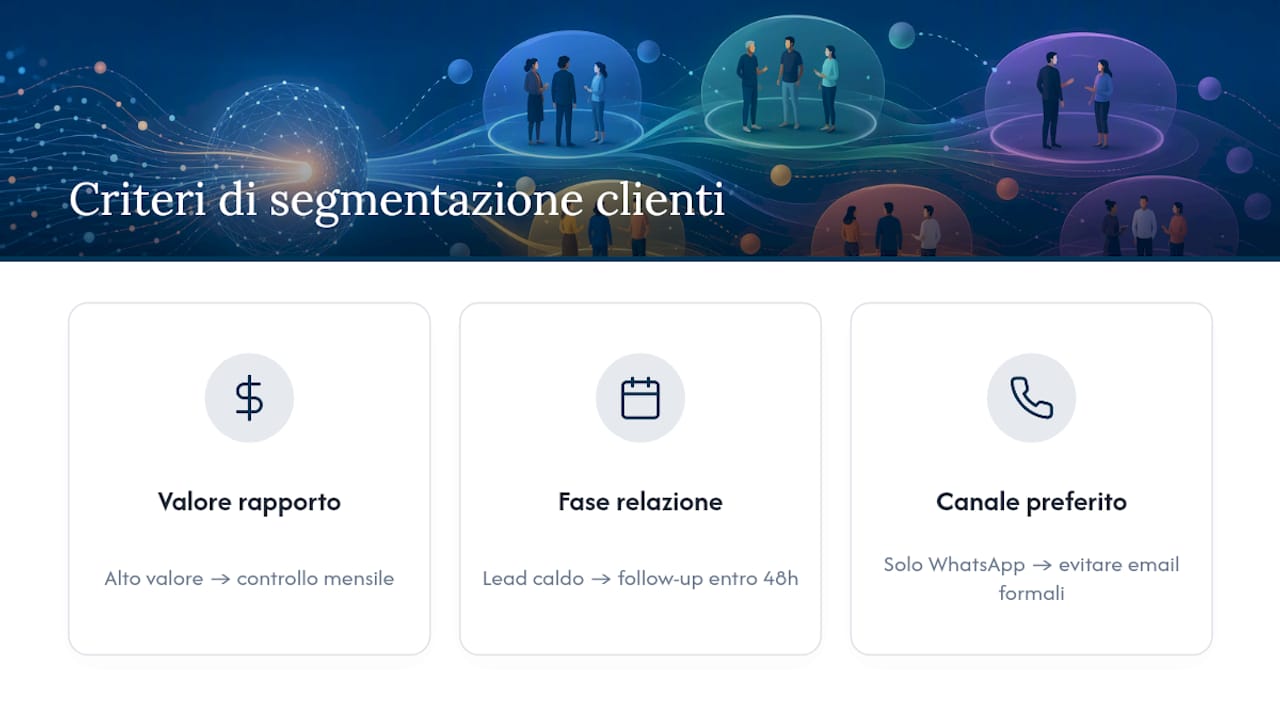
Segmentation works only if it stays simple: a maximum of three or four groups, or the system becomes more complicated than the problem it was meant to solve. A spreadsheet with too many categorization columns is a classic sign that segmentation has stopped helping and started getting in the way.
How to connect task management to marketing
Client tasks and marketing campaigns often live in separate worlds: the person managing email marketing does not know what the person handling the client’s project is doing, and vice versa. This separation leads to awkward duplicates, such as sending a promotional newsletter to a client who has just filed a complaint.
A useful connection starts with a simple principle: every contact in your management system should include the status of the relationship, not just basic contact details. If a client is in onboarding, pause general marketing communications until onboarding is complete; if they have been a loyal client for years, they can receive different content from someone who has just signed.
A well-configured CRM also automates the collection and proof of consent to data processing for marketing purposes, reducing legal risk and improving the recovery of dormant contacts. This means that before launching a campaign, you can automatically filter for people who have given explicit consent and avoid sending it to those who have not.
In day-to-day practice, this comes down to two habits: update the client’s status whenever the relationship changes, and link each campaign to a specific segment instead of the entire contact list. An editorial calendar integrated with client tasks lets you schedule content that fits each group’s stage, without having to rebuild lists manually every time.
How to measure whether client tasks are really working
Managing tasks without measuring their effectiveness is like driving without looking at the dashboard: you are moving, but you do not know how fast or in which direction. Useful monitoring for a micro-team does not require complex dashboards, just three or four indicators tracked consistently.
The first indicator is the number of overdue tasks that have not been completed: if this number grows week after week, the follow-up system is failing; clients are not becoming more demanding. The second is the average response time to a request, measured by comparing the date a task was opened with the date of the first recorded action. The third is contact frequency by segment: if a high-value client group has not received a check-in for two months, the segmentation described above is not producing concrete results.
A monthly report, even one that is just ten lines long, summarizing these three metrics helps identify problems before they turn into complaints. You do not need a sophisticated analytics system: it is enough for your task management tool to produce a readable periodic export, or better yet, an automatic report.
Avoid measuring too much: if you spend more time building charts than managing clients, measurement has stopped being useful and has become a parallel job. Three numbers tracked every month are better than twenty indicators checked once and never again.
A practical example of effective client task management
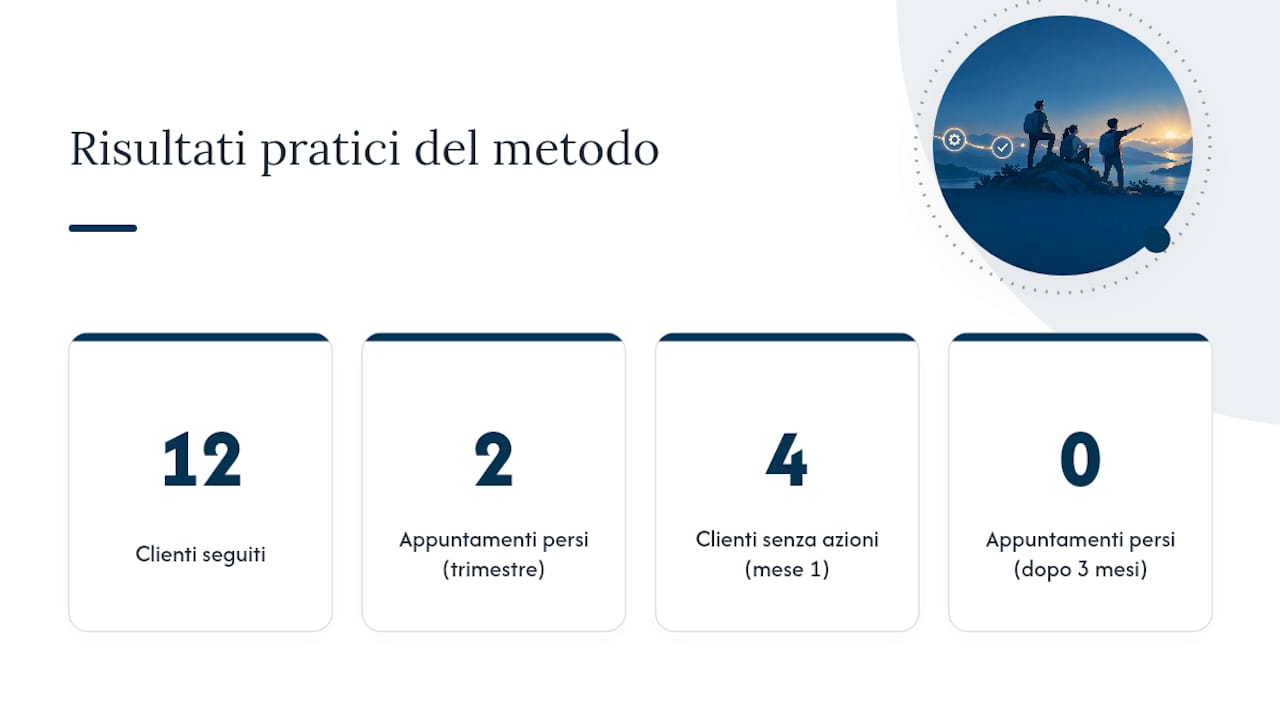
Imagine a consultant who works with twelve active clients in corporate training and one-to-one coaching. Before adopting a structured system, she tracked commitments in a paper planner and scattered notes on her phone. The result: two missed appointments in one quarter and one client who ended the engagement because “nobody ever remembered to call them back.”
The change came from applying exactly the method described in this article: one record for every client with a status (active, paused, lead), a required next action with a due date, and a review of overdue tasks every Monday morning. In the first month, she discovered that four “active” clients had no scheduled actions at all for weeks: they had become invisible in the old system simply because nobody had ever written “call back by Friday.”
After three months, the result was not a miraculous increase in revenue, but something more concrete: no missed appointments, and a paused client reactivated thanks to a quarterly reminder that simply did not exist before. The difference came not from sophisticated software, but from the habit of never leaving a task without a date and an owner.
This kind of result occurs in different settings, from social media managers handling editorial calendars for several clients to coaches who guide people through programs lasting weeks or months. The common factor is not the industry, but the discipline of always linking a task to a verifiable deadline.
Why simplicity beats completeness
The most operational field in any management system is not the contact record or the conversation history: it is the next action with a due date and an owner. Without that connection, even the most sophisticated CRM cannot prevent missed follow-ups, because human memory is not designed to remember twelve clients at once.
People who start with too many required fields abandon the system within two weeks because the effort of entering data outweighs the perceived benefit. It is better to start with contact details, tasks, and due dates, then add modules as the need actually arises, rather than because they “might come in handy.” This is what makes client task management sustainable for someone working alone or with a partner: not a wealth of features, but repeating the small action that keeps everything under control.
— Fabrizio
Try KeSbatty to centralize your client tasks
If you have read this far, you have probably already understood the problem: information scattered across Excel, email, and different apps, with the constant risk of missing a follow-up. KeSbatty was created to bring that fragmented workflow together in one tool, without making you configure modules you will never use.

With KeSbatty, you can keep contacts, tasks, calendar, and documents in the same client record, and send quotes and files through a public link without requiring the client to create an account. Modules are enabled only when needed, so you pay for and configure only what you actually use. For details about plans and costs, visit the official website. Try the platform with your real clients and see within a week whether the task, calendar, and document workflow saves you the time you are currently losing.
Sources
For anyone who wants to check the obligations and criteria cited in this article firsthand, these sources remain reliable: the EDPB explains data protection principles for small businesses in practical terms; the European Commission clarifies when GDPR rules apply to SMEs; Capterra provides an up-to-date overview of CRM features for small businesses; and WebLegal covers GDPR requirements specific to self-employed professionals in Italy.
- Capterra - customer relationship management software for small businesses
- WebLegal - GDPR for self-employed professionals in Italy (2026)
Frequently Asked Questions
What is client management?
It is the set of tasks, information, and communications you keep linked to each client to ensure timely follow-ups and continuity in the relationship. In practice, it means having one record per client with their status, open tasks, deadlines, and documents in the same place.
What are the 4 types of clients?
A common operational classification distinguishes leads, active clients, paused clients, and closed clients according to the stage of the relationship. Other classifications are based on financial value or purchase frequency, but for a micro-team, statuses tied to the relationship stage are the most useful to track.
What is the best app for managing clients?
There is no single best app for everyone: it depends on the number of clients, your budget, and whether you need to link tasks, calendar, and documents in the same place. Modular platforms such as KeSbatty let you enable only the features you need, making them suitable for freelancers and micro-teams that do not want complex setups.
What are the key components of client interaction?
The essential components are contact details and interaction history, tasks with a due date and an owner, an appointments calendar, and linked documents such as quotes or contracts. Without these four elements linked together, any interaction risks remaining fragmented.
How much does client task management software cost?
Costs vary widely depending on the features enabled and the number of contacts managed. With KeSbatty, the Base toolbox is free for up to 100 contacts, while the Full toolbox costs €12 per month or €120 per year to unlock all advanced modules.