How to Prevent Appointment No-Shows: What Really Works
Preventing appointment no-shows takes four immediate steps: send automatic reminders 48 and 24 hours in advance, with a link to confirm or cancel; make cancellations easy so the slot is freed right away; use an automatic waitlist to fill it; and require deposits only in higher-risk cases (new clients, premium services, and repeat no-shows). Measure your no-show rate before and after 30 days to see what is working.
In brief:
- Most no-shows result from forgetfulness, double bookings, or a low perceived value, so they call for targeted diagnosis and action.
- The cost of missed appointments can be significantly higher than a small deposit, making it worthwhile to invest in reminder systems and automatic cancellations.
- Sending reminders 48 and 24 hours in advance with a confirmation link can reduce no-shows by up to 50%, especially when combined with an easy cancellation process.
- An automatic waitlist can quickly fill a freed-up slot and make better use of your time, while targeted deposits help prevent repeat no-shows.
- Reducing manual work by activating integrated, automated tools can improve attendance, free up resources, and increase revenue.
Table of Contents
- Why clients miss appointments: diagnosing the causes in your business
- Calculating the cost of a no-show and why prevention is worth investing in
- Practical strategies to reduce no-shows (how, why, and when to use them)
- Putting it into practice based on booking volume
- Technology and integrations: connecting your calendar, messaging, and payments
- Publisher practical review: how KeSbatty supports no-show prevention
- The author's reflection: turning no-show prevention into a competitive advantage
- Kesbatty: one place for your calendar, reminders, and clients
- Sources
- Frequently asked questions
Why clients miss appointments: diagnosing the causes in your business
Before you jump into reminders and deposits, take a moment. Not every no-show stems from the same problem, and treating the wrong symptom can cost you time and clients alike.
There are four recurring causes, and they almost always coexist in the same business in different proportions:
- Simply forgetting: the client really did intend to come, but work, family, and a thousand notifications made the appointment slip their mind.
- Double booking: they made another commitment for the same time and chose—or forgot—to notify only the other party.
- Difficulty cancelling: they know they cannot make it, but cancelling requires a phone call during business hours, so they put it off and end up not doing it.
- Low perceived value: missing the appointment costs them nothing, so they give it very little attention.
You do not need complicated software to find out which cause is most common in your business. Two or three weeks of focused observation is enough. Whenever someone misses an appointment, note three things: how much time passed between booking and the appointment, which channel the booking came through (phone, website, social media), and whether it is the first time that client has missed an appointment.
A very common pattern: clients who book weeks in advance have a higher no-show rate than those who book for the next day, simply because they have more time to forget or change their plans. If you notice that missed appointments cluster around bookings made well in advance, the problem is memory, not trust in your service. If, instead, the people who miss appointments are mostly new clients who came through a social media channel without direct contact, they probably have not yet seen the value of your work. A reminder is not enough in that case: you need a warmer first interaction.
Also keep a simple record of repeat no-shows. Even a spreadsheet with a name, date, and reason (when they give one) will give you a clear picture after a month of where to act first and which tool to use.
Calculating the cost of a no-show and why prevention is worth investing in
A no-show is more than an organizational headache: it is a cost you can calculate in euros, and that figure can convince you whether or not to invest in a solution.
Here is a practical formula:
- Count your average monthly appointments.
- Multiply that number by your current no-show rate (if you do not know it, estimate it using the data gathered during the diagnosis stage).
- Multiply by the average price of your service.
- Multiply the result by 12 to get an annual estimate.
Add to this calculation something that is often overlooked: the cost of staff who remain committed to the empty slot, and the opportunity cost of not being able to offer that slot to another client on the waitlist. A useful framework for estimating these costs distinguishes between lost direct revenue, staff costs, and missed opportunities, helping you avoid underestimating the final amount.
A tip: do the calculation for your specific situation before choosing which tool to activate.
Here are a few numerical examples to make it more concrete.
As a practical threshold: if the estimated monthly cost exceeds a few hundred euros, an automatic reminder system pays for itself in the first month. If the no-show rate remains above 10% even after you introduce reminders, it is time to consider targeted deposits. At that point, the problem is no longer client forgetfulness but the value they perceive in the commitment they made.
Practical strategies to reduce no-shows (how, why, and when to use them)
Each tool for preventing missed appointments creates a different amount of friction for clients and has a different level of effectiveness depending on the context. Let us look at them one by one, with practical guidance on when each makes sense.
Multichannel reminders: almost always the first step
Automatic reminders by SMS or WhatsApp can reduce no-shows by up to 50% when two messages are combined: one 48 hours before the appointment and one 24 hours before. This is the tool with the best balance between implementation effort and results, and you should activate it before any other strategy.
Recommended sequence:
- 48 hours before: a message reminding the client of the date and time and letting them confirm or reschedule with one click.
- 24 hours before: a second, more direct reminder with the same management link.
- 2 hours before (optional): useful especially for quick services or clients with a history of forgetting, but not for everyone.
Here is an example of effective wording for the first reminder: “Hi [Name], we’ll see you on [day] at [time] for [service]. Confirm here: [link]. If you can’t make it, cancel here and free up the slot for another client.” The tone is direct, gives a clear action, and does not blame anyone who needs to reschedule.
Choose your channel carefully: email alone is not recommended as the only solution, because open rates are much lower than for WhatsApp and SMS, especially in medical practices where communication needs to arrive in real time.
Asking for confirmation without sounding pushy
Active confirmation works best when it is built into the reminder itself, rather than sent as a separate request. A simple “Confirm” button in the 48-hour message, with no need to reply in writing or call, significantly increases the response rate. Avoid asking for confirmation more than twice: a third message starts to feel like pressure, not care for the client.
Easy cancellations: the most overlooked tool
If cancelling requires a phone call during business hours, many clients simply do not do it and end up missing the appointment. A direct link in the reminder that lets them cancel on their own at any time of day removes that friction. It is not just a “courtesy” feature: it is what gives you the slot back in time to reassign it.
Automatic waitlist: how to avoid wasting a freed-up slot
When a cancellation frees up a slot, an automatic waitlist puts it back into circulation without any manual work. Data show that this mechanism can fill 80–90% of freed-up slots within one or two hours when the system automatically notifies clients on the waitlist with a last-minute offer.
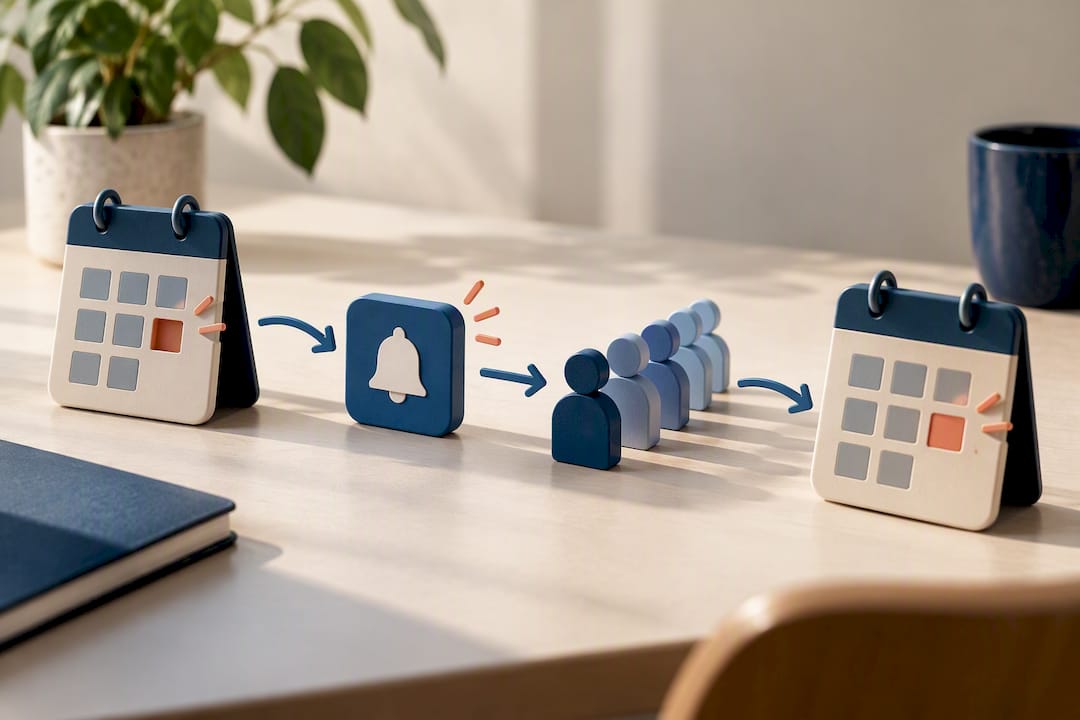
For a waitlist to work well, it should notify clients in order of sign-up or based on geographic or scheduling proximity. Present the offer as an opportunity, not a fallback: “A slot has opened up today at 4:00 p.m. Would you like it?” works better than a generic “We have a gap in the schedule.”
Deposit or down payment: use selectively, not across the board
A deposit is the most effective tool against chronic no-shows, but it also creates the most friction if applied without a clear reason. In the restaurant industry, introducing deposits or pre-authorizations brought the no-show rate down from 12.8% to 5.4%, with an average amount of about €20 per person. In beauty and wellness centers, combining deposits, reminders, and a waitlist has brought missed appointments below 4–8% in just a few weeks.
The practical rule is to target deposits: apply them only to new clients with no history, high-value premium services, group bookings or high-demand weekends, and clients already flagged as repeat no-shows. Applying them indiscriminately risks driving away regular clients who have never caused a problem.
How you present the deposit matters almost as much as the amount. Describing it as a refundable guarantee returned at the time of the appointment, or as a discount on the final service, feels less punitive than simply calling it a “penalty” or “mandatory advance payment.”
Track client history so you can apply rules gradually
None of these tools works well if you do not know who has already missed an appointment. Simple tracking—even just a “repeat no-show” tag after two unexcused absences—lets you apply different policies: standard reminders for everyone, but a mandatory deposit only for clients who have already bailed twice.
Putting it into practice based on booking volume
Businesses handle different numbers of appointments, and the right tool varies significantly between a professional managing 10 appointments a day and a clinic managing 100. Here is how to choose.
| Daily volume | Recommended tool | Indicative cost | Expected benefit |
|---|---|---|---|
| 1 appointment | SMS or WhatsApp managed through a lightweight scheduling app | Low, often included in basic plans | 20–30% fewer no-shows with reminders alone |
| — | WhatsApp Business API integrated with your calendar | Per-message cost, modest monthly budget | Full automation of the 48h/24h sequence and less time spent on manual management |
| — | App with push notifications + WhatsApp Business API + automatic waitlist | Moderate investment, offset by savings from fewer no-shows | Freed-up slots filled quickly, with automatic history tracking |
| More than 100 appointments | Complete management platform with integrated deposits and client segmentation | Higher investment, justified by the volume | Automated management of reminders, targeted deposits, and measured overbooking |
For a small business, starting with SMS or WhatsApp managed manually or through a simple app is enough to see concrete results in the first month. As volume grows, integration with your digital calendar becomes essential: without automatic syncing, sending reminders manually for 50 or 100 appointments a day is simply unsustainable.
A realistic rollout plan takes about four weeks. In the first week, activate only the 24-hour reminder and observe the response rate. In the second, add the 48-hour reminder and the self-service cancellation link. In the third, activate the automatic waitlist for freed-up slots. In the fourth, if your volume calls for it, introduce targeted deposits for the at-risk groups identified during the diagnostic stage.
Collect consent at the time of the first booking, explaining that clients will receive reminders by SMS or WhatsApp, and always offer them an easy way to turn them off.
Technology and integrations: connecting your calendar, messaging, and payments
The technical setup behind these strategies does not need to be complicated. Three pieces need to work together: the calendar, the messaging channel, and, if you use deposits, the payment system.
The first piece is calendar synchronization. Whenever an appointment is created, changed, or cancelled, the system should automatically trigger reminders at 48 and 24 hours, without you having to set them up manually each time.
For messaging, you essentially have three options:
- SMS: a universal channel with very high delivery rates, but a higher per-message cost and no rich interactivity (no buttons, just text and links).
- WhatsApp Business API: very high read rates, the ability to put confirmation buttons directly in the message, and a low cost at medium volumes, but it requires approval of the phone number and message templates.
- App with push notifications: free after installation and great for loyal clients who have already downloaded the app, but useless for one-time bookers who do not install anything.
Pre-authorization is perceived as less intrusive, but it requires a payment gateway that supports it natively.
For businesses that manage online bookings, a booking widget integrated with the calendar is a good example of how to make both booking and, consequently, management of freed-up slots self-service.
A tip: before investing in a complete system, test the entire flow with a small group of clients for seven days: booking, 48-hour reminder, 24-hour reminder, self-service cancellation, and slot reassignment. If the flow works on a small scale, scaling it up is a matter of volume, not design.
Publisher practical review: how KeSbatty supports no-show prevention
All the strategies described so far share one problem: they require coordination between several tools, and for a freelancer or small team that means moving from one app to another all day. That is exactly the problem Kesbatty aims to solve by keeping the calendar, reminders, and client history in one place.
The features directly related to what we have covered:
- Appointment management and a centralized calendar, with automatic reminders that can be configured for the 48h/24h sequence.
- Send documents and quotes via public links, without requiring the client to log in: useful for confirming service details before the appointment.
- Client history tracking, to naturally identify repeat no-shows and decide who should be subject to stricter policies.
- Modules you can activate only when needed, without configuring features you will never use.
Everything starts from the same calendar, so there is no need to piece together different software.
The gradual approach is probably the most practical part: activate only the modules you really need right now, whether that is just appointment management or also sending quotes, and add the rest as your workload grows.
The author's reflection: turning no-show prevention into a competitive advantage
Most businesses tackle no-shows with a single tool, usually an SMS reminder, and expect miraculous results. That is not how it works. The right sequence is to measure, then automate, then differentiate: first find out how much missed appointments really cost and where they come from; then set up reminders and easy cancellations; only at the end introduce targeted deposits where they are needed.
The return on investment is what almost everyone underestimates. An automatic reminder system costs very little compared with the revenue it recovers in the first month, yet many businesses still handle cancellations by phone because “that’s how it’s always been done.” It has not always worked: it has always worked less well than it could.
The opposite mistake is automating everything and losing the human connection. A reminder that sounds machine-written, with no client name or friendly tone, gets fewer responses than a personalized one. Automation should free up time for relationships, not replace them.
— Fabrizio
Kesbatty: one place for your calendar, reminders, and clients
If you have read this far, you probably manage appointments on your own or with a small team, and the last thing you want is another piece of software to learn just to stop no-shows. Kesbatty was created for people who work this way: a single platform where your calendar, automatic reminders, and client history coexist, without making you configure anything you do not really need.

Modules are activated only when you need them: start with appointment management, including confirmation, a calendar invite, and a cancellation link; then, as your workload grows, add quote sending without a login or history tracking for repeat no-shows. There is no mandatory setup or the kind of complexity typical of CRMs designed for enterprise teams, and your data stays stored in Europe with export always available.
You can try KeSbatty for free up to 100 contacts, with no credit card required. For current plan and pricing details, visit the official website. Activate your Kesbatty account and set up your first reminder sequence in just a few minutes.
Sources
The data cited in this article comes from sources specializing in appointment management and reducing missed appointments: Kiosk Digital’s analysis of the causes and costs of no-shows, Krenar’s seven strategies for automatic waitlists, SimplyBook.me’s framework for calculating the cost of missed appointments, and Biutify’s beauty and wellness case study on combining prevention strategies.
Use these figures as a starting point for your own calculation: apply the stated percentages to your appointment volume and average price, then compare the result after activating the first strategies to see whether your industry responds in line with these figures or differently.
- How to reduce no-shows: causes, costs, and strategies for eliminating missed appointments - Kiosk
- How to Reduce No-Shows: 7 Strategies for Eliminating Missed Appointments - Krenar
- Simplybook
- Reducing no-shows at a beauty salon: 4 strategies that really work | Biutify
Frequently asked questions
What do you call it when a client does not show up for an appointment?
The most commonly used term, including in Italian, is “no-show”: it refers to a client who has booked but does not show up or give notice. In everyday language, people also say “stand someone up” or “miss an appointment.”
What does “no-show appointment” mean?
A no-show appointment is a confirmed booking where the client does not arrive and does not notify the business in advance that they are cancelling. It differs from a late cancellation, where the client gives notice but too close to the appointment time for the slot to be reassigned.
What are good excuses for cancelling an appointment?
There is no universally “good” excuse: what really matters to someone managing a schedule is how much notice they get, not the reason. A client who cancels at least 24 hours in advance using a self-service link gives you time to reassign the slot through the automatic waitlist, regardless of the reason they give.
What happens if I book a table or appointment and do not show up?
It depends on the business’s policy: many restaurants and beauty centers that require a deposit keep it in the event of an unannounced no-show, while other businesses simply record the missed appointment in the client’s history. Businesses that charge deposits for at-risk bookings always make this clear at the time of booking.
Can Kesbatty help prevent appointment no-shows?
Yes, Kesbatty manages appointments linked directly to a contact, with confirmation, a calendar invite, and a cancellation link. The platform is free for up to 100 contacts, with advanced modules available in the Full toolbox plan; visit the official website for current pricing.