Ready-to-use CRM: the fast route for small businesses and professionals

A ready-to-use CRM is the best choice for professionals and small businesses that want to get started right away without technical complexity. These are platforms configured to be up and running in a few days, with no custom development or external partners: most small businesses find everything they need here, reserving custom solutions for those with truly unusual processes. In the sections below, you’ll find realistic timelines, costs, a checklist, and the first steps to get up and running.
In brief:
- A ready-to-use CRM can be set up in a few days, thanks to preset configurations that cover the main needs of small businesses and professionals.
- Before signing an annual subscription, it’s a good idea to test its features with real data and check integrations, exports, and setup time.
- Only when sales processes are highly customized or integrated with complex external systems might a custom CRM be worth the investment.
- For effective adoption, it’s best to start with a simple module, involve the team gradually, and continually measure usage results.
- Data and automations should be easy to export and stored in Europe to ensure flexibility and compliance with regulations.
Table of contents
- Why choose a ready-to-use CRM: the practical benefits
- When a custom CRM is really worth it
- How to evaluate a ready-to-use CRM during the free trial
- How to set up your CRM and be up and running in 48 hours
- How to get the whole team to actually use the CRM
- What I’ve learned from watching small businesses adopt a CRM
- KeSbatty: ready to use and designed for solo workers or teams of two
- Sources
- Frequently asked questions
Why choose a ready-to-use CRM: the practical benefits
The first benefit is speed: a ready-to-use CRM can be set up in days, not months. Create an account, import your contacts, and get to work. There’s no need to wait for a specification, a development quote, or a technical team to write custom code.
There’s no upfront cost for requirements analysis or programming: you pay a monthly or annual subscription and know the amount before you start. Typical features already cover much of what a freelancer or small business actually uses:
- Contact and company management with a visible pipeline
- Calendar and appointments linked to tasks
- Sending trackable quotes and documents
- Automatic reminders so you don’t miss follow-ups
The limits become apparent when you need deep customization or integrations with complex internal management systems: that’s where a ready-made package reaches its limits.
A tip: Before signing an annual subscription, test the product for at least two weeks with real data, not fake contacts. That’s the only way to find out whether the workflow really holds up.
When a custom CRM is really worth it
Not all businesses are alike, and an off-the-shelf package isn’t always the right answer. The dividing line is practical: if your processes differ significantly from the standard, a custom CRM may be worth the investment.
Here are the signs to look for:
- You have sales workflows with conditional rules that no standard module can reproduce
- You need to connect the CRM to an ERP or proprietary management system with nonstandard logic
- You automate dozens of lead attribution rules that an off-the-shelf package can’t handle
- Your list of “things I still do by hand because no software covers them” is long
A simple rule of thumb works better than a thousand theories: list the manual tasks you do today because no tool automates them. If that list fills a page, custom development deserves serious consideration. If there are only three or four exceptions, a module you can turn on in a ready-to-use CRM will solve the problem without dedicated development.
How to evaluate a ready-to-use CRM during the free trial
A demo or trial isn’t for “seeing if you like it”: it’s for checking specific points before you commit. Follow this order:
- Test the core features with real data: enter real contacts, create a pipeline with at least three stages, and try moving a task from one status to another.
- Check the essential integrations: email, calendar, and accounting software should connect without constant manual steps.
- Simulate a real case from your work: if you’re a coach, try sending a quote; if you manage social media, check the editorial calendar.
- Measure the time it takes to get started: how many minutes does it really take from signing up to importing your first contact?
- Check data export: a reliable CRM lets you download everything in a readable format, without barriers to leaving.
Implementations that reduce manual entry and include automations significantly improve everyday use and user satisfaction. One often-overlooked detail is where the data is stored. For those working in Europe, knowing that the servers remain within European territory isn’t a technicality; it’s a practical safeguard in the event of inspections or customer requests.
How to set up your CRM and be up and running in 48 hours
A good start prevents months of messy data and quietly abandoning the tool. Follow these steps:
- Clean your data before importing it. An Excel file with duplicate names or incorrect email addresses will make your CRM messy from day one.
- Import your contacts and create a basic pipeline. Three or four stages are enough to start; you don’t need a complex workflow.
- Set up the basic integrations. Connect email and calendar before adding advanced automations.
- Test with a real case. Take a real client, track them from start to finish, and fix anything that doesn’t work.
- Run through a pre-launch checklist. Contacts imported, pipeline active, reminders configured, test document sent.
A tip: Don’t wait until “everything is perfect” before you start using the CRM for real: you refine the pipeline by working with it, not by planning it on paper.
How to get the whole team to actually use the CRM
An unused tool is no use, no matter how well made it is. Adoption rarely fails because of technical limitations: it fails when the process isn’t clear or the team isn’t involved from the start.
Gradual implementations focused on one process at a time significantly increase adoption rates compared with “doing everything at once.” Here are some practical tactics:
- Start with a single module (the contact pipeline, for example) and add the rest after two weeks
- Measure simple KPIs: weekly logins, recorded tasks, and follow-ups completed on time
- Create a small daily routine, such as updating contact statuses at the end of the day
- Assign one person responsibility for keeping the data clean, even on a two-person team
People who resist change often don’t hate the CRM; they hate adding another step to an already busy workload. Showing a concrete, immediate benefit, such as no longer having to search through a hundred emails, is more effective than any theoretical training.
What I’ve learned from watching small businesses adopt a CRM
Most of the mistakes I see aren’t about choosing the product; they’re about the illusion that a CRM can solve a process that was never written down. People who start without mapping how they currently manage contacts and appointments end up replicating the chaos inside a new tool, just with a nicer interface.
Some solutions are based on the idea that modules you can activate only when needed help you avoid facing useless features at your first login. Sending documents through a public link, without requiring the recipient to create an account, is a detail that can save a lot of back-and-forth emails in day-to-day work. A coach working with multiple clients can send a quote through a direct link and check whether it has been opened without using other apps.
— Fabrizio
KeSbatty: ready to use and designed for solo workers or teams of two
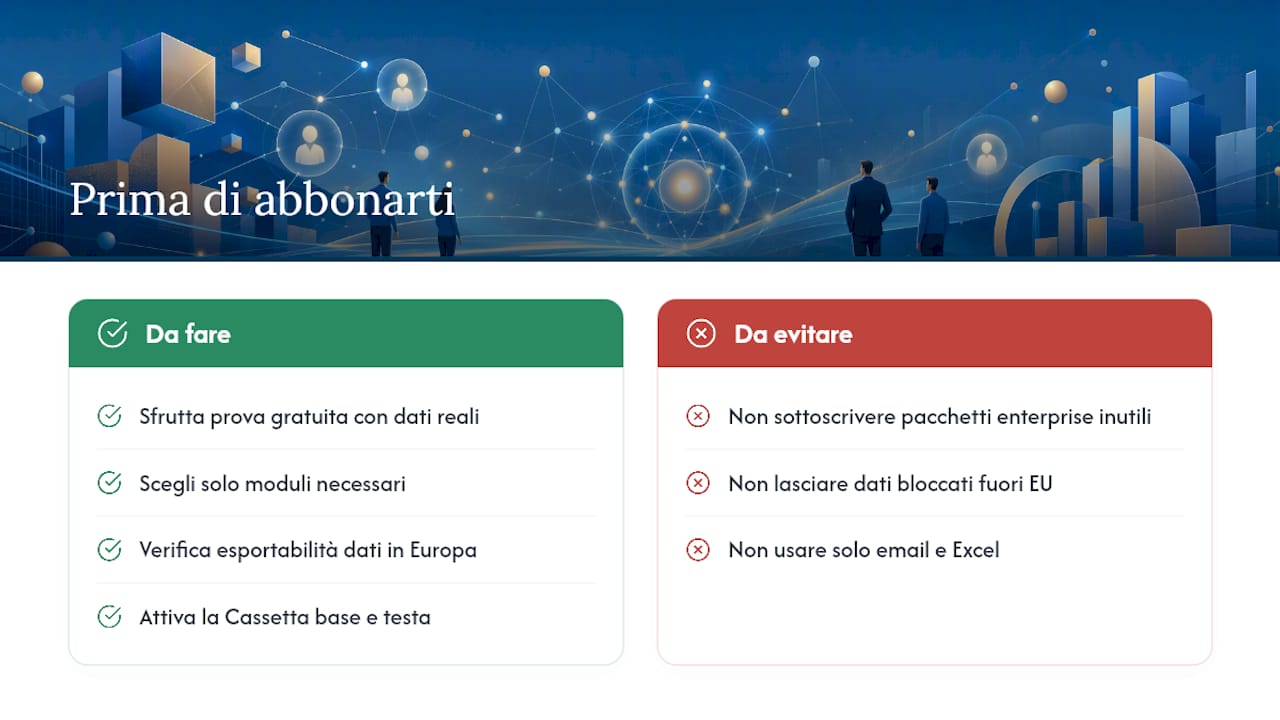
Among ready-to-use options, some solutions stand out by letting you activate only the modules you need, avoiding enterprise packages designed for much larger sales departments.

There are free plans up to a certain number of contacts, with basic centralized management features; paid options can unlock advanced modules and features such as automations and checklists. Before subscribing, it’s a good idea to try the product free for a few days with real data.
It’s important for data to remain stored in Europe and always be exportable, so you can avoid being locked in if you change tools in the future. If you work alone or with a colleague and want to stop chasing emails, Excel sheets, and scattered reminders, activate your Base toolbox on KeSbatty and see in an afternoon whether the workflow works for you.
Sources
To better understand the difference between ready-made and custom solutions, Ivemind’s CRM guide for small businesses provides an overview of the selection criteria. On the other side, Renor’s guide to custom CRM development explains when a tailored investment makes sense. For internal adoption, Marco Pericci’s CRM implementation guide remains a practical reference.
- Business CRM for Small Businesses: What It Is and How to Choose One | Ivemind
- Custom CRM Development for Small Businesses: A Complete Guide
- CRM Implementation: A Guide to Making It Really Work
Frequently asked questions
What is an easy-to-use CRM?
An easy-to-use CRM lets you manage contacts, appointments, and tasks without technical training, with modules you can activate only when you need them. KeSbatty, for example, centralizes these functions in an interface designed for freelancers and micro-teams, with no mandatory setup at first login.
Which CRM is the most widely used?
There is no single dominant CRM among Italian professionals and small businesses: the choice varies depending on team size, budget, and process complexity. Most small businesses choose ready-to-use solutions because they cover the most common needs without requiring custom development.
What is the best free-forever CRM?
The idea of “free forever” depends on the limits set by the provider, usually tied to the number of contacts or users you can manage. KeSbatty offers a free Base toolbox with basic centralized management features, including contacts, a follow-up dashboard, and email reminders at no cost.
What does CRM mean?
CRM, short for customer relationship management, is a tool that centralizes contacts, communications, and tasks related to each customer or lead. It helps prevent important information from being scattered across emails, Excel sheets, and personal notes by keeping everything in one place the team can access.