CRM for Small Practices: How to Choose One and Get Started

For a practice with 1–5 professionals, it makes sense to start with a simple, modular CRM that can integrate with certified email (PEC) and practice management software. Here’s why, and how to try one for 30 days. The right choice isn’t the software with the most features, but the one your team will actually use from day one. Look for a platform that lets you activate only the modules you need, with data stored in Europe, and test it with a real use case before signing an annual contract.
In brief:
- Small practices are better off with a modular CRM that integrates easily with PEC and practice management software, and lets them activate only the features they actually need.
- A well-configured CRM can reduce wasted time, improve traceability, and decrease no-shows, using simple metrics you can monitor over the first three months.
- Essential features include deduplicated contact records, communication history, deadline tracking with alerts, and simple shared document management.
- Choose a CRM based on its total cost of ownership, including integrations, training, and setup time—not just the monthly subscription price.
- Effective adoption comes from a quick onboarding process focused on practical, step-by-step tasks, preferably without loading the entire historical archive right away.
Contents
- Why a CRM is useful for small practices: concrete benefits and metrics to track
- Essential CRM features for professionals and why they matter
- How to choose: which criteria really matter for a small practice?
- Practical implementation: a phased plan and cost estimate for micro-practices
- Why choose a modular platform with data in Europe
- What really works in the first 8–12 weeks
- KeSbatty: the right toolbox for people who want to keep things simple
- Sources
- Frequently asked questions
Why a CRM is useful for small practices: concrete benefits and metrics to track
In most Italian practices, client data is still scattered across email inboxes, spreadsheets, and paper diaries. Only 6–11% of professional practices use a CRM, which helps explain why so many matters get lost through missed deadlines and forgotten callbacks. People who still use Excel as a “client database” usually discover the problem at the worst possible moment: when a long-standing client calls and nobody at the practice remembers the last interaction.
A well-configured CRM isn’t a tech indulgence; it solves a very concrete problem: the practice’s institutional memory no longer depends on one person. When the owner is on vacation or a staff member changes jobs, the information is still accessible.
The practical benefits can be measured in three areas:
- Fewer no-shows: automatic email or SMS reminders reduce missed appointments, a problem that particularly affects law firms and accounting practices with busy calendars.
- Trackable follow-ups: every client communication remains in a searchable history instead of getting lost among different email threads.
- Time saved on operations: less time spent looking for information, more time for billable work.
Tip: Track three simple numbers for the first three months: the percentage of missed appointments, the average number of days to close a matter, and the number of follow-ups actually completed. These metrics tell you whether the CRM is working—not how many features you’ve activated.
Useful automation for a small practice is “light touch”: appointment confirmations, follow-ups after a deadline, and renewal reminders. Complex marketing campaigns (https://simple-work.it/crm-per-studi-medici-e-dentistici-come-sceglierlo/) are still unnecessary for professionals managing long-term relationships rather than leads to convert at scale.
Essential CRM features for professionals and why they matter
Not every feature in a general-purpose CRM is useful to a law firm or accounting practice. Some, however, are non-negotiable because they affect how the practice works every day.
- Deduplicated contact records with tax fields: tax code, VAT number, PEC, and regulatory references should all be in one client record, without duplicates across different staff members.
- Integrated communication history: emails, phone calls, and PEC messages linked to the right client, so anyone at the practice can retrieve the context in seconds.
- Deadline tracking with automatic alerts: synchronized with the calendar, it gives you a warning before a tax or court deadline becomes an emergency.
- Simple document sharing: being able to send a quote or file to a client through a public link, without requiring them to create an account, speeds up document exchange considerably.
- Different roles and permissions: even in a team of two or three, you need to be able to limit access to sensitive data, a basic requirement for proper processing under the GDPR.
The essential features identified by industry professionals confirm this list: deadline tracking, complete contact records, communication history, and integration with PEC and practice management software are often what determine whether a CRM is adopted or abandoned.
Tip: Don’t confuse a CRM with practice management software. Practice management software handles billing and compliance obligations; a CRM manages the client relationship over time. Integrating the two systems works better than expecting one to replace the other, as an analysis of the legal sector also confirms.

How to choose: which criteria really matter for a small practice?
The monthly subscription price is only part of the calculation. The right criterion is total cost of ownership, which adds together the subscription, migration of existing data, team training, and time lost to duplicate entries across systems that aren’t integrated.
A solution that looks inexpensive on paper can cost more than a pricier one if it takes weeks to configure or requires a dedicated technical contact that a small practice simply doesn’t have. The same logic applies to some comparisons of Salesforce, Zoho, and HubSpot: the more powerful the system, the greater the risk of paying for features that go unused.
Before signing, ask every provider these questions:
- Does the system integrate with PEC and the practice management software already in use?
- Can you export your data at any time, without fees or exit penalties?
- What support is included, and what language is support available in?
- How long does onboarding take for a team of 2–5 people?
Keep this in mind: beyond the data fragmentation already mentioned, the real hidden cost of a poorly integrated CRM is the time spent entering the same information twice in two different systems.
During the free trial, test exactly the workflow you use every week: create a client, schedule an appointment, send a document, and check that the automatic reminder works. If this takes more than ten minutes to configure, the system probably isn’t designed for a small practice.
Practical implementation: a phased plan and cost estimate for micro-practices
Moving from Excel and a paper diary to a working CRM doesn’t require a large-company project. It takes a phased approach, tested before it’s rolled out across the whole practice.
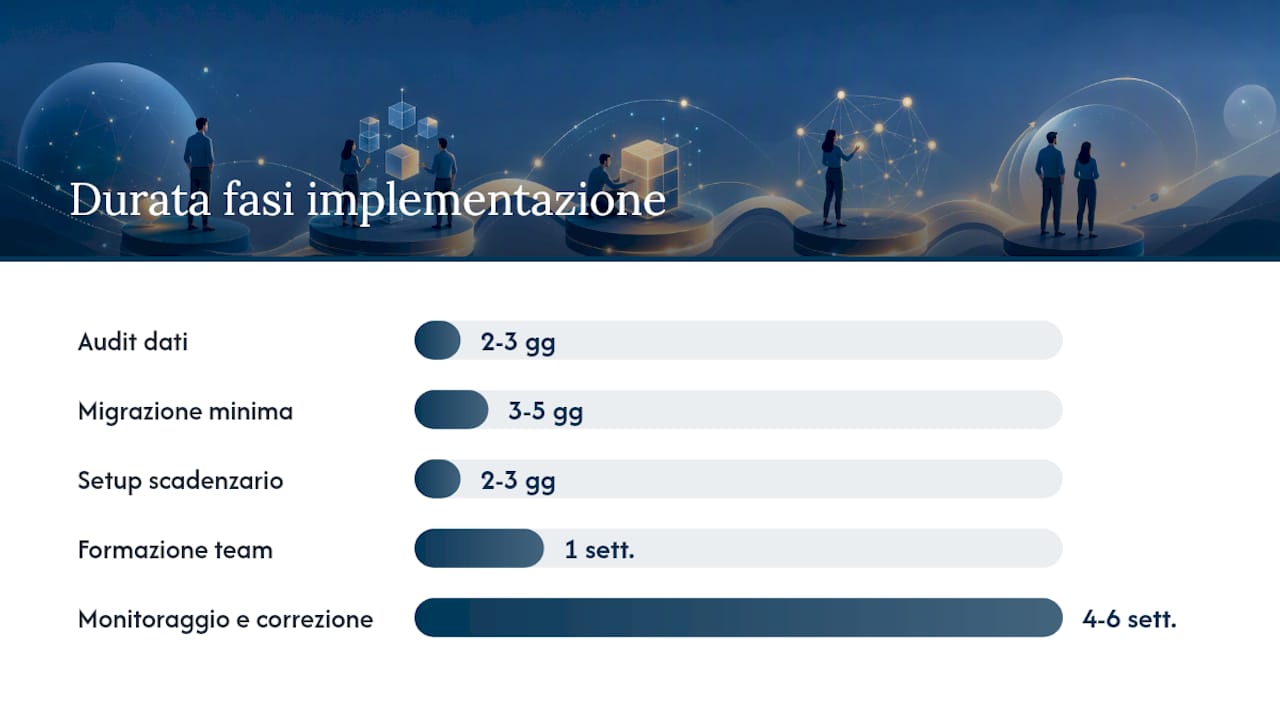
- Audit existing data (2–3 days): list where contacts, documents, and deadlines are currently stored. Often, three or four different sources turn up that nobody had ever brought together.
- Minimal migration (3–5 days): import only active client records and upcoming deadlines, not the entire historical archive. Migrate the rest later, at a comfortable pace.
- Set up deadline tracking (2–3 days): configure alerts for upcoming real deadlines, not theoretical ones from a manual.
- Train the team (1 week, in parallel): short sessions focused on specific tasks work better than a multi-hour theory course.
- Monitor and adjust (weeks 4–6): check whether people are actually using deadline tracking, and fix what the team is ignoring.
For a practice of 1–5 people, setting up a basic working system for calendars, contacts, reminders, and document sharing generally takes between two and six weeks, not months. A phased approach reduces the risk of investing in complex integrations before you know whether the team will actually adopt the tool.
Tip: Keep costs down by using only the modules you need in the first phase, and train the team internally with someone who already understands the system instead of paying for outside courses for each person.
Why choose a modular platform with data in Europe
A CRM that forces you to activate ten features to use two is a problem, not a solution. Real modularity—the ability to switch on only the tools you need today—reduces both costs and the time it takes the team to learn the system.
A small practice doesn’t need an enterprise system with forty settings. It needs a tool the newest team member can use within an hour, without courses or outside technical support.
Where data is stored isn’t just a technical detail: for a law firm or accounting practice handling clients’ sensitive information, knowing that it is stored in Europe matters in the final decision, along with being able to export everything at any time without being tied to a provider. The UNI 11871 practice standard, designed for organizing law and accounting practices, also highlights the importance of clear organizational requirements, including structured management of client information.
What really works in the first 8–12 weeks
Quick onboarding always beats theory-based training: have people use the system with a real case from day one. The most common mistake is uploading the entire historical archive before getting started, which slows adoption. Measure ROI by looking at how many fewer hours you spend searching for information, not how many features you’ve activated.
— Fabrizio
KeSbatty: the right toolbox for people who want to keep things simple
If you work alone or with a small team and are tired of chasing clients and deadlines across five different tools, there are solutions designed to provide one place for contacts, appointments, and tasks, without requiring you to configure modules you don’t need.

The platform activates only the features you really need: client records, calendar, task kanban board, automatic reminders, and document sharing through a public link, without requiring the recipient to create an account. Data remains stored in Europe, and contact exports to CSV are always available, so you’re never locked in to a provider. The free version, the Base Toolbox, covers up to 100 contacts at no cost. If you need the full package, the Full Toolbox costs €12 per month or €120 per year, with all advanced modules unlocked.
Start the 14-day free trial and test the workflow you use every week: create a client, schedule an appointment, send a document. If it works there, it works in your practice.
Sources
- Practice management software for professional practices | NovaMarte Blog
- CRM for accounting practices: which one to choose | QuiCommercialista
- Officina Consulting — UNI 11871 standard
Frequently asked questions
What is an easy-to-use CRM for a small practice?
An easy-to-use CRM is one the team adopts without lengthy training, usually with contact records, a calendar, and reminders ready to use. Some platforms focus on modular feature activation without requiring complex configuration.
What is the best practice management software for small businesses and practices?
There is no single best software for everyone: the right choice depends on how many integrations you need with PEC and the practice management software already in use. For micro-teams and independent professionals, a modular platform can reduce setup time compared with enterprise systems designed for larger companies.
Which CRM is most used by professional practices?
The data shows that overall adoption remains low: only 6–11% of Italian professional practices use a CRM, so there is not yet a dominant tool in the sector. Most still manage clients through email and spreadsheets.
What is a good low-cost CRM for a small practice?
A good low-cost CRM covers the basic features—contacts, calendar, and reminders—without making you pay for advanced modules you don’t use. Some platforms offer free versions with contact limits and paid upgrade plans for additional features. For pricing details, see the official website.