How to Choose the Right CRM for a Small Business

Choose the CRM that fits your day-to-day workflow, not the one with the most positive reviews. Put three things first: the real cost (licenses, training, and time lost during setup), the integrations you already use every day, and how easily your team will actually adopt it. For a freelancer or a small team, a modular tool that combines several functions may be enough on its own, without having to piece together five different software products.
In brief:
- Choose a CRM based on your team’s adoption needs, integration with everyday tools, and ease of use, not on the software’s popularity.
- Before choosing a tool, it is essential to answer practical questions about the number of users and contacts, the customer journey, and the actual costs.
- The real cost includes licenses, onboarding, and transition time, while free plans often hide limits and expensive upgrades.
- During the free trial, it is important to test email syncing, appointment management, integration with your business management system, and real automations using genuine data.
- To implement a CRM in four weeks, map the process, configure only the essentials, train the team, and monitor usage, avoiding overconfiguration.
Table of contents
- What are the essential criteria for evaluating a CRM?
- Practical checklist: questions to ask before choosing
- What does a CRM really cost, and how do you calculate the return?
- How to choose a CRM that can handle growth over time
- What to test during a CRM free trial
- Implementing a CRM in 4 weeks: a practical timeline
- Why KeSbatty could be the solution for freelancers and micro-teams
- Fabrizio’s perspective: what you learn from choosing the wrong CRM
- Try KeSbatty: one tool instead of five
- Sources
- Frequently asked questions
What are the essential criteria for evaluating a CRM?
The right question isn’t “What is the best CRM overall?” but “How does a contact move through my sales process?” People who choose based on a software’s popularity often end up forcing their workflow into a tool designed for a different kind of business. The result is that, after three months, no one uses it as they should, according to Digital360.
There are four areas worth focusing on before signing up for any subscription:
- Team adoption: a simple interface, a genuinely usable mobile version (not just “compatible”), and quick data entry without ten mandatory fields for every contact.
- Essential integrations: syncing with email, your calendar, and the billing or business management tools you already use. A CRM that’s isolated from the rest of your work means entering data twice, and no one will do that for long.
- Real cost: not just the monthly plan price, but also onboarding and the hours your team will spend learning to use it well.
- Scalability and security: the ability to grow with you without having to switch everything in a year, plus clear assurances about where customer data is stored.
For small and medium-sized businesses, three factors determine whether a project succeeds or fails: actual team adoption, integration with the email and phone systems already in use, and automations that genuinely reduce manual work, rather than ones that sit unused in the settings panel, as BusinessWarrior points out.
The interface language also matters more than you might think. A CRM that your team struggles to read or understand in its working language gets in the way of daily use, even if it has all the right features on paper, as Appvizer notes.
Practical checklist: questions to ask before choosing
Before looking at demos and price lists, answer these questions. They turn a vague wish (“we want to get more organized”) into concrete requirements you can compare across the options on the market.
- How many of us are there today, and how many will there be in a year? Count active users and managed contacts, not just your current situation.
- How does a customer move through our process? Trace the actual journey: first contact, negotiation, sale, after-sales support.
- Which tools can’t we give up? Email, calendar, billing, business management system: list everything that needs to connect without makeshift workarounds.
- How much can we really spend, in money and hours? Include training time, not just the monthly fee.
- Who will be responsible for the CRM in the company? Without an internal point person, even the best tool will be underused.
A checklist like this helps turn business needs into verifiable technical choices: usability, syncing, budget, and implementation effort are the criteria that really make a difference, according to Appvizer.
A tip: Write down your answers to these five questions before looking at a single demo. Otherwise, you may be won over by the flashiest feature, not the one you actually need.
What does a CRM really cost, and how do you calculate the return?
The monthly plan price is only part of the bill. The total cost of ownership adds up three items: the license, onboarding (sometimes charged separately, sometimes included), and the time the team loses while switching to the new system. Even an inexpensive license can weigh heavily on the budget if training takes weeks and go-live brings half of your regular activities to a halt, as BusinessWarrior notes.
One figure to keep in mind: many tools offer free or freemium plans to get started, but there’s a risk of underestimating hidden limits on the number of users, contacts, or available automations, and finding yourself paying for an upgrade sooner than expected, as Mundobytes notes.
For most small businesses, three metrics are enough to measure the return: time saved on repetitive tasks (reminders, sending quotes, updating customer records), fewer communication errors with customers, and increased conversions thanks to more timely follow-ups.
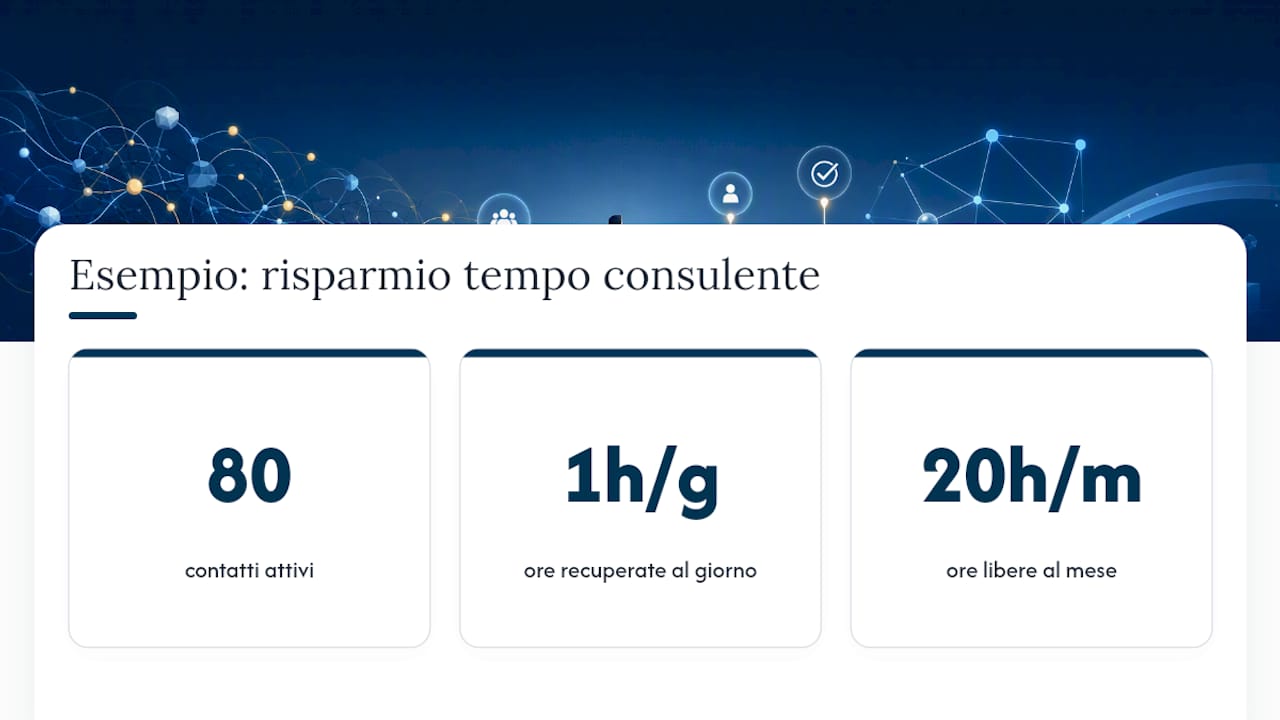
Here’s a simplified example. A consultant managing 80 active contacts who spends an hour a day searching for old emails or chasing missed appointments could recover almost all of that hour with a well-configured CRM. Over a working month, that means twenty free hours, which can translate into more time to win clients or simply working fewer evenings.
How to choose a CRM that can handle growth over time
Scalability isn’t a list of advanced features in a price list. It’s the practical ability to handle more users and larger volumes of data without having to migrate everything to another system in a year, as Agenda Digitale explains.
Before signing up, check these points:
- User permissions: can you add someone to the team without having to rethink the whole role structure?
- Data limits: how many contacts, documents, or automations are included in the plan, and what happens when you exceed those limits?
- Real modularity: can you turn on a new feature (for example, an editorial calendar for content or appointment management) only when you need it, without paying for the whole package from the start?
Some signs suggest that a CRM won’t keep up as your business grows: prices that jump sharply as soon as you exceed a user threshold, no mid-tier plan between free and enterprise, or basic features (such as data export) locked behind an expensive upgrade. If the provider doesn’t clearly explain what happens as you grow, take it as a warning sign, not a detail to clarify later.
What to test during a CRM free trial
Most CRMs offer a trial period. How you use it can make the difference between an informed choice and a subscription you regret two months later. Here’s what to check, beyond simply “whether it works”:
- Email syncing with the customer record: when a message arrives from a contact, does their record update automatically, or do you have to copy everything by hand?
- Calendar and appointments: can you view and manage appointments without opening a second tool in another browser tab?
- Billing and payments: does the CRM connect to your business management system, or does it require you to enter the same information twice every time you issue a quote?
- Simple automations through Zapier or Make: if the CRM doesn’t have a direct integration with a tool you use, can you build a simple bridge without technical skills?
Test these four points with real data, not the demo contact supplied by the provider. Import twenty real contacts, schedule three real appointments, and send a genuine quote. It’s the only way to understand whether the tool fits into your work or whether you’re forcing it into a workflow it wasn’t made for.
Implementing a CRM in 4 weeks: a practical timeline
A realistic implementation plan for a small business takes about four weeks, and it’s more manageable than it sounds when you break it into clear stages, according to BusinessWarrior.
- Week 1, map the process: write down the 4–6 actual stages of your customer cycle, from first contact to closing, before even opening the software.
- Week 2, minimum configuration: import your existing contacts, connect email and calendar, and turn on only the features you need right away. Resist the urge to configure everything possible from the start.
- Week 3, practical training: hold short, hands-on sessions for the team based on real examples from your work, not generic tutorials from the provider.
- Week 4, monitoring: observe who uses the tool and how, and correct bad habits before they become the norm.
The most common mistake at this stage is overconfiguration: turning on twenty custom fields and ten automations before the team has even learned how to enter a contact. Start small and add complexity only when you actually use it.
Why KeSbatty could be the solution for freelancers and micro-teams
KeSbatty was created to meet the criteria described above, with an approach designed for people who work alone or in small teams. It offers modules that you can turn on only when you really need them.
What this means in practice for a freelancer or a small team:
- Centralized management: contacts, companies, appointments, and tasks can be organized in one place, reducing the need to switch between multiple apps.
- Send documents without a login: you can send quotes and files to clients through public links without asking them to create an account.
- Modularity: customizable tasks and kanban boards, automatic reminders, monthly report, editorial calendar for content: you can turn on features as needed.
- Data stored in Europe: data can be managed in accordance with data localization criteria.
For a professional managing several clients or appointments at once, a modular structure can help you pay for and configure only what you really need, avoiding features designed for much larger businesses.
Fabrizio’s perspective: what you learn from choosing the wrong CRM
The most common mistake I see in small businesses isn’t choosing the wrong CRM in the abstract. It’s choosing a CRM designed for a company with twenty people and trying to make it work with two. The result is always the same: months of configuration, a team that misses the Excel spreadsheet, and a tool that ends up being used at ten percent of its potential.
The rule I use to choose between an all-in-one tool and a stack of separate tools is simple: if your team has fewer than five people, one tool almost always beats three applications that are difficult to integrate. Fewer points of failure, fewer passwords to remember, and fewer meetings to figure out why data didn’t sync.
To measure adoption in the first quarter, look at just one thing: how often the team opens the CRM without you asking. If the answer is “almost never,” training isn’t the problem. The tool is.
— Fabrizio
Try KeSbatty: one tool instead of five
If you work alone or with a partner, the problem is rarely finding “the best CRM on the market.” The problem is stopping paying (in money and time) for five different tools that speak different languages. KeSbatty was created for exactly this reason: contacts, appointments, tasks, and document sharing in one place, with modules you turn on only when you really need them.

The free plan covers a limited number of contacts, enough to see whether the tool fits the way you work before unlocking the advanced modules. You can start your free KeSbatty trial and import your real contacts today, with no credit card and no need to configure twenty fields before you can see whether you like it.
Sources
The statements in this article about team adoption, real costs, and operational checklists are based on analyses published by Italian publications specializing in business management software and business digitalization.
- How to use a CRM to improve contact management
- CRM: a complete guide to managing customer relationships
- How to choose CRM software for small businesses (Appvizer)
- Business CRM: how to choose one (and really use it) in your SME
Frequently asked questions
Which CRM should I choose for my business?
There’s no single best CRM: it depends on how customers move through your sales process and which tools you already use every day. For a freelancer or a team of up to two people, a modular platform like KeSbatty is often enough on its own, without having to integrate five different software products.
Which CRM is most used by small businesses?
There is no single verifiable figure for the most widely used CRM among Italian small businesses. Real needs (integrations with email and billing, ease of use, total cost) matter more than a tool’s popularity.
What makes a CRM really easy to use?
An easy-to-use CRM has a simple interface, a working mobile version, and lets you enter a contact in a few seconds without unnecessary required fields. The interface language matters a lot: a team that struggles to read it will use the tool less and less, as Appvizer notes.
What is the best CRM for a small business or freelancer?
The best one is the CRM that covers your actual workflows (contacts, appointments, quotes) without forcing you to pay for modules you’ll never use. Some CRMs offer free plans with a contact limit and let you activate advanced features as needed, which can suit people who work alone or in small teams.
How long does it take to implement a new CRM?
For a small business, about four weeks is enough: map the process, configure the essentials, train the team, and monitor initial usage. The main risk is overconfiguring everything right away instead of starting with the essential features, according to BusinessWarrior.